Screenshots
About APPLock
🚀 New Feature Launch: Self-Discipline Mode + Website Blocking
Lend your PC for a minute and worry someone will look around. Step away from your desk. Kids clicking whatever they find at home. Or you simply can't stop scrolling.
AppLock puts app lock, website blocking, file encryption and self-discipline timers in one background utility — so you protect both your privacy and your focus, without installing four different tools.
Key Features:
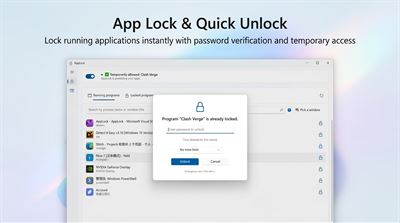
✔ Precise Protection — pick exactly which apps to protect, individually. Drag the picker onto any window to lock it, or choose from the app list. Each app can have its own password.
✔ Quick Lock & One-Click Lockdown — set a password per app, plus an emergency hotkey that locks every protected app instantly, wherever you are in Windows.
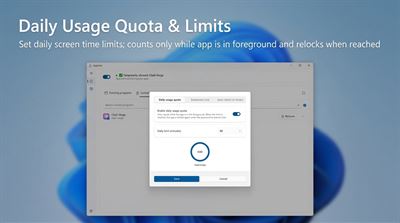
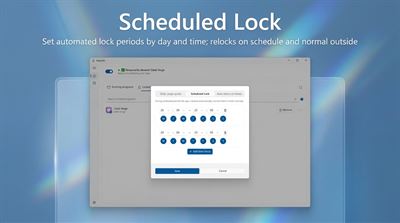
✔ New: Self-Discipline Mode — set a daily usage quota per app and scheduled lock windows (e.g. blocked 9:00–12:00, or allowed only 18:00–22:00). When the quota runs out or a scheduled window starts, the app relocks automatically. Need a bit more? "Extend Time" asks for your password — that pause is deliberate, not a loophole. Temporary unlocks can be as short as you like.
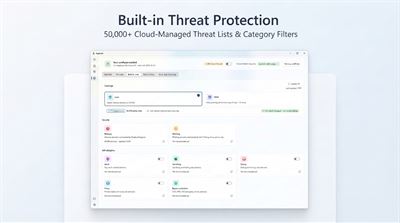
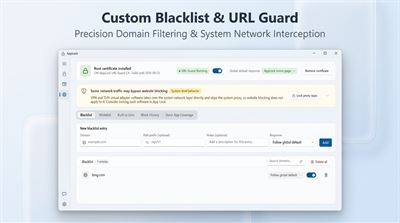
✔ New: Website Blocking (URL Guard) — malware and phishing sites are filtered free of charge, always on, with lists that update in the cloud every day — no manual upkeep. Premium adds adult, gambling, dating and piracy categories, plus anti-bypass sources. Build your own blacklist by domain or path prefix, allow-list the domains you need, and review a block history of what was stopped. Works across browsers and in-app webviews over HTTP and HTTPS.
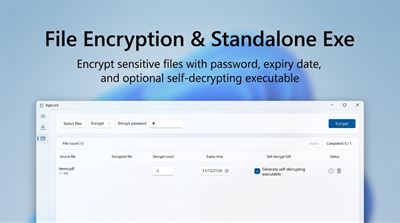
✔ File Encryption — AES-256 with passwords stretched through PBKDF2 and per-file salts, all local. Encrypt files in batches by drag-and-drop, set a maximum decrypt count and an expiry date, and generate a self-decrypting executable so a recipient needs only their password — no AppLock installation. A standalone decrypt tool is included for emergencies.
✔ Seamless Operation — runs quietly in the system tray with a status icon, starts with Windows in silent mode, and never touches how the locked app behaves once you've unlocked it. Auto-relock after a period of keyboard/mouse idle, and auto-lock the main window when you walk away.
✔ Hard to Get Around — admin password plus optional Windows Hello (fingerprint / face) unlock, security questions so a forgotten password is recoverable, temporary lockout after repeated wrong attempts, and uninstall protection so nobody quietly removes the tool that's guarding your apps.
✔ Multi-Scenario Use — office privacy on shared machines, family devices and child-safe browsing, study or work focus sessions, and protecting confidential files before handing a laptop over.
✔ Honest by Design — everything stays on your device: passwords, encrypted files, block history and mislock reports are all local. No account, no uploads. 17 interface languages, light and dark themes, and in-app notifications instead of pop-ups that interrupt you.
Free vs Premium
App lock, file encryption, your own black and white lists, and the daily-updated malware blocking are all free to use. Premium lifts the caps on locked apps and encrypted files, opens the full set of website categories with longer history retention, and adds uninstall protection, self-decrypting executables and custom lock-status thumbnails. Choose a subscription or a one-time lifetime purchase.
AVALW Coverage
Not yet mentioned in AVALW articles.
Similar apps


 Phone by GoogleGoogle LLCReliable phone calls with spam protection, caller ID and more helpful features★ 4.4 52440k


 Google Play servicesGoogle LLCGoogle Play services - Google services for Android apps★ 4.3 44573k



 Call of Duty®: Modern Warfare® 4 (Windows)Activision Publishing Inc.War erupts on the Korean Peninsula as North Korea launches a full-scale invasion that threatens to destabilize the world in Call of Duty®: Modern Warfare® 4. A ★ 4.3 16579k


 gov.brServiços e Informações do BrasilGov.br is a means of user access to digital public services.★ 4.6 14047k


 MyTelkomsel – Buy InternetTelkomselBuy credit, internet quota, streaming, game voucher & get cashback with e-wallet★ 3.8 12353k


 myIM3: Data Plan & Buy PackageIndosat Ooredoo HutchisonCheck balance & quota, detect & block spam, exchange IMPoin only on myIM3★ 4.4 11302k


 Files by GoogleGoogle LLCClean up your phone, find files, play media, and share files offline★ 4.5 9097k


 CNH do BrasilServiços e Informações do BrasilDigital driver's license and vehicle registration certificate, first driver's license, traffic violation and vehicle information.★ 4.9 8390k