Screenshots
About Atlas File Manager
Atlas File Manager
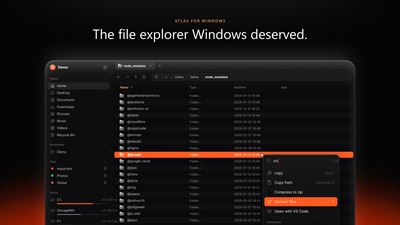
Atlas File Manager is a next-generation desktop file manager built from scratch in Rust to deliver unprecedented speed, fluid 60+ FPS responsiveness, and powerful multitasking. Engineered as a modern replacement for traditional file managers, Atlas combines sleek desktop aesthetics with workstation-grade performance.
Whether you are navigating massive codebases, organizing creative media libraries, analyzing drive capacity, or managing day-to-day files, Atlas delivers the speed, clarity, and control you need.
Key Capabilities
⚡ Blazing-Fast Native Performance
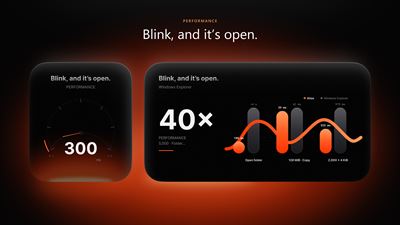
Built entirely in Rust with native GPU-accelerated rendering, Atlas eliminates sluggishness and UI lag. Enjoy instant cold startup, zero indexing delays, and silky-smooth scrolling through directories containing tens of thousands of files—all while maintaining an exceptionally light memory footprint.
📑 Tabs & Dual-Pane Workspaces
Multitask with effortless precision:
- Unlimited Tabs: Open, duplicate, reorder, and restore tabs just like in a modern web browser.
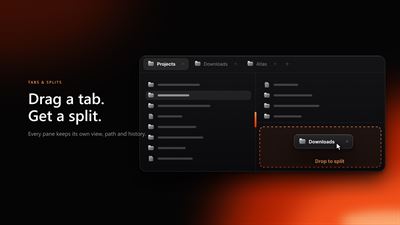
- Dual Panes & Splits: Work with side-by-side or stacked split panes to move and compare files across folders without juggling multiple windows.
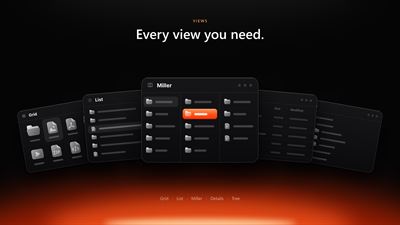
- Multiple View Modes: Tailor your perspective per folder with high-density Details, adaptive thumbnail Grids, or multi-level Miller Columns.
- Folder View Inheritance: Configure view styles, columns, and sorting per folder or propagate them across entire subfolder trees.
🔍 Instant Search & Real-Time Filtering
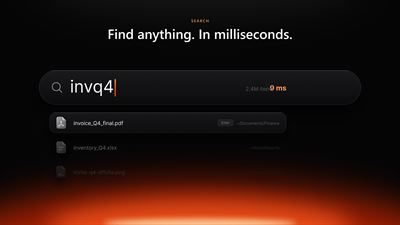
Never lose a file again. Atlas features instant indexed file search and fuzzy filtering across drives with millisecond response times. Filter files on the fly by type, extension, or custom tags without slowing down your system.
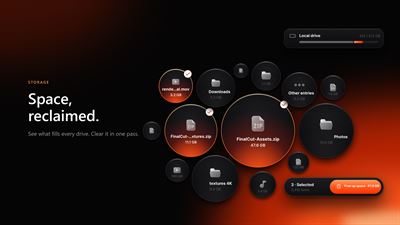
💾 Interactive Disk Space Visualizer & Cleanup
Take complete control of your storage:
- Visual Space Lens: Explore interactive hierarchical space maps (treemaps) where block sizes reflect actual drive usage. Double-click to zoom into large subfolders.
- Intelligent Storage Cleanup: Safely identify obsolete temporary files, oversized downloads, browser caches, and crash dumps.
- Safe Review: Permanently delete or move unwanted items to the Recycle Bin with full preview confirmation before any changes take place.
🔒 Privacy-First Architecture & Encrypted Vaults
Your files belong strictly to you:
- Zero Telemetry: Atlas operates 100% locally. No tracking, no user profiling, and no analytics beacons.
- Private Encrypted Vaults: Protect sensitive folders with password-authenticated local encryption. Locked vaults remain completely opaque and unreadable across other user profiles and File Explorer until unlocked with your password.
⌨️ Power-User Keyboard Palette & Shortcuts
Designed for maximum hands-on-keyboard efficiency:
- Command Palette (Ctrl+P): Run any command, toggle views, jump to bookmarks, or change settings instantly from a single fuzzy-searchable prompt.
- Quick Access Pinning: Pin your most critical actions directly to the quick header for single-click execution.
- Customizable Keybindings: Adjust hotkeys to fit your muscle memory, including full keyboard navigation.
- High-Speed Batch Renaming: Rename hundreds of files simultaneously using customizable patterns, sequence numbers, and text replacement rules.
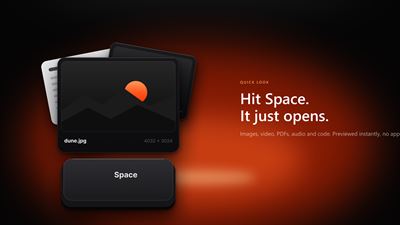
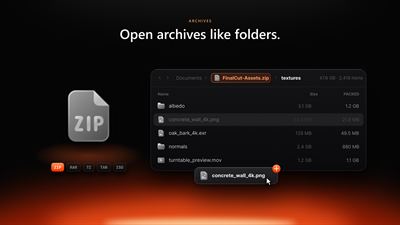
- Integrated Previews: Built-in instant preview inspector for Markdown, syntax-highlighted source code, PDFs, high-resolution images, audio, video, and archives.
Experience the Future of File Management
Step up to a modern, privacy-respecting file manager engineered for pure speed and focus. Download Atlas File Manager today and experience file navigation reimagined.
Free and Atlas Premium
Atlas is free to download and use. The free edition includes up to 2 side-by-side panes, 2 profiles, 1 saved cloud connection, 10 file conversions per day (one file at a time) and batch rename for up to 25 files at once. Atlas Premium is an optional one-time add-on, available from this Microsoft Store page, that removes these limits: unlimited panes, profiles and cloud connections, batch conversion with no daily limit, and unlimited batch rename.
AVALW Coverage
Not yet mentioned in AVALW articles.
Similar apps


 Phone by GoogleGoogle LLCReliable phone calls with spam protection, caller ID and more helpful features★ 4.4 52440k


 Google Play servicesGoogle LLCGoogle Play services - Google services for Android apps★ 4.3 44573k



 Call of Duty®: Modern Warfare® 4 (Windows)Activision Publishing Inc.War erupts on the Korean Peninsula as North Korea launches a full-scale invasion that threatens to destabilize the world in Call of Duty®: Modern Warfare® 4. A ★ 4.3 16579k


 gov.brServiços e Informações do BrasilGov.br is a means of user access to digital public services.★ 4.6 14047k


 MyTelkomsel – Buy InternetTelkomselBuy credit, internet quota, streaming, game voucher & get cashback with e-wallet★ 3.8 12353k


 myIM3: Data Plan & Buy PackageIndosat Ooredoo HutchisonCheck balance & quota, detect & block spam, exchange IMPoin only on myIM3★ 4.4 11302k


 Files by GoogleGoogle LLCClean up your phone, find files, play media, and share files offline★ 4.5 9097k


 CNH do BrasilServiços e Informações do BrasilDigital driver's license and vehicle registration certificate, first driver's license, traffic violation and vehicle information.★ 4.9 8390k