
Screenshots
About Authenticator 2FA App - Authik
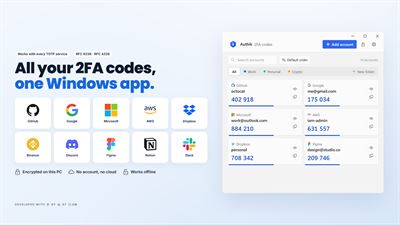
Fast, fully offline 2FA authenticator — your codes never leave your device.
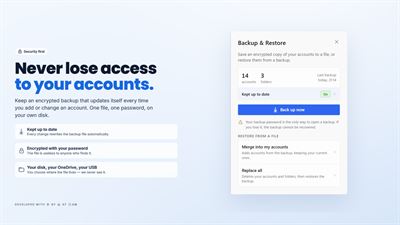
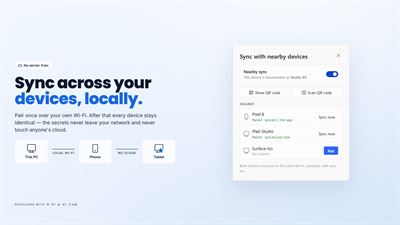
Never get locked out again: automatic encrypted backups and private device-to-device sync keep every account safe across all your devices.
Protect your online accounts with Authik, a fast, secure, and privacy-focused Authenticator App for 2FA, TOTP, and HOTP. Generate one-time verification codes, add accounts in seconds by scanning a QR code, and keep everything recoverable with encrypted backup, restore, and sync.
Whether you're securing email, cloud services, social media, cryptocurrency exchanges, or developer accounts, Authik makes two-factor authentication simple and reliable.
⭐ Features
🔐 TOTP & HOTP Authentication
• Generate secure one-time passwords (OTP).
• Compatible with industry-standard TOTP and HOTP authentication.
• Choose algorithm, digits, and period — works with thousands of online services.
• Real-time countdown so you always know how long a code is good for.
📷 Multiple Ways to Add Accounts
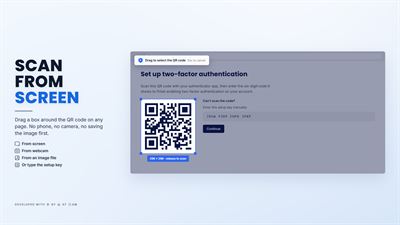
• Instantly scan a QR code directly from your screen — no phone needed.
• Scan QR codes using your camera.
• Import QR codes from images or screenshots.
• Enter a setup key by hand when a service doesn't offer a QR code.
• Open otpauth:// links straight from your browser into Authik.
💾 Never Lose Access
• Encrypted backup and restore, protected by a password only you know.
• "Keep this file up to date" — pick a file once and Authik rewrites it automatically every time something changes. Point it at OneDrive and your backup is always current, everywhere.
• A recovery code so a forgotten passcode never means a lost vault.
• Restore onto a new PC and every account is exactly where you left it.
🔄 Sync Across Your Devices
• Pair Authik on Windows with Authik on your other devices and keep accounts in sync automatically.
• Sync runs directly between your devices over your own network — no server, no cloud account, no copy of your secrets anywhere but your devices.
• Pairing is confirmed with a matching code or a QR scan, and every connection is end-to-end encrypted.
• Add an account on one device and it appears on the rest.
📦 Move Between Devices
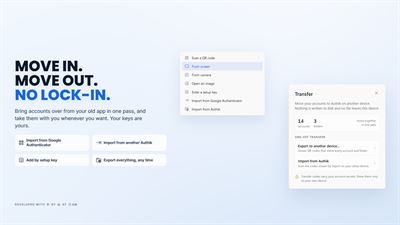
• Transfer accounts to another device by scanning a single QR code.
• Import from other authenticator apps.
• Export your accounts whenever you want — your data is yours to take.
🗂️ Stay Organized
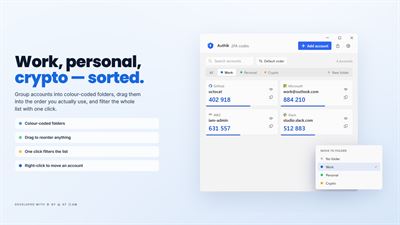
• Group accounts into folders.
• Search as you type to jump to any account instantly.
• Reorder accounts to keep the ones you use most at the top.
• Recognizable issuer logos for popular services.
🔒 Lock It Down
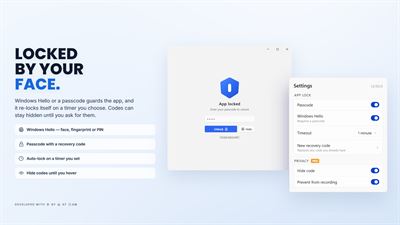
• Protect the app with a passcode or Windows Hello (face, fingerprint, or PIN).
• Auto-lock after a period of inactivity.
• Hide codes until you choose to reveal them.
• Block screenshots and screen recording of the app window (Pro).
⚡ Fast & Easy to Use
• Clean, modern Windows interface that starts instantly.
• Light and dark themes.
• Add an account in seconds.
🌐 Works Offline
• Generate verification codes with no internet connection at all.
• Access your authentication codes anytime, anywhere.
🛡️ Privacy First
• Your authentication data stays on your device, encrypted at rest.
• No account registration. No sign-up. No tracking.
• No servers to breach, because there aren't any.
Authik works with any service that supports TOTP or HOTP.
Why Choose Authik?
• Fast and lightweight
• QR code scanner from screen, camera, or image
• Automatic encrypted backup that keeps itself up to date
• Private device-to-device sync with no cloud in between
• Offline OTP generation
• Simple, modern experience
• Privacy-focused security
Secure your online accounts with Authik, the powerful Authenticator App for 2FA, OTP, TOTP, HOTP, MFA, and secure login verification.
⚠️ Free Version
• Up to 8 authenticator accounts and 3 folders.
• Everything else included: TOTP and HOTP, screen QR scanning, camera scanning, image QR import, backup and restore, automatic backup, device sync, import and export, folders, search, passcode protection, Windows Hello, and hidden codes.
• Upgrade to Pro for unlimited accounts, unlimited folders, screen recording protection, Advanced Mode, and more.
✅ Pro Version: Full features, no limitations.
AVALW Coverage
Not yet mentioned in AVALW articles.
Similar apps


 Avira SecurityAviraHelp protect and optimize your digital life with Avira Free Security. Its smart scan checks your device for online security, privacy & performance issues and he★ 4.7 735k


 Fing Network ScannerFing LimitedFing Desktop gives you complete visibility and control over your home or office network, directly from your laptop. Used by 100+ million people worldwide, Fing ★ 4.6 116k


 MalwarebytesMalwarebytes Corp.Malwarebytes Premium Security is an effective and easy-to-use antivirus that stops sophisticated cyber threats that traditional antivirus programs miss, built t★ 4.5 111k
 VPN by VeePNVeePN Corp.Secure Your Windows Connection with VeePN VeePN helps protect your Windows traffic with free encrypted VPN access, fast server locations, and privacy tools buil★ 4.2 108k


 Avast One Free AntivirusAVAST SoftwareAvast One is your personal digital guardian; choose protection your way, for your life’s online moments. Stay safer from viruses and other malware with award-wi★ 4.7 99.8k


 TotalAVTotal Security LimitedAntivirus protection for all your devices. Get protection against viruses, malware, scams and ransomware with TotalAV antivirus protection. All in one security ★ 4.6 72.1k
 Avast Antivirus Download CenterAVAST SoftwareProtect your Windows 10 PC against viruses, ransomware, spyware, and other types of malware with Avast Free Antivirus. Used by more than 400 million people arou★ 4.5 52k
 1PasswordAgileBits Inc.Security at the speed of life. Protect and share passwords, financial accounts, credit cards, and more with the password manager that’s as simple as it is secur★ 4.7 42k
More by this developer


 Authik - 2FA AuthenticatorGEMIRY COMPANY LIMITEDOffline 2FA codes with PIN & biometric lock and encrypted, portable backups.-


 Audio Converter. MP3 ConverterGEMIRY COMPANY LIMITEDConvert audio to MP3, M4A, WAV, FLAC and more. Offline, in batches, tags kept.★ 4.2 60


 ReClick: Auto Clicker & MacroGEMIRY COMPANY LIMITEDAuto tap anywhere on a timer, or record your taps once and replay them on cue.-


 Video Converter. MP4 ConverterGEMIRY COMPANY LIMITEDTurn MOV, MKV, AVI and more into MP4, GIF or MP3 on your phone. Trim it first.★ 1.7 6