
Screenshots


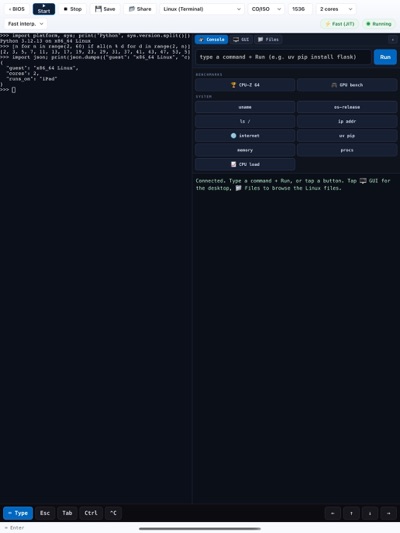

About Bootbox
Bootbox is a virtual PC for iPad and iPhone. It emulates a complete 64-bit x86 computer in software and boots real operating systems on it, with no jailbreak, sign-in or server.
CHOOSE A SYSTEM
• Linux Desktop: windows, a taskbar, a terminal, a file manager and a WebKit web browser.
• Linux Terminal: a full Linux console with Python 3.12 and pip, internet access, and Wine for Windows command-line programs.
• Android 12 (AOSP): the Android home screen with touch and keyboard. It resumes in seconds from a ready-made snapshot.
• Your own disk images and ISO files.
A REAL COMPUTER, EMULATED
• Up to 8 virtual CPU cores that really run in parallel.
• Internet inside the virtual machine, through a network stack built into the app.
• Files move between your device and the virtual machine, and machines can be saved and resumed.
• Built-in benchmarks (CPU-Z, 7-Zip, sysbench, GPU and web tests) show what the emulated PC can do.
GOOD TO KNOW
Every instruction of the virtual PC is translated in software, so it runs much slower than a real computer. It's best for learning Linux, scripting, retro-style computing and experiments, not heavy work. The systems download on first use (about 240 MB for the Linux desktop, about 900 MB for Android) and then run offline. Newer devices with more memory run them best.
Bootbox collects no data.
AVALW Coverage
Not yet mentioned in AVALW articles.
Similar apps


 Phone by GoogleGoogle LLCReliable phone calls with spam protection, caller ID and more helpful features★ 4.4 52440k


 Google Play servicesGoogle LLCGoogle Play services - Google services for Android apps★ 4.3 44573k



 Call of Duty®: Modern Warfare® 4 (Windows)Activision Publishing Inc.War erupts on the Korean Peninsula as North Korea launches a full-scale invasion that threatens to destabilize the world in Call of Duty®: Modern Warfare® 4. A ★ 4.3 16579k


 gov.brServiços e Informações do BrasilGov.br is a means of user access to digital public services.★ 4.6 14047k


 MyTelkomsel – Buy InternetTelkomselBuy credit, internet quota, streaming, game voucher & get cashback with e-wallet★ 3.8 12353k


 myIM3: Data Plan & Buy PackageIndosat Ooredoo HutchisonCheck balance & quota, detect & block spam, exchange IMPoin only on myIM3★ 4.4 11302k


 Files by GoogleGoogle LLCClean up your phone, find files, play media, and share files offline★ 4.5 9097k


 CNH do BrasilServiços e Informações do BrasilDigital driver's license and vehicle registration certificate, first driver's license, traffic violation and vehicle information.★ 4.9 8390k
More by this developer


 EigenDenoisechienchung YuEigenDenoise is a native macOS application for image denoising and spectral analysis based on random matrix theory (RMT). It is designed for researchers, studen-


 GPS-location-appchienchung YuGPS-location-app records walking, running, cycling and riding workouts with detailed route tracking on iPhone, iPad and Apple Watch. It keeps recording where sa-


 SidecarBridgechienchung YuSidecarBridge turns your iPhone or iPad into a private local viewer and remote-control surface for your Mac. Pair once with the companion Mac app using its temp-


 Whisperkitchienchung YuWhisper turns speech into accurate text — entirely on your device. Powered by Apple's Neural Engine and an open-source multilingual speech recognition model, Wh-