
Screenshots


About Card Saver - Expense Tracker
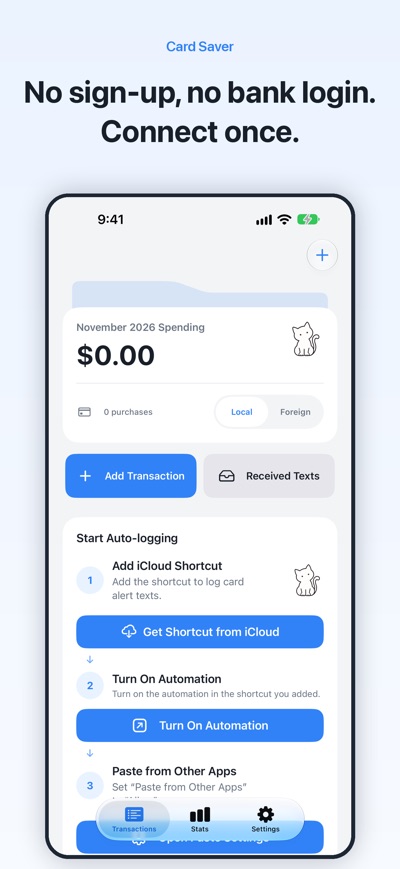
Card Saver turns the card alert texts you already get into an expense log, automatically.
■ TEXT IN, EXPENSE LOGGED
Connect the shortcut once. Each card alert text is recorded with amount, merchant, card and time. Refunds are subtracted, and the same purchase is never counted twice.
■ READS ALERTS FROM MANY COUNTRIES
Understands card alert texts in English, Japanese, Traditional Chinese and Korean, from the US, Japan, Taiwan, Hong Kong and Korea. Merchants are sorted into categories automatically.
■ NO SIGN-UP, NO BANK LOGIN
No account and no linking to your bank. Everything stays on your iPhone.
■ SEE WHERE YOUR MONEY GOES
This month's total, the last 7 days and spending by category, in your local currency. Foreign purchases are kept separate by currency.
■ PASTE OR TYPE
Got an alert by email or app notification? Copy and paste it, or enter an expense by hand. On supported devices, on-device AI reads unfamiliar formats.
Automatic logging works with alerts that arrive as text messages. Turn on text alerts in your card app.
■ CARD SAVER PRO
AI analysis and spending charts come with Card Saver Pro, an auto-renewing monthly or yearly subscription. It renews automatically unless canceled at least 24 hours before the current period ends.
Terms of Use (EULA): https://www.apple.com/legal/internet-services/itunes/dev/stdeula/
Privacy Policy: https://runfekim.github.io/cardledger-support/privacy.html
AVALW Coverage
Not yet mentioned in AVALW articles.
Similar apps


 VenmoVenmoVenmo is the fast, safe, social way to pay and get paid. Join over 90+ million people who use the Venmo app today SEND AND RECEIVE MONEY Pay and get paid for an★ 4.8 15472k


 Mercado Pago: cuenta digitalMercado LibreYour account to pay with a QR code, have a line of credit, a card and more★ 4.8 15069k


 Capital One MobileCapital OneWhat’s on the Capital One Mobile app? All of your accounts, and so much more. Whether you’re out in the world or feeling right at home, you can manage your mone★ 4.8 11162k


 DANA Indonesia Digital WalletPT Espay Debit Indonesia KoeA digital wallet (e-Wallet) for all cashless & card-less transactions★ 4.5 10938k


 Wells Fargo Mobile®Wells FargoAccount Management •Access your cash, credit, and investment accounts with Touch ID®¹ or Face ID®¹ •Review activity and balances •View your credit card transact★ 4.9 10804k


 Chase Mobile®: Bank & InvestJPMorgan Chase & Co.Bank securely with the Chase Mobile® app: send and receive money with Zelle®, deposit checks, monitor credit score, budget and track income & spend. Use J.P. Mo★ 4.8 9543k


 Cash AppBlock, Inc.The easy way to spend, save, and invest. Pay anyone in cash or bitcoin instantly and enjoy free Lightning Network transfers with compatible wallets. Start savin★ 4.8 8742k


 BB: Banco, Conta, Pix, CartãoBanco do Brasil SAComplete digital account with Pix, credit card, loan, financing and more.★ 4.6 8529k
More by this developer


 CapStack - Screenshot FinderJiYeon NohFind the screenshot you need with a word you remember. CapStack reads text from screenshots and helps you organize the captures you want to keep. • Search text -


 BabyWaa - Baby Story bookJiYeon NohBabyWaa Our child's special story, kept together by mom and dad A baby album app that lets you create collages from your photos and videos, decorate them with a-


 CATTIMO: Cozy Todo & FocusJiYeon NohCATTIMO turns a busy day into one calm next step. Bring your todos, Apple Reminders, and Calendar events together in a warm illustrated room. Choose what matter-


 CatDog: Pixel Focus RoomJiYeon NohCatDog is a little pixel focus room that fits in your pocket. Pick a pixel scene you like, start the timer, and do one thing at a time. Snow falling on a quiet -