
Screenshots



About Clap Finder: Lost Phone Alarm
Can't find your phone? Just clap!
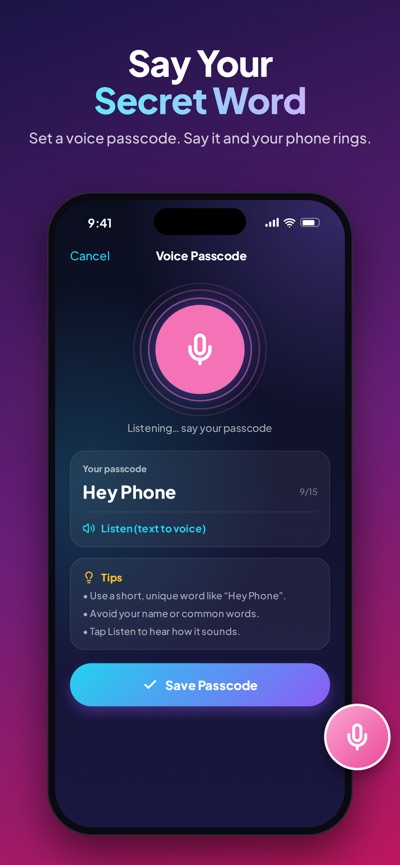
Clap Finder listens for your clap, whistle or secret voice passcode and makes your iPhone ring out loud, even when it's on silent. Find it in seconds under sofa cushions, in a bag, in the car or in another room, even with the screen locked.
THREE WAYS TO FIND YOUR PHONE
- Clap: clap 2–3 times and your phone answers
- Whistle: a short whistle is all it takes
- Voice Passcode: choose a secret word, say it and your phone rings
LOUD, BRIGHT AND IMPOSSIBLE TO MISS
- Rings even when your iPhone is on silent
- 15 flashlight patterns: strobe, SOS, beacon, disco and more
- 12 vibration patterns: heartbeat, tick-tock, SOS and more
- Adjustable sensitivity to avoid false alarms
- Works in the background and with the screen locked
MAKE IT YOURS
- 23 alarm sounds: police siren, dog barking, "Hey, stay here!", air horn, lion roar, Santa, Halloween and more
- Use any song or recording from Files as your alarm
- Fake incoming-call themes: your phone "calls" you with a name and photo you choose
- Colorful classic and sound-themed alarm screens
ANTI-THEFT PROTECTION
- Don't Touch My Phone: the alarm sounds if someone moves your phone
- Pocket Mode: the alarm sounds if it's pulled out of your pocket or bag
- Charger Alarm: the alarm sounds if someone unplugs the charger
- Only you can stop it, with Face ID, Touch ID or your passcode
PRIVATE BY DESIGN
Sound is analysed on your iPhone in real time. Nothing is recorded, saved or uploaded.
FREE OR PREMIUM
Clap Finder is free with ads. Watch a short video to try any premium sound for 24 hours, or go Premium with a one-time purchase: no ads, all 10 premium sounds and your own custom sound, forever. No subscription.
HOW TO USE
1. Choose Clap, Whistle or Voice
2. Tap Start and lock your phone
3. Lost it? Clap, whistle or say your passcode and follow the sound
Tip: keep Clap Finder open in the background (don't swipe it away in the app switcher) so it can hear you. For the loudest alarm, keep your media volume up.
Questions or ideas? Email us at funtechify@instaberry.net
Terms of Use (EULA): https://www.apple.com/legal/internet-services/itunes/dev/stdeula/
Privacy Policy: https://instaberry.net/#/privacy-policy
AVALW Coverage
Not yet mentioned in AVALW articles.
Similar apps


 Phone by GoogleGoogle LLCReliable phone calls with spam protection, caller ID and more helpful features★ 4.4 52440k


 Google Play servicesGoogle LLCGoogle Play services - Google services for Android apps★ 4.3 44573k



 Call of Duty®: Modern Warfare® 4 (Windows)Activision Publishing Inc.War erupts on the Korean Peninsula as North Korea launches a full-scale invasion that threatens to destabilize the world in Call of Duty®: Modern Warfare® 4. A ★ 4.3 16579k


 gov.brServiços e Informações do BrasilGov.br is a means of user access to digital public services.★ 4.6 14047k


 MyTelkomsel – Buy InternetTelkomselBuy credit, internet quota, streaming, game voucher & get cashback with e-wallet★ 3.8 12353k


 myIM3: Data Plan & Buy PackageIndosat Ooredoo HutchisonCheck balance & quota, detect & block spam, exchange IMPoin only on myIM3★ 4.4 11302k


 Files by GoogleGoogle LLCClean up your phone, find files, play media, and share files offline★ 4.5 9097k


 CNH do BrasilServiços e Informações do BrasilDigital driver's license and vehicle registration certificate, first driver's license, traffic violation and vehicle information.★ 4.9 8390k
More by this developer


 Urdu Easy Keyboard: Type UrduInstaberry Technologies Private LimitedUrdu easy keyboard Easy Urdu keyboard is a problem-solving application for those who are looking to text and type a message in Urdu format. If you want to type ★ 2.3 3


 How Will My Future Baby LookInstaberry Technologies Private LimitedThis is an amazing app which will get you entertained so let's start. Every parent wants to see their future baby's look like. So now you don't have to wait for★ 2.0 4


 Super VIP VPN-Super VPN MasterInstaberry Technologies Private Limited1 touch - million of connections: With this Super VIP VPN proxy unlimited app, you can enjoy surfing website or using of apps. Super VIP VPN is a free VPN clien★ 4.2 6


 Body Shape Editor – ReShape MeInstaberry Technologies Private LimitedBody Shape Editor – ReShape Me gives you professional body-reshaping tools in a simple, one-finger app. Slim, enhance, stretch and retouch any photo in seconds -