
Screenshots


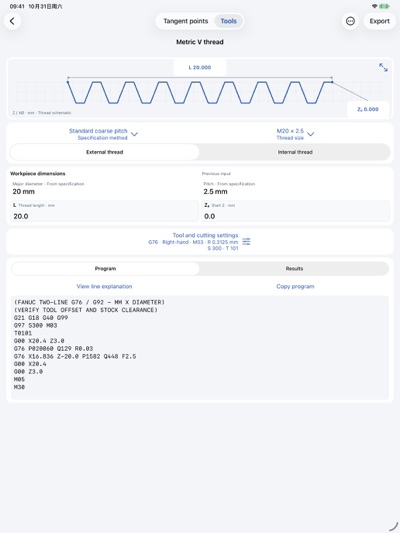
About CNC Lathe: Geometry & G-Code
CNC Lathe: Geometry & G-Code is an offline tool for CNC turning dimensions, tangent points, tool-nose compensation and machining programs. Choose a shape by its drawing, enter dimensions, compare the matching geometry and results, then export a program file when needed.
Choose and calculate with drawings
• 42 local contour types, grouped by taper and straight sections, ball ends, single-arc transitions, multiple arcs, grooves and raised features, and mixed taper/arc profiles.
• 10 common part templates for stepped shafts, bores, relief grooves, sleeves, tapers and annular grooves.
• Matching drawings and input fields. Confirmed inputs update the results, with errors identified at the relevant fields.
• Review tangent-point coordinates and compensation status alongside the nose radius, tool-tip reference and coordinate origin.
Review programs and export files
• Switch between machining programs and tangent-point results.
• Generate G-code within the scope stated on each export page, and save real .nc or .txt files.
• Choose absolute or incremental coordinates and formatting options where supported. Reopen saved files in export records, or save and send a copy through the system Files and sharing features.
Workshop toolbox
Tools cover threads, grooves, macros, tolerance lookup, tapers and geometry, material weight and cutting parameters. Follow the units and scope shown for each tool.
Work offline
Core calculations, drawings and program generation need no internet connection. The interface supports Simplified Chinese, English, Japanese and German. Favorites, recent items, input drafts and settings are saved on your device. No registration or advertising.
Check before machining
Output may be a contour fragment that requires an appropriate machine main program. Controller cycles, variables and compensation conventions can differ. Follow the export page's scope, check tools, references, stock and safe approach/retraction, and simulate on the destination machine before machining.
Support: tangnanus@gmail.com
AVALW Coverage
Not yet mentioned in AVALW articles.
Similar apps


 Phone by GoogleGoogle LLCReliable phone calls with spam protection, caller ID and more helpful features★ 4.4 52440k


 Google Play servicesGoogle LLCGoogle Play services - Google services for Android apps★ 4.3 44573k



 Call of Duty®: Modern Warfare® 4 (Windows)Activision Publishing Inc.War erupts on the Korean Peninsula as North Korea launches a full-scale invasion that threatens to destabilize the world in Call of Duty®: Modern Warfare® 4. A ★ 4.3 16579k


 gov.brServiços e Informações do BrasilGov.br is a means of user access to digital public services.★ 4.6 14047k


 MyTelkomsel – Buy InternetTelkomselBuy credit, internet quota, streaming, game voucher & get cashback with e-wallet★ 3.8 12353k


 myIM3: Data Plan & Buy PackageIndosat Ooredoo HutchisonCheck balance & quota, detect & block spam, exchange IMPoin only on myIM3★ 4.4 11302k


 Files by GoogleGoogle LLCClean up your phone, find files, play media, and share files offline★ 4.5 9097k


 CNH do BrasilServiços e Informações do BrasilDigital driver's license and vehicle registration certificate, first driver's license, traffic violation and vehicle information.★ 4.9 8390k
More by this developer

 My Auto Clicker app楠 唐Want to effortlessly click on any web? Auto Clicker has got you covered. Our simple and fast auto-clicker app makes it easy to automatically click on social med★ 2.2 5


 Masker:CosplayMatch楠 唐Masker is a cosplay community and creator hub. Share your looks, discover cosers, learn craft tips, and find events—safely and respectfully. What you can do Pos-


 Afterglow Cam楠 唐Make everyday photos your own with Afterglow Cam. Explore 19 camera styles and 41 color looks, from positive and negative film moods to monochrome, CCD and inst-


 Prank Sound App楠 唐Discover Endless Fun with Prank APP – Your Go-To App for Mischievous Fun and Laugh-Out-Loud Moments! Whether you’re planning to surprise your friends, liven up ★ 5.0 1