
Screenshots




About Copyfold: Clipboard Manager
Copyfold remembers everything you copy, so you never lose it again.
Press Control-Command-V in any app and your clipboard history appears: text, links, colors, images and files, newest first. Find what you need in a few keystrokes, and it's back on your clipboard.
FIND ANYTHING
- Type a few words to search every clip, its name and the app it came from
- Text inside screenshots and scans is recognized on your Mac, so searching "invoice" finds the photo of one
- Filter by text, links, images, files or colors with the Tab key
- A preview pane shows the full text, the color, the image or the files, plus where each clip came from and how often you used it
USE IT YOUR WAY
- Return copies the selected clip and takes you back to your app, ready for Command-V
- Command-1 to Command-9 pick one of the first nine
- Option-Return gives you plain text, without formatting
- Drag any clip into another app
PASTE A STACK, IN ORDER
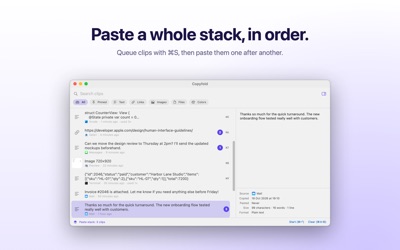
Filling in a form or moving several values between documents? Queue clips with Command-S and start the stack: the first clip is ready to paste. After each paste, Command-Return in Copyfold, or Copy Next Clip in the menu bar, loads the next one.
TRANSFORM TEXT IN A KEYSTROKE
Command-K opens every action for a clip, including 16 text transforms:
- UPPERCASE, lowercase, Title Case, camelCase, snake_case, kebab-case
- Trim whitespace, join lines, sort lines, remove duplicate lines
- URL and Base64 encode and decode
- Format or minify JSON
PIN AND NAME YOUR SNIPPETS
Pin the address, link, color or reply you use every day and give it a name. Pinned clips stay at the top, are found by name, and are never deleted automatically.
PRIVATE BY DESIGN
- Clips that password managers mark as concealed are never saved
- Anything that looks like an API key, a private key or a card number is skipped
- Tracking parameters such as utm_source and fbclid are removed from copied links
- Ignore specific apps, pause capture, or skip just the next copy
- No account, no network connection, no analytics. Your history stays on your Mac.
FITS THE WAY YOU WORK
- Lives in the menu bar and opens with a shortcut you can change
- Keep 50 to 2,000 clips, and delete old ones automatically if you like
- Launch at login, export and import your history
- Actions for the Shortcuts app: get recent clips, copy a clip, pause capture
REQUIREMENTS
macOS 14 or later. No special permissions: Copyfold never asks for Accessibility or Input Monitoring access and never watches your keyboard.
AVALW Coverage
Not yet mentioned in AVALW articles.
Similar apps


 Phone by GoogleGoogle LLCReliable phone calls with spam protection, caller ID and more helpful features★ 4.4 52440k


 Google Play servicesGoogle LLCGoogle Play services - Google services for Android apps★ 4.3 44573k



 Call of Duty®: Modern Warfare® 4 (Windows)Activision Publishing Inc.War erupts on the Korean Peninsula as North Korea launches a full-scale invasion that threatens to destabilize the world in Call of Duty®: Modern Warfare® 4. A ★ 4.3 16579k


 gov.brServiços e Informações do BrasilGov.br is a means of user access to digital public services.★ 4.6 14047k


 MyTelkomsel – Buy InternetTelkomselBuy credit, internet quota, streaming, game voucher & get cashback with e-wallet★ 3.8 12353k


 myIM3: Data Plan & Buy PackageIndosat Ooredoo HutchisonCheck balance & quota, detect & block spam, exchange IMPoin only on myIM3★ 4.4 11302k


 Files by GoogleGoogle LLCClean up your phone, find files, play media, and share files offline★ 4.5 9097k


 CNH do BrasilServiços e Informações do BrasilDigital driver's license and vehicle registration certificate, first driver's license, traffic violation and vehicle information.★ 4.9 8390k
More by this developer


 CSV Inspect – Viewer & FilterSnow Line Software S.P.R.L.CSV Inspect is a high-performance CSV viewer built for macOS. Open files of any size, apply multi-column filters, and paginate through results — without ever lo-

 Stitch It - PDF Join DocumentsSnow Line Software S.P.R.L.Introducing Stitch It — the elegant macOS solution for combining PDF files with effortless precision. With Stitch It, merging PDFs is as simple as selecting you-


 Disk Space UsageSnow Line Software S.P.R.L.Disk Space Usage answers one question: where did your storage go? Point it at a folder, a drive, or an external disk. It measures every file inside and shows yo-


 Watermark My PDFSnow Line Software S.P.R.L.PDF Watermark is the fastest way to add personalized watermarks to your documents. Whether you're protecting confidential information, branding company material-