
Screenshots



About Cuevilo: Teleprompter Studio
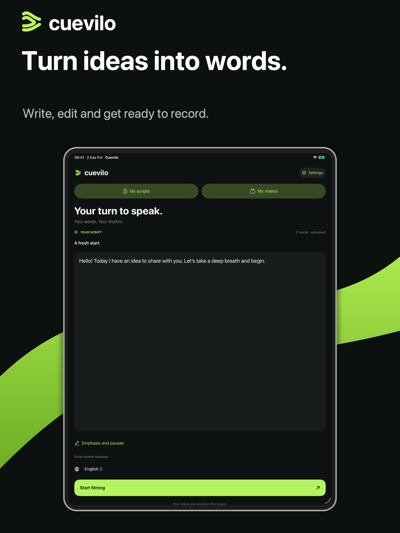
Read your script while looking at the camera, record your video, and prepare it to share. Cuevilo works on iPhone, iPad and Mac, with Apple Watch remote controls.
READ AT YOUR OWN PACE
Adjust scrolling speed, text size, line spacing and the reading area. Use speech-following scrolling, a reading guide, section markers and rehearsal modes. Start with a countdown; text begins scrolling one second after recording starts.
EDIT YOUR VIDEO
Create automatic captions and edit their wording, timing and appearance. Highlight individual words, choose a caption style, add a logo and music, crop the frame and trim the video. Keep editing the same video, then save or share the result.
ORGANIZE YOUR SCRIPTS
Use folders, projects, favorites, search and sorting. Import Word and TXT documents and share scripts as TXT. Optionally sync scripts and videos across supported devices with iCloud, or send text from your computer to your phone.
APPLE WATCH REMOTE
Start and stop recording, pause and resume the text, and adjust reading speed with the Digital Crown. Remote control of a paired Mac or iPad uses your iPhone as a bridge.
CUEVILO PRO
An active subscription is required for Pro features such as new recordings and editing. Existing saved content remains available to view and export. Monthly and annual subscriptions are offered. Eligible users can start a 7-day free trial; current pricing and offer eligibility appear on the purchase screen. Unless canceled, the selected subscription is charged when the trial ends and renews automatically. Manage or cancel your subscription in your Apple account settings.
Privacy policy: https://www.tesmedlink.de/products/cuevilo/cuevilo-privacy-policy
Terms of use (EULA): https://www.apple.com/legal/internet-services/itunes/dev/stdeula/
AVALW Coverage
Not yet mentioned in AVALW articles.
Similar apps


 YouTubeGoogleGet the official YouTube app on iPhones and iPads. See what the world is watching -- from the hottest music videos to what’s popular in gaming, fashion, beauty,★ 4.7 49315k


 InstagramInstagram, Inc.Little moments lead to big friendships. Share yours on Instagram. — From Meta Connect with friends, find other fans, and see what people around you are up to an★ 4.7 29567k



 Affinity by CanvaCanvaONE APP TO CRAFT IT ALL, FOR NO COST AT ALL. Design. Edit. Lay it out. Affinity gives you vector, pixel, and layout tools, all in the same professional-grade ap★ 4.8 27291k


 Video Editor & Maker - InShotInShot Video EditorAI video editor with music! Edit video with effects, slideshow & slow motion★ 4.8 24760k


 MX PlayerAmazon Mobile LLCPowerful video player with advanced hardware acceleration and subtitle supports★ 4.2 14336k


 VivaVideo - Video Cut & EditorQuVideo Inc. Video Editor & Video Maker AppAI Video Editor: AI Templates, Text to Video, Extract Audio, Auto Caption.★ 4.3 12268k


 YouCut - Video Editor & MakerInShot Video EditorAI Video Editor with Music, Filter, Slideshow, Effect, Merge & Trim Video.★ 4.8 8635k


 Screen Recorder - XRecorderInShot Inc.Record games with audio. Smooth, HD screen capture & Built-in video editor.★ 4.7 7662k
More by this developer


 Teacher's PlannerTES MED LINK GmbHOrganize classes, subjects, students and assignments with Teacher’s Planner. Track submissions, add scores and teacher notes, export student lists as PDF and co-


 AcademicFlowTES MED LINK GmbHAcademicFlow brings academic writing, source reading, research analysis and planning into one workspace for students and researchers. Develop an article or thes-


 TickowTES MED LINK GmbHTickow brings a clear, beautiful clock to your iPhone, iPad and Mac, with your notes, planner and favorite ambient sounds close at hand. A CLOCK THAT FEELS LIKE-


 Academic Manuscript ManagementTES MED LINK GmbHAcademic Manuscript Management is an editorial workflow workspace for academic journal editors and editorial teams. Organize every manuscript from first submiss-