
Screenshots




About DeckSync: Live Slide Sync
Present a PDF deck to every iPad in the room. No cloud, no accounts, no internet required.
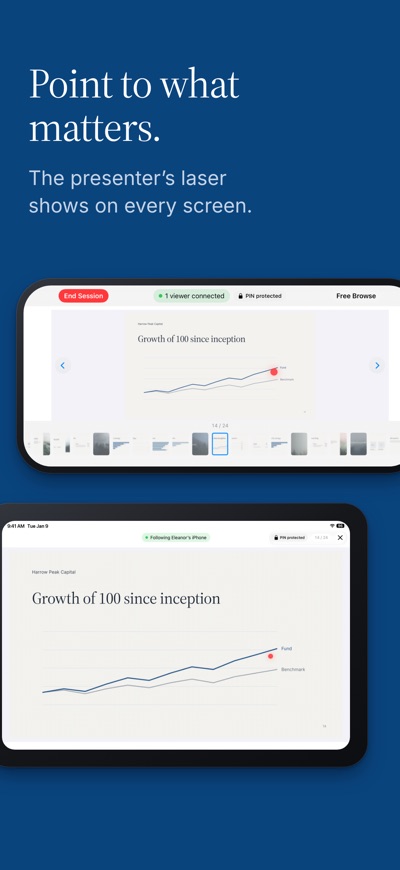
DeckSync turns a stack of iPads into one synchronized presentation. One device drives the deck; viewers follow every page turn and laser pointer in real time over a direct peer-to-peer link. Nothing touches a server. Nothing leaves the room. And only the presenter needs a subscription — viewers join free.
BUILT FOR THE ROOMS THAT STILL PRINT
Investor meetings and LP updates
Board and committee meetings
Fund marketing and roadshows
Sales presentations in client offices
Any conference room with unreliable guest Wi-Fi
VIEWERS JOIN FREE One subscription runs the whole meeting. Attendees install DeckSync, tap your session from the nearby list, and follow along at no cost. No sign-up. Nothing to configure.
HOW IT WORKS
Import a PDF from Files, OneDrive, SharePoint, Google Drive, Dropbox, Box, AirDrop, the share sheet, or USB.
Tap Start Presenting and set an optional four-digit PIN.
Viewers open DeckSync, pick your session from the nearby list, and the deck loads.
Swipe, tap a thumbnail, or touch and drag for the laser pointer. Every connected device follows.
FEATURES
Sync over your Wi-Fi network, or directly device to device. Internet not required.
Synced laser pointer visible on every follower device.
Free browse mode for Q&A, then one tap to pull the room back to your slide.
If the presenter's connection drops, viewers reconnect automatically and keep the deck on screen.
PIN-protected sessions prevent accidental joins from the floor above.
Pre-load the fleet before a roadshow, or push the deck to each device as it joins.
Full-screen viewing, thumbnail navigation, and dark mode.
iPad and iPhone, mixed freely in the same session.
PRIVACY BY ARCHITECTURE DeckSync has no backend and no accounts. No analytics, no crash reporting, no third-party SDKs. Your deck travels device to device and stays on your devices. The app makes no outbound network requests of its own — the only exceptions are your App Store subscription, handled by Apple, and a diagnostic log if you ever choose to email one to support. Apple's privacy label confirms the rest: no data collected.
REQUIREMENTS iPadOS or iOS 26.3 or later. DeckSync 1.2 or later on every device. PDF only. Convert PowerPoint or Keynote decks before importing.
SUBSCRIPTION A subscription unlocks presenting. One-week free trial, then $9.99 per month or $74.99 per year. Joining a session as a viewer is free, and importing and managing your PDF library is free too. Cancel anytime in App Store settings.
Terms of Service: https://kojex.net/decksync/terms Privacy Policy: https://kojex.net/decksync/privacy
AVALW Coverage
Not yet mentioned in AVALW articles.
Similar apps


 Booking.com for BusinessBooking.comManage your business travel with the Booking.com for Business app! Book trips and manage expenses in just a few minutes. - Book your whole business trip in one ★ 4.8 6450k


 ADP Mobile SolutionsADP, IncADP Mobile Solutions provides you with an easy and convenient way to access payroll, time & attendance, benefits, and other vital HR information for you and you★ 4.7 4460k


 Indeed Job SearchIndeed Inc.Discover your next job opportunity on Indeed, the free job search app designed to connect you with better work anytime, anywhere. Forget the other job search ap★ 4.8 4078k


 Microsoft TeamsMicrosoft CorporationWhether you’re connecting with your community for an upcoming activity or working with teammates on a project, Microsoft Teams helps bring people together so th★ 4.8 3378k


 Zoom WorkplaceZoom Communications, Inc.Zoom Workplace helps you streamline your day and collaborate effortlessly with the power of AI. Zoom Workplace brings video meetings, chat, phone, appointment s★ 4.7 3244k


 DoorDash - DasherDoorDash, Inc.Enjoy the freedom to be your own boss and earn money on your schedule. Plus, get 100% of your tips, always. * CASH AFTER EVERY DASH * Get paid right after every★ 4.7 2464k


 Duo MobileDuo Security LLCDuo Mobile works with Duo Security's two-factor authentication service to make logins more secure. The application generates passcodes for login and can receive★ 4.9 2306k


 Naukri: Job Search Appinfoedge.comSearch jobs, apply fast, and get noticed by 5 lakh+ recruiters hiring in India★ 4.5 2024k