
Screenshots




About Duyle Parent: Parental Control
Duyle helps you set healthy screen time limits for your child, block the apps and websites you don't want them using, and see where they are, all from your own iPhone or iPad.
Duyle works as a pair. Install Duyle Parent on your phone and Duyle Child on your child's iPhone or iPad. Sign in on both with the same parent account, and the rules you set here are applied on your child's device using Apple's Screen Time technology.
DAILY SCREEN TIME LIMITS
- Set a daily time allowance on an easy dial.
- Choose what happens when time's up: lock the managed apps, block web browsing, and get an alert.
- With Pro, set a different limit for each day of the week, so school nights and weekends can have their own rules.
APP RULES
- Your child picks the apps and categories to manage on their own device, as Apple requires. They then appear here.
- Set each app to Allow, Always allowed, Block, or give it its own time limit.
WEB FILTERING
- Turn web filtering on to control what your child can reach in Safari and most browsers.
- Add websites to block or allow.
YOUTUBE, YOUR WAY
- Choose whether youtube.com can be opened in the browser.
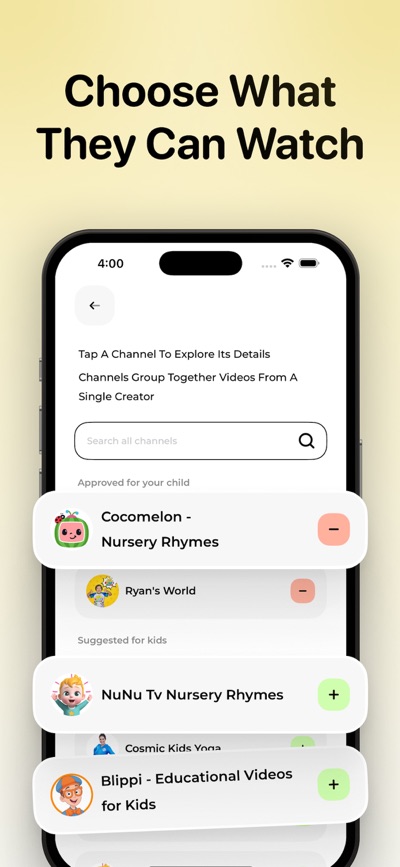
- Approve the YouTube channels your child may watch. They watch only those channels inside Duyle Child.
FAMILY PAUSE
- Pause every child's device at once, or just one child's, for as long as you choose. Great for dinner, homework or bedtime.
LOCATION
- See your child's location on a map, so you know they got to school or home safely.
- Get told if location is turned off on their phone.
REQUESTS
- Your child can ask for extra time or for access to an app with one tap.
- Approve or decline from your phone, and the answer is sent straight to their device.
ALERTS
- Know when your child reaches their daily limit or an app limit.
- Get alerted if Screen Time protection or web filtering is turned off on their device.
BUILT TO STAY ON
- Turning off protection inside Duyle Child requires your parent account password.
- Duyle uses Apple's Family Sharing Screen Time approval, so your child can't remove the app or its permission without a parent.
- Manage several children from one account, each with their own rules.
DUYLE PRO
Duyle is free to download and the core daily limit and app rules work without paying. Duyle Pro unlocks per-day limits, Family Pause, the location map, adding websites to your filter list, and approving your child's requests.
Pro is available as a weekly or yearly auto-renewing subscription, or as a one-time lifetime purchase. Subscriptions may include a free trial. Payment is charged to your Apple Account when you confirm the purchase, or when a free trial ends. Subscriptions renew automatically unless cancelled at least 24 hours before the end of the current period, and your account is charged for renewal within 24 hours before the period ends. You can manage or cancel your subscription in your Apple Account settings at any time after purchase. Any unused part of a free trial is forfeited when you buy a subscription.
Privacy Policy: https://sites.google.com/view/cipherqtechllp/privacy-policy
Terms of Use: https://sites.google.com/view/cipherqtechllp/terms-of-use
Requirements: the free Duyle Child app on your child's iPhone or iPad (iOS 17.1 or later). Your child's device must be signed in with an Apple Account that is a child member of your Family Sharing group, and you approve Screen Time access on it with your own Apple Account.
AVALW Coverage
Not yet mentioned in AVALW articles.
Similar apps


 Zedge™ Wallpapers & RingtonesZedgeDiscover millions of background wallpapers & ringtones or make your own with AI.★ 4.7 17993k


 Zillow Real Estate & RentalsZillow.comFind your new home to buy or rent with expert real estate tools and millions of listings right at your fingertips. Seamlessly save, search, and share home listi★ 4.8 7238k


 Android AutoGoogle LLCControl maps, media and messaging, with Gemini while you drive★ 4.1 6304k


 Amazon AlexaAMZN Mobile LLCUse the Amazon Alexa app to manage Alexa-enabled devices, control music playback, view shopping lists on the go, keep track of upcoming reminders, check on acti★ 4.5 5906k


 PinterestPinterest, Inc.Pinterest is a place of endless possibilities. You can: - Discover everyday inspiration - Shop styles you love - Try and learn something new Create boards, save★ 4.8 5789k


 Parallel Space - app cloningLBE TechRun multiple accounts of the same app on a single device★ 4.1 5115k


 Microsoft SwiftKey AI KeyboardSwiftKeyAI-powered Copilot. Personalized keyboard with gifs, stickers & themes★ 4.3 4602k



 World of Tanks Blitz – Daylight AssaultWargaming Group LimitedCharge into battle with the explosive energy of daylight! This bright World of Tanks Blitz theme brings 5 high-resolution wallpapers packed with sun-scorched de★ 4.1 4525k
More by this developer


 Sleep Tracker & Sounds: NiniCipherQ Tech LLPNini is your personalized night routine. Wind down with a simple plan, fall asleep to soothing sounds and stories, track your sleep, record snoring and wake up -


 AI Tattoo Generator - CreatorCipherQ Tech LLPIf you want to create unique tattoo ideas instantly using the power of AI and custom templates. This app helps you explore creative tattoo designs based on your-


 Watermark Maker Image - VideoCipherQ Tech LLPWatermark Maker app or add Signature on image is an easy to use photo editing app that helps you protect and enhance your images. Add custom watermarks with tex-


 Blood Pressure Tracker - BPTCipherQ Tech LLPBlood Pressure Tracker - BPT is the simple, private way to log your blood pressure, pulse, weight and blood sugar in one place. Add a reading in seconds, see ho-