
Screenshots



About Dyslexia & ADHD: dys reading
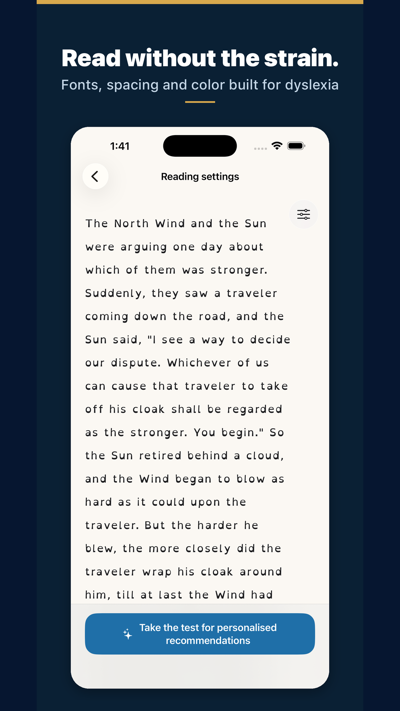
Find the on-screen reading settings that suit you.
For dyslexic and ADHD readers, children and adults alike — and for anyone who tires quickly on screen.
This app is a settings lab: experiment with fonts (including OpenDyslexic), text size, letter and line spacing, and colors on a sample text — and see the result instantly.
IMPORTANT — This app is not a screening or diagnostic tool. Dyslexia is diagnosed by a qualified professional (speech-language pathologist). This app only helps you explore display preferences.
WHY SPACING MATTERS
In a controlled study published in PNAS (Zorzi et al., 2012), increasing the space between letters immediately improved reading accuracy in children with dyslexia — with no training. Effects vary from reader to reader, which is exactly why testing your own settings matters.
WHAT YOU CAN DO
- Try different fonts and compare them on the same text
- Adjust text size, letter spacing and line spacing
- Test text and background colors for your visual comfort
- Send feedback and suggest new settings
Once you know what works for you, apply your preferences in our other apps (Scandys, Navidys, School tool) or in your device's accessibility settings.
AVALW Coverage
Not yet mentioned in AVALW articles.
Similar apps



 Duolingo - Language LessonsDuolingo Inc.Learn a new language with the world’s most-downloaded education app! Duolingo is the fun, free app for learning 40+ languages through quick, bite-sized lessons.★ 4.7 5492k


 Duolingo: Language LessonsDuolingoLearn a new language, chess & more with the world's most downloaded education app! Duolingo is the fun, free app for learning 40+ languages through quick, bite-★ 4.7 5492k


 Read Along by GoogleGoogle LLCLearn to read with the magic of your voice and a friendly reading buddy★ 4.6 5287k


 Brainly: AI Homework HelperBrainlyQuick Math Helper & Science Solutions | Get Homework Answers for School Doubts★ 4.5 4470k


 Gauth: AI Study CompanionGauthTech Pte. Ltd.Ask anything, get right answer★ 4.8 2111k


 Remind: School CommunicationParentSquareRemind is a communication platform that helps every student succeed. Whether you're in the classroom, at home, or anywhere in between, Remind makes it easy to s★ 4.8 1799k


 Memrise: Fun language lessonsMemriseImprove vocabulary & learn to speak English, Spanish, German, Japanese & more!★ 4.4 1571k


 ClassDojoClassDojoClassDojo connects teachers, tutors, kids, and families★ 4.8 1341k
More by this developer


 OpenDyslexic School Editionmichael dardolOpenDyslexic School Edition is OpenDyslexic for schools: every feature unlocked, with no in-app purchases, no accounts and no data collection at all. A reading--


 CRR: Marine Radio Exammichael dardolPrepare for your marine radio certificate (CRR) and pass on the first try. Train under real conditions: full offline handbook, theme-by-theme practice with inst-


 Devia — villages & road tripmichael dardolFaites une pause hors de l'autoroute. Une aire de repos, un sandwich sous plastique, et on repart. À huit minutes de la sortie, il y avait un village. Devia réu-


 Recharge: EV Charging Costmichael dardolStop guessing what your EV really costs to charge. Recharge does the math for you in 1 second. Type in your car. Pick where you charge. Get the exact price in €-