Screenshots
About Ezy Pen – Screen Pen, Draw & Annotate
🎯 Draw, Annotate & Highlight Your Screen with Ease
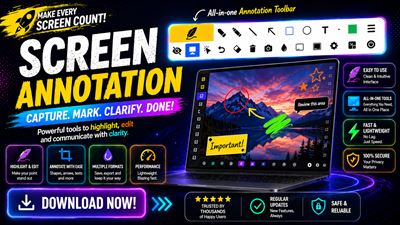
Ezy Pen is a powerful screen pen and screen annotation tool for Windows that lets you draw on your screen over any application in real time. Whether you're teaching online, giving presentations, recording tutorials, collaborating in meetings, or explaining ideas visually, Ezy Pen makes screen annotation simple, fast, and professional.
Annotate your desktop without interrupting your workflow and keep your drawings visible while switching between applications.
✨ Key Features
🖊️ Draw on Any Screen
Write, sketch, highlight, and annotate over any desktop application, browser, document, presentation, or video in real time.
🎨 Professional Annotation Tools
• Pencil
• Highlighter
• Straight Line
• Arrow
• Rectangle
• Ellipse
• Text Tool
• Eraser
🌈 Custom Colors & Brush Sizes - Choose from multiple colors and adjustable pen sizes to create clear, professional annotations.
⌨️ Customizable Keyboard Shortcuts - Launch tools instantly with fully customizable hotkeys for a faster workflow.
📸 Screenshot & Snipping Tool - Capture your full screen or a selected area with the built-in screen capture and snipping tools.
🧠 Blurryboard Mode - Focus your audience by reducing distractions and highlighting only what matters.
🧹 Easy Editing - Undo mistakes, erase specific drawings, or clear all annotations with a single click.
🖥️ Multi-Monitor Support - Draw and annotate seamlessly across multiple displays.
🔕 Lightweight System Tray App - Runs quietly in the background, always ready whenever you need it.
💼 Perfect For
• Teachers & Educators
• Online Classes
• Business Presentations
• Remote Work
• Zoom Meetings
• Microsoft Teams Meetings
• Google Meet Sessions
• Content Creators
• YouTubers
• Streamers
• Gamers
• Software Demonstrations
• Training Sessions
• Screen Recording
• Live Tutorials
🚀 Why Choose Ezy Pen?
• Fast and lightweight
• Easy-to-use interface
• Smooth, real-time screen drawing
• Professional annotation tools
• Designed for productivity and presentations
• Works over any Windows application
• Ideal for teaching, meetings, tutorials, and collaboration
Transform your Windows desktop into an interactive canvas. Draw on your screen, highlight important information, create engaging presentations, explain ideas visually, and collaborate more effectively with Ezy Pen the complete screen pen, screen drawing, and screen annotation solution for Windows.
AVALW Coverage
Not yet mentioned in AVALW articles.
Similar apps
 Phone by GoogleUtilities★ 4.4 52440k
 Google Play servicesUtilities★ 4.3 44573k
 Call of Duty®: Modern Warfare® 4 (Windows)Utilities★ 4.3 16579k
 gov.brUtilities★ 4.6 14047k
 MyTelkomsel – Buy InternetUtilities★ 3.8 12353k
 myIM3: Data Plan & Buy PackageUtilities★ 4.4 11302k
 Files by GoogleUtilities★ 4.5 9097k
 CNH do BrasilUtilities★ 4.9 8390k
More by this developer
 PDF Merger & Splitter - Split & Join PDF FilesProductivity★ 4.3 30
 HEIC. HEIC to JPG, HEVC to MP4. Semivio HEIC ConverterPhoto & Video★ 3.6 10
 File Shredder - Securely Delete FilesPrivacy & Security★ 4.3 140
 AuthGuard: Authenticator App for 2FAPrivacy & Security★ 4.4 18
 PDF Password Remover - Lock & Unlock PDFProductivity★ 4.5 110
 Advanced Renamer - Bulk Rename Files, Batch RenameUtilities★ 4.2 58