
Screenshots



About FlipMate: Flip & Desk Clock
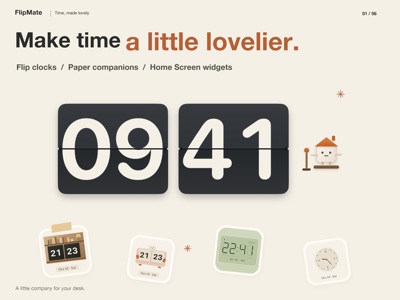
FlipMate is a desk clock with flip faces, photo slideshows and Home Screen widgets. A Pomodoro timer and countdown help you set aside time for studying, working or reading.
Give your iPhone or iPad a look you love, from clear digital displays to playful paper companions. Enjoy 18 free clock faces, plus photo clocks, focus timers and widgets.
CLOCK FACES WITH CHARACTER
Explore classic flip, walnut, minimal digital, retro LCD, LED dot-matrix and analog styles. Discover paper scenes with little companions, a bookshop and a tailor's workshop. In the app, select paper faces play brief animations when the minute or hour changes.
MAKE IT YOUR DESK CLOCK
Choose a face and color palette, show the date and select a 12- or 24-hour format. Portrait and landscape layouts, day and night modes, and desk mode let you make the display your own.
YOUR PHOTOS, WITH THE TIME
Display the time and date over your favorite photos and play them in order or shuffle them. Bring trips, family, pets and everyday moments to your desk. Removing a photo from FlipMate deletes only its imported copy, leaving the original in your photo library untouched.
TIME TO FOCUS
Start a 25-minute focus session or a 45-minute countdown, with pause and reset controls. Check timer status after returning to the clock. Enable notifications to receive a completion reminder.
WIDGETS FOR YOUR HOME SCREEN
Choose small, medium or large clock widgets and configure their colors, date and time format separately. Some styles include a monthly calendar, weekly progress or times in multiple cities. Widget updates are scheduled by the system; in-app companion animations do not play in widgets.
START FREE, UNLOCK MORE
Use 18 clock faces, photo clocks, focus timers and widgets for free. FlipMate Plus unlocks more selected clock faces and material themes with a one-time purchase. No subscription required.
Make every glance at the time a little more enjoyable.
AVALW Coverage
Not yet mentioned in AVALW articles.
Similar apps


 Phone by GoogleGoogle LLCReliable phone calls with spam protection, caller ID and more helpful features★ 4.4 52440k


 Google Play servicesGoogle LLCGoogle Play services - Google services for Android apps★ 4.3 44573k



 Call of Duty®: Modern Warfare® 4 (Windows)Activision Publishing Inc.War erupts on the Korean Peninsula as North Korea launches a full-scale invasion that threatens to destabilize the world in Call of Duty®: Modern Warfare® 4. A ★ 4.3 16579k


 gov.brServiços e Informações do BrasilGov.br is a means of user access to digital public services.★ 4.6 14047k


 MyTelkomsel – Buy InternetTelkomselBuy credit, internet quota, streaming, game voucher & get cashback with e-wallet★ 3.8 12353k


 myIM3: Data Plan & Buy PackageIndosat Ooredoo HutchisonCheck balance & quota, detect & block spam, exchange IMPoin only on myIM3★ 4.4 11302k


 Files by GoogleGoogle LLCClean up your phone, find files, play media, and share files offline★ 4.5 9097k


 CNH do BrasilServiços e Informações do BrasilDigital driver's license and vehicle registration certificate, first driver's license, traffic violation and vehicle information.★ 4.9 8390k
More by this developer


 FondDays: Countdown & WidgetsWuhan Jiange Technology Co., Ltd.Remember what matters. Look forward to what’s next. FondDays keeps countdowns, anniversaries, birthdays, and ages close with Home Screen and Lock Screen widgets★ 5.0 2


 LitePDF: PDF Scanner & OCRWuhan Jiange Technology Co., Ltd.Private PDF work, finished on your device. LitePDF helps you scan, recognize, redact, sign, compress, and protect documents without uploading the files you proc-


 FindShot: Screenshot LibraryWuhan Jiange Technology Co., Ltd.Keep important screenshots. Find them by text when you need them. FindShot is your local screenshot library. Save screenshots of orders, receipts, appointments,-


 SleepSnore: Snore RecorderWuhan Jiange Technology Co., Ltd.Record overnight sounds, replay possible snoring, sleep-talking, and room-noise clips, and compare changes across nights—all with on-device analysis. SleepSnore★ 4.0 1