
Screenshots



About Gringo XP Freestyle Panel FF
Gringo XP Freestyle Panel FF is a companion app for players who like to fine-tune their setup. It is a design, calculation, and training studio that lives entirely inside this app — it draws nothing over other apps and changes nothing outside this app.
CROSSHAIR DESIGNER
- Design your crosshair: size, gap, rotation, opacity, outline, and color.
- Four styles: cross, dot, circle, and T-shape.
- Preview it live on an in-app training-range background.
- Save as many named crosshairs as you like, and switch between them anytime.
SENSITIVITY CALCULATOR & VISUALIZER
- Enter a sensitivity multiplier and per-scope values (general, red dot, 2x, 4x, sniper).
- See all effective values calculated and visualized at once.
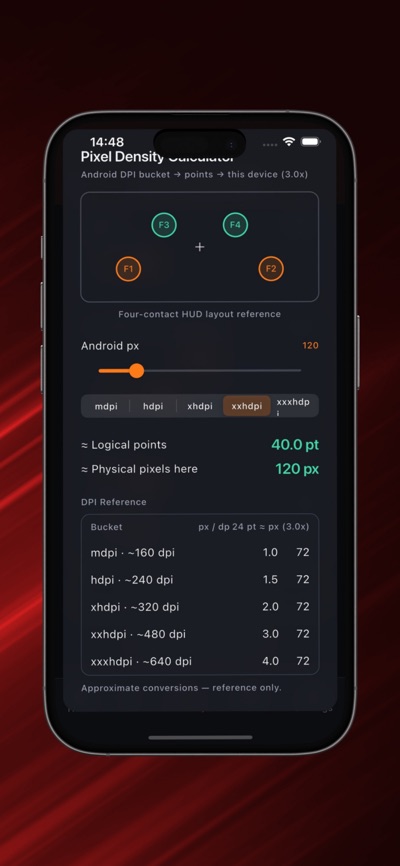
- Reference table translates between standard mobile DPI conventions and iOS points, so you can compare setups from other devices.
- Fire button size preview, plus swipe velocity and touch scale reference values.
TRAINING VISUALIZER
- Practice with tap-target drills inside the app, driven by your saved values.
- Clearly labeled as an in-app simulation — reference only.
PRESET LIBRARY
- Browse curated crosshair and sensitivity presets.
- Save and equip favorites, manage your own configurations, and export nothing you do not choose to share.
SETTINGS & PRIVACY
- Dark and light themes.
- Full control over ads personalization: change your answer anytime in-app, or in iOS Settings.
- Your configurations stay on your device.
Note: this is a visualizer and reference calculator. It does not draw over other apps and does not change any game's settings. Values it computes are for you to read and use wherever you like.
AVALW Coverage
Not yet mentioned in AVALW articles.
Similar apps


 Phone by GoogleGoogle LLCReliable phone calls with spam protection, caller ID and more helpful features★ 4.4 52440k


 Google Play servicesGoogle LLCGoogle Play services - Google services for Android apps★ 4.3 44573k



 Call of Duty®: Modern Warfare® 4 (Windows)Activision Publishing Inc.War erupts on the Korean Peninsula as North Korea launches a full-scale invasion that threatens to destabilize the world in Call of Duty®: Modern Warfare® 4. A ★ 4.3 16579k


 gov.brServiços e Informações do BrasilGov.br is a means of user access to digital public services.★ 4.6 14047k


 MyTelkomsel – Buy InternetTelkomselBuy credit, internet quota, streaming, game voucher & get cashback with e-wallet★ 3.8 12353k


 myIM3: Data Plan & Buy PackageIndosat Ooredoo HutchisonCheck balance & quota, detect & block spam, exchange IMPoin only on myIM3★ 4.4 11302k


 Files by GoogleGoogle LLCClean up your phone, find files, play media, and share files offline★ 4.5 9097k


 CNH do BrasilServiços e Informações do BrasilDigital driver's license and vehicle registration certificate, first driver's license, traffic violation and vehicle information.★ 4.9 8390k
More by this developer


 FreshDo - To Do List & Planneryoussef BoughabaFreshDo is the ultimate productivity engine designed for deep focus and relentless execution. Whether you are managing complex professional projects or organizi-


 NovaPDF: PDF Scanner & Editoryoussef BoughabaNovaPDF is a minimalist, local-first PDF studio designed to give you total control over your documents without sacrificing your privacy. Scan physical paperwork-