
Screenshots


About Icon Mosaic
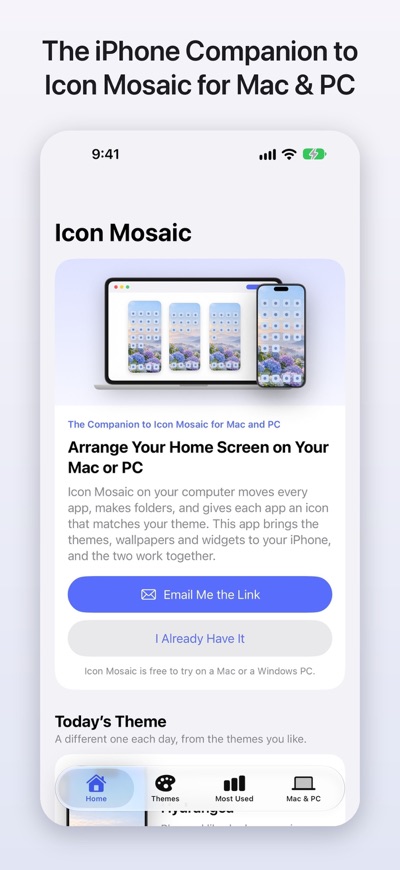
Icon Mosaic for iPhone is the free companion to Icon Mosaic for Mac and PC, and the two work together. Icon Mosaic on your computer is the Home Screen editor: it arranges every page, every folder and every app, with icons that match your theme. This app brings the themes, wallpapers and widgets to your iPhone.
You can use this app by itself for its themes and widgets. To rearrange your apps, make folders or change your app icons, you'll also need Icon Mosaic on a Mac or a Windows PC, which is free to try. The app opens with a link you can send to your computer.
THEMES FOR YOUR IPHONE
Choose from 24 calm, colorful themes, from soft mornings to deep night skies, or make a theme from one of your own photos. Set as Wallpaper uses a free shortcut that you add once. After that, it takes a tap.
A WALLPAPER THAT CHANGES ON ITS OWN
Let your iPhone choose a new wallpaper every morning, or whenever you like, from the themes you pick. Your widgets change color with it, and you can rotate only the themes that go with your app icons. It works with Shortcuts, so it can also change when you get home or when a Focus turns on.
WIDGETS IN MATCHING COLORS
Add widgets that go with your wallpaper to your Home Screen:
• The date and a month calendar
• A few kind words each day, or your own
• A daily horoscope for your sign
• The moon's phase and the next full moon
• Sunrise, sunset and golden hour
• A clock for another city
• A countdown to the day you're looking forward to
• A favorite photo in a frame
On your Lock Screen, you can add the date, the moon, sunrise and sunset, a clock for another city, and your countdown. Your widgets can change with your wallpaper, or with a Focus.
A GUIDE TO YOUR HOME SCREEN
Short, step-by-step help for things your iPhone can already do: hide a page, keep an app off your Home Screen, make your icons larger, tint them, and more.
YOUR MOST USED APPS
See which apps you use most each week. Icon Mosaic on your Mac or PC can then put them on your first page, where they're easiest to reach. Your Screen Time numbers stay on your iPhone, and Icon Mosaic never limits or blocks anything.
ARRANGE EVERYTHING ON YOUR MAC OR PC
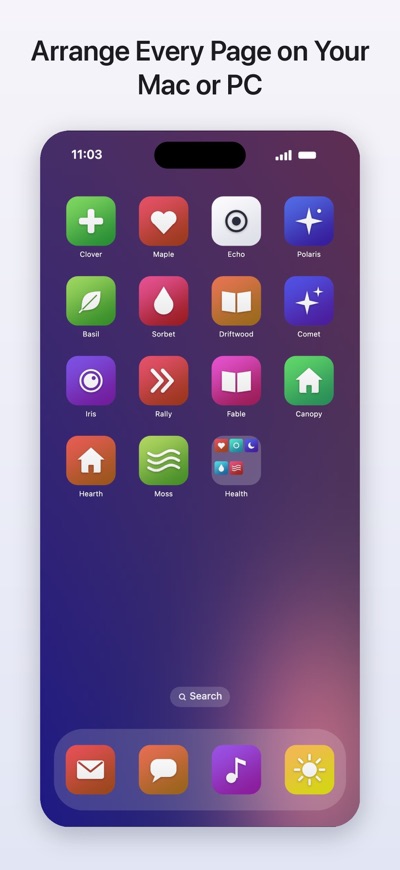
Icon Mosaic for Mac and Windows shows all of your Home Screen pages side by side on the big screen. Drag apps wherever you like, make folders, sort by color or A to Z, keep the apps you rarely use in the App Library, and give every app an icon that matches your theme. Pair your iPhone with it to see your new pages on your iPhone before you apply them, and to see what its Home Screen Checkup found. It's free to try on your computer.
PRIVATE BY DESIGN
No account, no ads and no tracking. Your photos, your sign and your Screen Time numbers stay on your iPhone, unless you choose to send a photo to your own computer.
Terms and Conditions: https://iconmosaicapp.com/terms/
Privacy Policy: https://iconmosaicapp.com/privacy/
AVALW Coverage
Not yet mentioned in AVALW articles.
Similar apps


 Phone by GoogleGoogle LLCReliable phone calls with spam protection, caller ID and more helpful features★ 4.4 52440k


 Google Play servicesGoogle LLCGoogle Play services - Google services for Android apps★ 4.3 44573k



 Call of Duty®: Modern Warfare® 4 (Windows)Activision Publishing Inc.War erupts on the Korean Peninsula as North Korea launches a full-scale invasion that threatens to destabilize the world in Call of Duty®: Modern Warfare® 4. A ★ 4.3 16579k


 gov.brServiços e Informações do BrasilGov.br is a means of user access to digital public services.★ 4.6 14047k


 MyTelkomsel – Buy InternetTelkomselBuy credit, internet quota, streaming, game voucher & get cashback with e-wallet★ 3.8 12353k


 myIM3: Data Plan & Buy PackageIndosat Ooredoo HutchisonCheck balance & quota, detect & block spam, exchange IMPoin only on myIM3★ 4.4 11302k


 Files by GoogleGoogle LLCClean up your phone, find files, play media, and share files offline★ 4.5 9097k


 CNH do BrasilServiços e Informações do BrasilDigital driver's license and vehicle registration certificate, first driver's license, traffic violation and vehicle information.★ 4.9 8390k
More by this developer


 Wonderline: Text SantaWondernook Studios LLCText Santa from your phone. He texts back. No mall lines. No lap photos. No new app for your kids to learn. Wonderline lets you tell Santa, the Tooth Fairy, the★ 5.0 3


 The Trip BinderWondernook Studios LLCThe Trip Binder brings everything your group needs into one place—from rosters and schedules to live head counts, assignments, room and bus sign-ups, medical in★ 5.0 1