
Screenshots



About Kaomoji Keyboard + Emoji Maker
Kaomoji Keyboard – Paste Keyboard & Emoji Maker for Kaomoji & Unicode Art
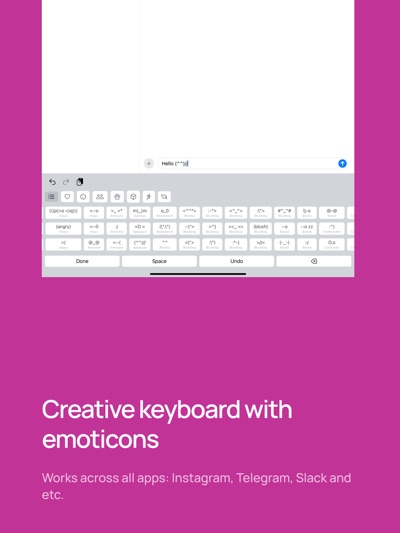
Express yourself with your very necessary emojis—tap into thousands of hand-crafted kaomoji or build your own custom creations in seconds, all from this privacy-first iOS paste keyboard.
WHAT’S INSIDE
- Massive Unicode & Kaomoji Library
Browse hundreds of categories—from Animals and Emotions to Actions, Nature, Objects, and more.
- Emoji Maker & Kaomoji Maker
Your intuitive “emoji maker”: choose a base, eyes, mouth, arms, and accessories with simple taps, then copy your custom kaomoji instantly.
- Recents & Favorites
Automatic tracking of your most recent picks, plus one-tap access to all your saved favorites (your very necessary emojis, always at hand).
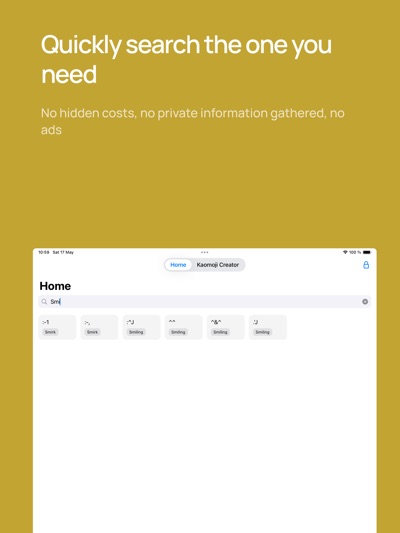
- Blazing-Fast Search
Type any keyword (“happy,” “bear,” “heart”) and see relevant unicode art and kaomoji pop up in real time.
- Seamless Paste Keyboard Extension
Install once and use everywhere: Messages, Instagram, Slack, email—if you can type, you can paste emoticons.
- Privacy-First & Offline
Entirely self-contained on your device. No tracking, no internet needed.
GETTING STARTED
1. Open the Kaomoji Keyboard host app to explore categories, mark favorites, or launch the Kaomoji Maker.
2. Enable Kaomoji Keyboard in Settings → General → Keyboard → Keyboards → Add New Keyboard.
3. Tap Kaomoji Keyboard and allow Full Access (we never collect your data—this is only so you can paste emoticons).
4. In any app, tap the globe icon on your keyboard to bring up your kaomoji palette—or hit the wand icon in the host app to craft your own.
Add personality to every chat—download Kaomoji Keyboard now and make your conversations unforgettable!
AVALW Coverage
Not yet mentioned in AVALW articles.
Similar apps


 Phone by GoogleGoogle LLCReliable phone calls with spam protection, caller ID and more helpful features★ 4.4 52440k


 Google Play servicesGoogle LLCGoogle Play services - Google services for Android apps★ 4.3 44573k



 Call of Duty®: Modern Warfare® 4 (Windows)Activision Publishing Inc.War erupts on the Korean Peninsula as North Korea launches a full-scale invasion that threatens to destabilize the world in Call of Duty®: Modern Warfare® 4. A ★ 4.3 16579k


 gov.brServiços e Informações do BrasilGov.br is a means of user access to digital public services.★ 4.6 14047k


 MyTelkomsel – Buy InternetTelkomselBuy credit, internet quota, streaming, game voucher & get cashback with e-wallet★ 3.8 12353k


 myIM3: Data Plan & Buy PackageIndosat Ooredoo HutchisonCheck balance & quota, detect & block spam, exchange IMPoin only on myIM3★ 4.4 11302k


 Files by GoogleGoogle LLCClean up your phone, find files, play media, and share files offline★ 4.5 9097k


 CNH do BrasilServiços e Informações do BrasilDigital driver's license and vehicle registration certificate, first driver's license, traffic violation and vehicle information.★ 4.9 8390k
More by this developer


 Offprint: Web to PDF & EPUBNikolai RodionovOffprint turns the web page you're reading into a file you can keep — a clean PDF, an EPUB for your e-reader, or a Markdown document for your notes. Open any ar★ 5.0 3


 TypeShelf: Reply KeyboardNikolai RodionovKeep your customer replies ready. Save the answers you send again and again — shipping questions, opening hours, quotes, booking links, follow-ups — then switch★ 4.3 27