
Screenshots
About KDS - mypreorder
Turn any Windows device into a powerful kitchen display system with KDS by mypreorder — the KDS app built for hospitality. See online orders the instant they arrive, manage every stage of preparation, and keep your restaurant or cafe kitchen running smoothly — even without internet.
REAL-TIME ORDER MANAGEMENT
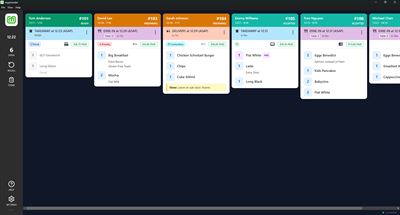
Orders from mypreorder appear instantly. Accept or reject with a single tap, then bump through Accepted → Preparing → Ready → Completed so your team always knows what's next.
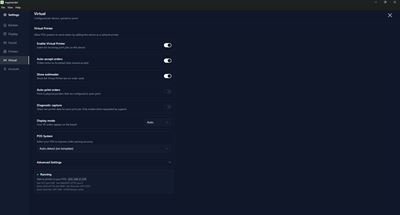
VIRTUAL PRINTER — CONNECT ANY POS WITHOUT AN INTEGRATION
Your tablet acts as a network receipt printer. Any POS system that prints to a Star or Epson printer can send dockets straight to your KDS — no API, no middleware, no developer needed. Just add your tablet's IP as a printer in your POS and go.
• Automatic network discovery (mDNS, Star UDP, Epson ENPC)
• Docket Template Editor — teach the app your POS receipt layout
• Star raster and ESC/POS text decoding
• Auto-accept, auto-print, and pass-through reprinting
• Order de-duplication prevents double-ups
• Display modes: auto, structured, raw, or hybrid
• Configurable protocol detection and timeout settings
• Status indicator with at-a-glance Virtual Printer health monitoring
Works with Lightspeed, Loyverse, Uniwell, and any ESC/POS-compatible point of sale.
CONFIGURABLE BUMP MODES
• Default — tap through each status stage
• Two-tap — select, then complete
• One-tap — instant complete with 5-second undo
Long-press for granular status control regardless of mode.
DOCKET PRINTING
Print kitchen dockets to any ESC/POS thermal receipt printer over Wi-Fi or Bluetooth. Supports Star Micronics, Epson, and generic printers in 58 mm and 80 mm widths.
ORDER TIMERS & PRIORITY COLOURS
Live elapsed or countdown timers on every order card. Headers shift green → orange → red as deadlines approach. Choose Relaxed, Standard, Urgent, or Custom presets with per-order-type overrides.
ALL DAY ITEMS & CONSOLIDATED VIEW
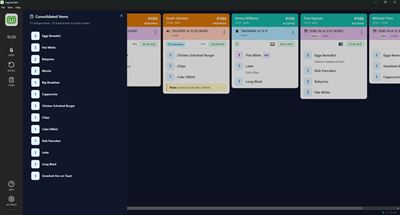
Track item totals across active orders with a persistent bottom bar. Open the Consolidated view to see every unique item aggregated by quantity across your board.
ITEM & MODIFIER STYLING
Colour-code items and highlight modifier keywords — "NO" in red, "ADD" in green, allergens in orange. One-tap presets for common patterns or create custom rules.
REFUND & SEND TO POS
Process full or partial refunds directly from the KDS. Send orders to your POS with one tap. Refund details and POS reference IDs displayed on the order card.
LEAD TIMES & STORE STATUS
Set pickup, delivery, and dine-in lead times on the fly. Toggle your store open or closed — changes sync instantly to mypreorder.
WORKS OFFLINE
Full offline-first architecture. Orders display instantly without internet. PIN login works offline after first use. Changes sync automatically when connectivity returns.
ROLE-BASED ACCESS CONTROL
Staff see a streamlined interface. Void and reject actions require a manager PIN. Settings lock for non-manager users. Full audit trail for every authorised action.
DESIGNED FOR SPEED
• Horizontal scrolling layout for quick scanning
• Tap items to strike them off during prep
• Recall completed or rejected orders instantly
• Keyboard shortcuts for power users
BUILT FOR ALL-DAY USE
• Keep Screen Awake prevents dimming during service
• PIN-based login for fast staff changeovers
• Real-time sync across every KDS device at your location
ADDITIONAL FEATURES
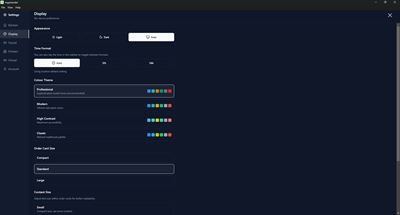
• Light, Dark, or Auto theme with content scaling
• Sound alerts with volume control
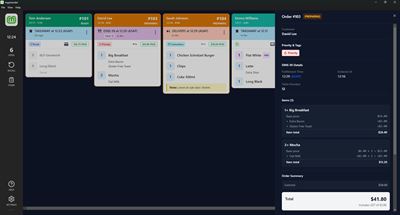
• Payment indicators, customer notes, delivery addresses
• Built-in diagnostics and Virtual Printer capture logging
• Responsive layout from phones to wall-mounted displays
REQUIREMENTS
• Wi-Fi recommended
• mypreorder merchant account
Download KDS by mypreorder and give your kitchen the clarity it needs.
AVALW Coverage
Not yet mentioned in AVALW articles.
Similar apps


 DoorDash: Food, Grocery, MoreDoorDash, Inc.With more than 310,000 menus and 55,000+ grocery, convenience and retail stores across 4,000+ cities in the U.S., Canada, Australia, and New Zealand, DoorDash o★ 4.8 23342k


 iFood comida e mercado em casaiFood Delivery de Comida e MercadoOrder food delivery, market, drinks, pharmacy and pet shop for little money★ 4.5 13493k


 Uber Eats: Food & GroceriesUber Technologies, Inc.Get food delivery to your doorstep from thousands of amazing local and national restaurants. Find the meal you crave and order food from restaurants easily with★ 4.8 10814k


 Blinkit: Groceries & moreBlinkitGet fruits, vegetables, groceries, electronics & more delivered at your doorstep★ 4.7 10211k


 StarbucksStarbucks Coffee CompanyOrdering ahead is just a download away. Get the Starbucks® app for an easier way to enjoy your favorites and discover Rewards in every sip as a member. ORDER SE★ 4.9 8367k


 McDonald'sMcDonald's USAGet the app now for Mobile Order & Pay, MyMcDonald’s Rewards, app exclusive deals, McDelivery, bonus offers and other features to make the most of your visit to★ 4.8 7882k


 CrumblCrumbl, LLCDiscover everything Crumbl all in one place with the Crumbl App! Need a sweet treat? Whether you prefer pickup, delivery, or catering, we’ve got you covered! Do★ 4.9 5684k


 OpenTableOpenTable, Inc.Every great meal starts with OpenTable. Download the app to find the perfect restaurant no matter where life takes you. DISCOVER SOMETHING NEW - Choose from ove★ 4.9 5641k
More by this developer


 The Rusty Bucket CafemypreorderOrder coffee & hot food ahead at The Rusty Bucket Cafe — BP Macksville/Tamworth-


 The Grand CastlemypreorderOrder online for Dine-in, Takeaway and Delivery at The Grand Castle, Wembley-


 Lady HillmypreorderLady Hill Online Ordering-


 MangiAmoremypreorderOrder ahead. Skip the queue. Fresh pasta and artisan pizza, made with amore.-