
Screenshots


About Korean & English Numbers
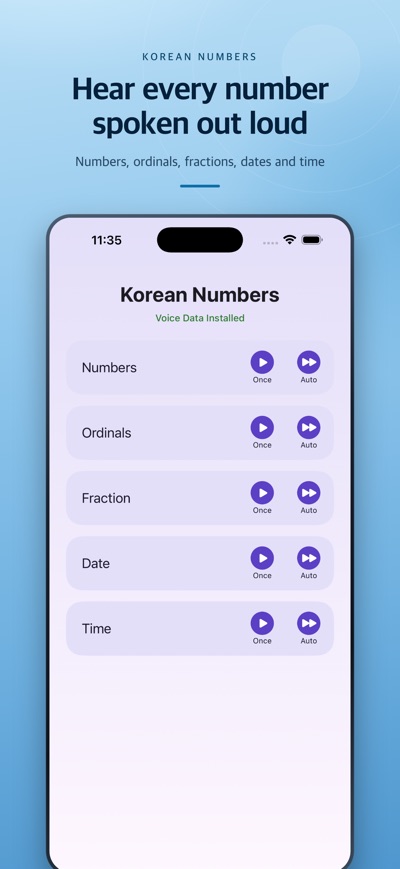
Numbers are the first thing to break down when you listen in another language. This app drills only that — numbers, ordinals, fractions, dates and times, spoken aloud in English and Korean.
FIVE TOPICS, TWO MODES EACH
• Numbers — up to 16 digits, with the reading shown on screen in both Korean (만·억·조) and English (thousand · million · billion · trillion)
• Ordinals — 1st, 2nd, 3rd … and Korean N번째
• Fractions — 3/5 and mixed numbers such as 2 and 3/5
• Dates — 2026-04-05 reads as "the fifth of April twenty twenty six"
• Times — 7:00 as "seven o'clock", 10:30 as "ten thirty" (12-hour)
ONCE — tap and hear
Type a value on the keypad and hit [English] or [Korean] to hear it one time.
On the Numbers screen, [Slowly] splits large values at every thousand: 12,345,000 comes out as "twelve million" then "three hundred forty-five thousand" — the fastest cure for losing track of digits.
AUTO — repeat until your ear catches up
Pick a step (+1 up to +1,000,000,000) and a count (5, 15, 65 or 115), press Play, and the app keeps incrementing and reading aloud. Dates step by day, month or year; times by minute or hour.
Switch on the [Korean] chip and every value is read in Korean first, then English.
VOICE CONTROLS
• Speed — 5 steps
• Pitch — 3 steps
• Gap between repeats — 3 steps
Start slow, work up to native pace.
ALSO
• Uses the voices built into your device, so it works with no internet connection (ads aside)
• No account, no sign-up
• iPhone and iPad, light and dark mode
Note: speech uses iOS system voices. Adding English and Korean voices under Settings > Accessibility > Spoken Content gives more natural pronunciation.
AVALW Coverage
Not yet mentioned in AVALW articles.
Similar apps



 Duolingo - Language LessonsDuolingo Inc.Learn a new language with the world’s most-downloaded education app! Duolingo is the fun, free app for learning 40+ languages through quick, bite-sized lessons.★ 4.7 5492k


 Duolingo: Language LessonsDuolingoLearn a new language, chess & more with the world's most downloaded education app! Duolingo is the fun, free app for learning 40+ languages through quick, bite-★ 4.7 5492k


 Read Along by GoogleGoogle LLCLearn to read with the magic of your voice and a friendly reading buddy★ 4.6 5287k


 Brainly: AI Homework HelperBrainlyQuick Math Helper & Science Solutions | Get Homework Answers for School Doubts★ 4.5 4470k


 Gauth: AI Study CompanionGauthTech Pte. Ltd.Ask anything, get right answer★ 4.8 2111k


 Remind: School CommunicationParentSquareRemind is a communication platform that helps every student succeed. Whether you're in the classroom, at home, or anywhere in between, Remind makes it easy to s★ 4.8 1799k


 Memrise: Fun language lessonsMemriseImprove vocabulary & learn to speak English, Spanish, German, Japanese & more!★ 4.4 1571k


 ClassDojoClassDojoClassDojo connects teachers, tutors, kids, and families★ 4.8 1341k
More by this developer


 Birthday Reminder - AgesCHANG GOO KIMKeep track of the birthdays that matter - including lunar calendar dates that shift every year. AgeMap stores them all in one place and reminds you before they -


 전국 CCTV 지도 - 실시간 교통영상 라이브캠CHANG GOO KIM전국 도로·교통 CCTV를 실시간 영상으로 한눈에! 고속도로부터 도심 교통까지, 전국 CCTV를 지도에서 바로 확인하세요. 주요 기능 * 지도에서 CCTV 찾기 - 네이버 지도 기반으로 내 주변 CCTV 위치를 마커로 표시 - 현재 위치로 즉시 이동, 일반/위성(하이브리드) 지도 전환 -


 Weather Radar Norway – RainCHANG GOO KIMWeather Radar Norway shows you where the rain and snow is right now, using radar and satellite imagery from The Norwegian Meteorological Institute. RADAR MAP Se-


 Weather Radar USA - NOAA LiveCHANG GOO KIMWeather Radar USA is a live radar map and a GOES satellite viewer in one app. Open it and an animated weather radar loop of the last 2 hours is already playing ★ 5.0 1