
Screenshots


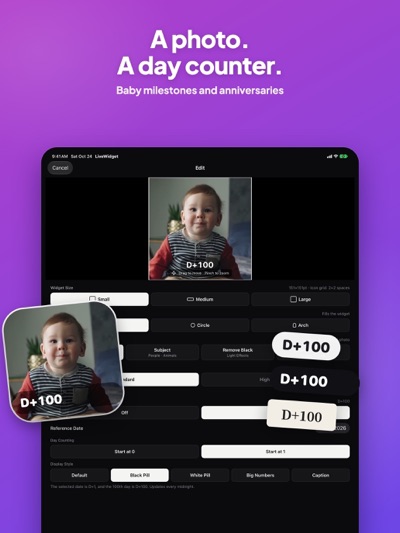
About LiveWidget: Widget Maker
Decorate your Home Screen with the faces and dates you love. LiveWidget turns your own photos into custom widgets, from a baby's smile with a day counter to a pet portrait that sits right on your wallpaper.
Photo processing and background removal happen on your device. No account, no sign-in, no ads.
PHOTO WIDGETS, YOUR WAY
Start with a photo and choose a small, medium, or large widget. Crop and zoom to find the right composition, then fill the widget or try a circle or arch. A photo is all you need.
A BACKGROUND THAT FITS
Keep just a person or pet with subject background removal, or remove a black or green background. Choose a transparent widget theme to match your wallpaper, or try blur, system, light, or dark. Give a favorite face its own spot on your Home Screen.
LITTLE DATES THAT MATTER
Add a D-day counter to a photo of your baby, mark your anniversary, or count the days until a special date. Count from day 0 or day 1 and choose from 5 styles. Show the days alongside the moment they belong to.
PREVIEW BEFORE YOU SAVE
See your widget on a mock Home Screen with your wallpaper before saving. Keep your creations in the library and rename them so they're easy to find. Add a LiveWidget widget to your Home Screen, then use Edit Widget to choose the saved clip and background theme for each one.
A LITTLE MOMENT, TOO
You can also choose up to 9 seconds from a video to show as a looping widget clip of up to 90 frames.
LIVEWIDGET PRO
Widget creation, background removal, and D-day counters work without Pro. Optional Pro adds sharper, high-quality saving at the highest resolution the widget allows, plus the Extra Large widget on iPhone with iOS 27.
Pro is available as a one-time purchase for lifetime use. Payment is charged to your Apple Account.
Terms of Use: https://relecompany.com/en/terms/livewidget
Privacy Policy: https://relecompany.com/en/privacy/livewidget
AVALW Coverage
Not yet mentioned in AVALW articles.
Similar apps


 Phone by GoogleGoogle LLCReliable phone calls with spam protection, caller ID and more helpful features★ 4.4 52440k


 Google Play servicesGoogle LLCGoogle Play services - Google services for Android apps★ 4.3 44573k



 Call of Duty®: Modern Warfare® 4 (Windows)Activision Publishing Inc.War erupts on the Korean Peninsula as North Korea launches a full-scale invasion that threatens to destabilize the world in Call of Duty®: Modern Warfare® 4. A ★ 4.3 16579k


 gov.brServiços e Informações do BrasilGov.br is a means of user access to digital public services.★ 4.6 14047k


 MyTelkomsel – Buy InternetTelkomselBuy credit, internet quota, streaming, game voucher & get cashback with e-wallet★ 3.8 12353k


 myIM3: Data Plan & Buy PackageIndosat Ooredoo HutchisonCheck balance & quota, detect & block spam, exchange IMPoin only on myIM3★ 4.4 11302k


 Files by GoogleGoogle LLCClean up your phone, find files, play media, and share files offline★ 4.5 9097k


 CNH do BrasilServiços e Informações do BrasilDigital driver's license and vehicle registration certificate, first driver's license, traffic violation and vehicle information.★ 4.9 8390k
More by this developer


 AnyWhere: Find DevicesReleCompanyWhere is my device? Where was my family member last seen? AnyWhere keeps your people and devices in one room, with each last reported location and its time on a-


 Orbit SeverReleCompanyTake the controls in Orbit Sever, a landscape real-time mech battle game. Dash through the field, take cover, and charge your weapons before releasing a shot. E-


 AnyBaby: Baby TrackerReleCompanyLog feeds, sleep, diapers and the little moments. For parents with a baby in one arm. Keep the whole family in the loop Share records for up to four babies. Sig-


 AnyUs: Couples App & WidgetReleCompanyNow every time you light up your phone, there's us. Most couple apps give you a number. A number is easy to scroll past. AnyUs puts a little drawing of you and -