
Screenshots
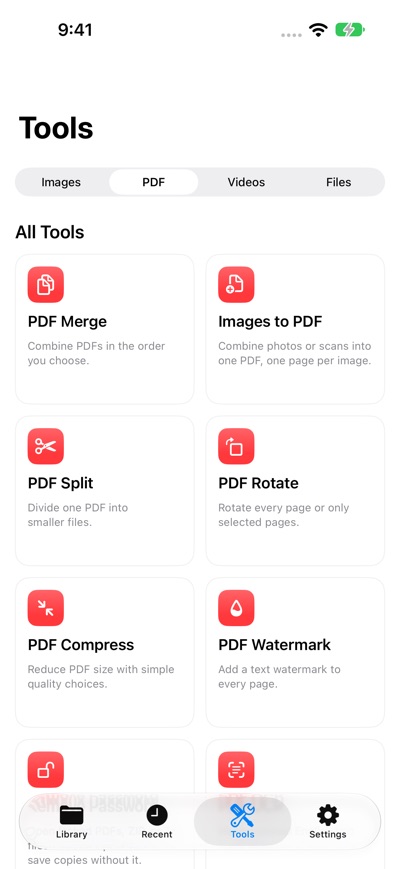

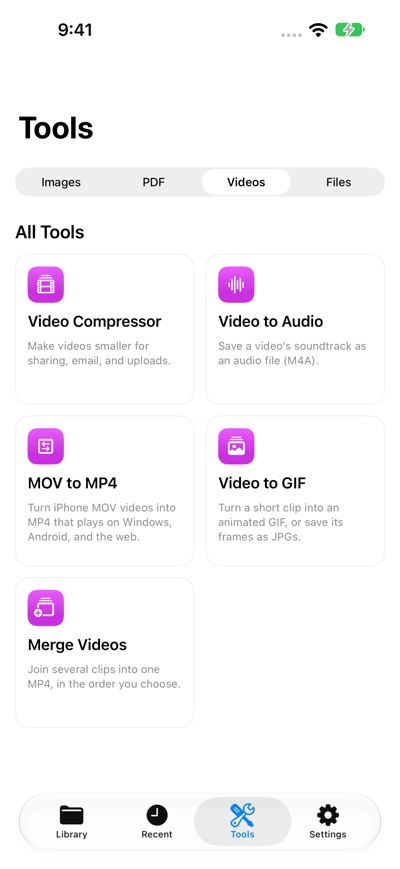


About LokalTools: Photo & PDF Tools
Paperwork often comes with a very specific request. Make a passport photo, lay out an ID card or passport on A4, or add a text watermark to a PDF—right when you need the file.
LokalTools brings practical photo, PDF, video, audio and file utilities together on your iPhone. Prepare documents for printing, sharing or sending, then save the finished files where you need them.
KEEP WORKING WITH YOUR RESULTS
Send a finished result straight into another compatible tool on iPhone or iPad, without saving and importing it again. For example, resize an image, compress it to JPEG, then turn it into a PDF. Choose each next step yourself.
FORMAL PHOTOS & A4 DOCUMENTS
• Create passport photos with country and document presets, then make a print sheet. Check the receiving authority’s current photo rules before use.
• Place an ID card at true size on an A4 page.
• Place a passport at true size on A4, with a portrait or landscape frame.
PDF & IMAGE TOOLS
• Add a text watermark across PDF pages; adjust its size, opacity, color, angle and alignment.
• Merge, split, rotate, compress and OCR PDFs.
• Compress JPEG photos, resize or crop images, convert formats and remove image metadata.
• Scan documents, remove backgrounds, blur faces and create QR codes.
VIDEO, AUDIO & FILES
• Compress videos, convert MOV to MP4, extract audio or make GIFs.
• Rename files in batches and find duplicate files.
Files are processed on your device. Nothing is uploaded for processing. Save to Files, Photos or your LokalTools library, or share the result. All tools are available for free; an optional subscription removes the occasional ad shown after processing.
Terms of Use: https://mlt-solutions.github.io/app-legal-docs/lokaltools/TERMS
Privacy Policy: https://mlt-solutions.github.io/app-legal-docs/lokaltools/PRIVACY
AVALW Coverage
Not yet mentioned in AVALW articles.
Similar apps


 Phone by GoogleGoogle LLCReliable phone calls with spam protection, caller ID and more helpful features★ 4.4 52440k


 Google Play servicesGoogle LLCGoogle Play services - Google services for Android apps★ 4.3 44573k



 Call of Duty®: Modern Warfare® 4 (Windows)Activision Publishing Inc.War erupts on the Korean Peninsula as North Korea launches a full-scale invasion that threatens to destabilize the world in Call of Duty®: Modern Warfare® 4. A ★ 4.3 16579k


 gov.brServiços e Informações do BrasilGov.br is a means of user access to digital public services.★ 4.6 14047k


 MyTelkomsel – Buy InternetTelkomselBuy credit, internet quota, streaming, game voucher & get cashback with e-wallet★ 3.8 12353k


 myIM3: Data Plan & Buy PackageIndosat Ooredoo HutchisonCheck balance & quota, detect & block spam, exchange IMPoin only on myIM3★ 4.4 11302k


 Files by GoogleGoogle LLCClean up your phone, find files, play media, and share files offline★ 4.5 9097k


 CNH do BrasilServiços e Informações do BrasilDigital driver's license and vehicle registration certificate, first driver's license, traffic violation and vehicle information.★ 4.9 8390k
More by this developer


 Kitty GambitKIEN WEI CHOOKitty Gambit is a calm focus timer built around an ambient tabletop scene. Start a work session, choose your companion cats, and let them play chess or checkers-


 ContentCue: Read & ListenKIEN WEI CHOOContentCue is a mobile browser, RSS reader, and podcast player — all in one app. Read, listen, and never lose your place. IMMERSIVE WEB READER Browse any websit-


 GrepTag: Search & Tag BooksKIEN WEI CHOOGrepTag is a keyword-scanning and tagging utility for your local TXT and EPUB files. Point it at your collection, search inside every file, and let it tag your -


 SmartDecrypt PDF ZIPKIEN WEI CHOOSmartDecrypt helps you unlock password-protected PDFs and archives without hunting through notes, messages, or old emails for the right password. Save a pattern-