
Screenshots
About NBT Editor: Edit level.dat, Player Data and World Files
Open the NBT files inside your Minecraft worlds and change any value: world settings and game rules in level.dat, a player's inventory and position, chests and other block entities, mobs, and the records in a Bedrock world's database.
FINDS YOUR WORLDS
- Lists the Java Edition worlds in your .minecraft saves folder and the Bedrock Edition worlds on this PC. Pick a world, then a file.
- Or open a Minecraft .dat, .nbt or .mca file from File Explorer (Open with), or drop it on the window.
EVERY TAG
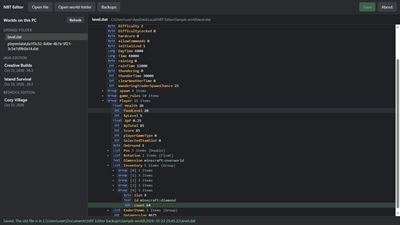
- See the whole tree: every compound, list and value, with its type.
- Change numbers, text and arrays, rename a tag or remove it. A value out of range is refused with a plain message.
JAVA EDITION (1.21 and newer, including the 26.x folder layout)
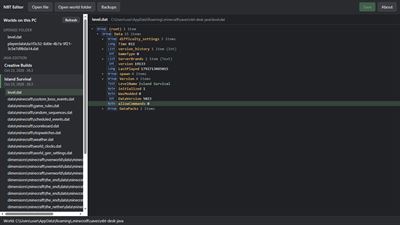
- level.dat: the world's name and settings, game rules, and the single-player player (inventory, position, health).
- Player files, game_rules.dat and the world's other data files.
- Region files (.mca): chests, signs, spawners and other block entities, and mobs (in the entities folder). Zlib and LZ4 chunks.
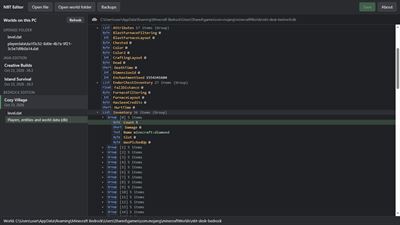
BEDROCK EDITION
- level.dat: game rules and world settings.
- The world's records: players (including this PC's player), entities and world data.
SAFE SAVE
- It won't save while the world is open in Minecraft: close the world, then save again.
- It won't overwrite a newer save by the game: if Minecraft saved the file after you opened it, nothing is written.
- A backup before every save, in Documents\NBT Editor backups (for a Bedrock world, its whole database folder).
- In your worlds, it only writes into files that are already there (the backups go to Documents).
FREE AND PRO
- Free: open, browse and edit everything, and save one change, so you can see it work in your world.
- Pro, a one-time purchase: save as many changes as you like.
Your files stay on your PC. The app's only internet use is the Microsoft Store, to show and sell Pro, and when you rate it.
NOT AN OFFICIAL MINECRAFT PRODUCT. NOT APPROVED BY OR ASSOCIATED WITH MOJANG OR MICROSOFT.
AVALW Coverage
Not yet mentioned in AVALW articles.
Similar apps


 Phone by GoogleGoogle LLCReliable phone calls with spam protection, caller ID and more helpful features★ 4.4 52440k


 Google Play servicesGoogle LLCGoogle Play services - Google services for Android apps★ 4.3 44573k



 Call of Duty®: Modern Warfare® 4 (Windows)Activision Publishing Inc.War erupts on the Korean Peninsula as North Korea launches a full-scale invasion that threatens to destabilize the world in Call of Duty®: Modern Warfare® 4. A ★ 4.3 16579k


 gov.brServiços e Informações do BrasilGov.br is a means of user access to digital public services.★ 4.6 14047k


 MyTelkomsel – Buy InternetTelkomselBuy credit, internet quota, streaming, game voucher & get cashback with e-wallet★ 3.8 12353k


 myIM3: Data Plan & Buy PackageIndosat Ooredoo HutchisonCheck balance & quota, detect & block spam, exchange IMPoin only on myIM3★ 4.4 11302k


 Files by GoogleGoogle LLCClean up your phone, find files, play media, and share files offline★ 4.5 9097k


 CNH do BrasilServiços e Informações do BrasilDigital driver's license and vehicle registration certificate, first driver's license, traffic violation and vehicle information.★ 4.9 8390k
More by this developer
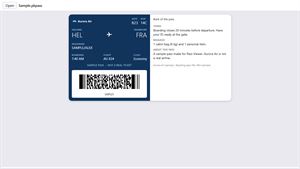
 PKPASS Viewer by NorthgableNorthgableGot a ticket or a boarding pass as a .pkpass file, and no phone that opens it? Open it on Windows. FREE - Opens .pkpass files and .pkpasses bundles: double-clic★ 5.0 6
 3D Viewer by NorthgableNorthgableOpen STL files and other 3D files (OBJ, 3MF, GLB, STEP, USDZ and more) and see them: most open in about two seconds. 3D Viewer shows the models you print, downl★ 4.8 8