Screenshots
About NotchPixel - Notch for Windows
A Dynamic Island-style notch for Windows 11 and 10.
Try it free for 7 days.
$9.99 once. No subscription, no account.
That is the US price; the Store shows the price for your country.
WHY NOT A FREE NOTCH APP?
If you only want the look, the free ones are good. NotchPixel adds an FPS/CPU/GPU/RAM strip and reminders over fullscreen games, one mute key for every app plus a call timer, files to your phone on the same Wi-Fi with no app or account, a Twitch/YouTube chat drawer and an OBS REC pill. It uses about 13 MB in Task Manager and 0% CPU at idle, runs on Windows 10 version 2004 and later and on Windows 11, and comes in 21 languages.
AT THE TOP OF YOUR SCREEN
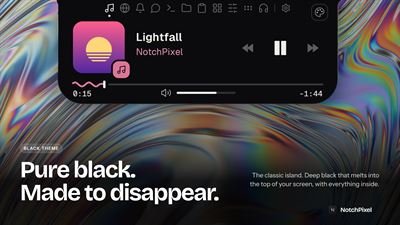
NotchPixel puts a notch at the top centre of your screen. Rest the pointer on it and it opens a card; move away and it is gone. It never takes your clicks.
YOUR PHONE AS A CONTROLLER
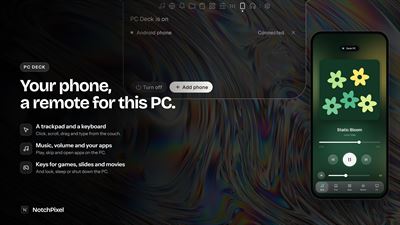
PC Deck turns your phone into a controller for this PC. Turn it on in the island's new Deck tab and scan the code for a trackpad, music controls, your apps, and modes for games, slides and movies. It stays off until you turn it on, and you allow each phone yourself. On iPhone, add it to your Home Screen for full screen. Your phone and PC need the same Wi-Fi, with the network set to Private in Windows. The phone's browser shows a certificate warning the first time, and you choose to continue.
A TASKBAR, IF YOU WANT ONE
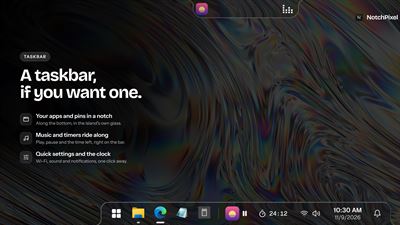
NotchPixel taskbar (Settings > Taskbar): a notch along the bottom of your screen in place of Windows' taskbar, with Start, your pinned and open apps, the song and timer, tray icons, quick settings and the clock. It follows the apps you pin in Windows and steps aside for games.
FILES TO YOUR PHONE
Drop a file on the notch and it waits on the shelf while you find the right folder, then drag it out into any app. To send it to your phone, scan the QR code with the phone's camera: the file opens in the phone's browser, with no app and no account on the phone. Both devices need to be on the same Wi-Fi, with the network set to Private in Windows. It works the other way too: send photos, files and text from the phone to the PC.
IN GAMES
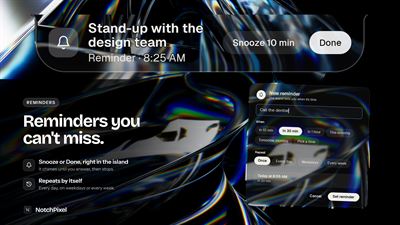
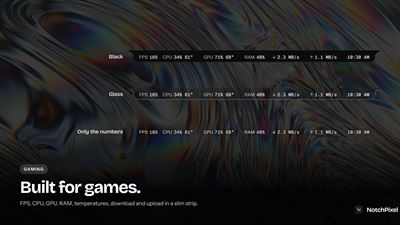
In a fullscreen game the notch steps aside, or becomes a slim strip with your frame rate, CPU, GPU and RAM. Reminders you set still appear over the game, and the chat drawer and a small browser drawer can stay open beside it. Set the game to borderless or windowed fullscreen: in exclusive fullscreen nothing can draw over a game. The FPS number comes from Windows' own frame events, nothing is injected into the game, and it needs a one-time Windows permission.
ON CALLS
Ctrl+Alt+M mutes your microphone in every app at once, because it mutes the microphone in Windows itself. While any app is using the mic, a call timer shows on the notch. The Calls tab has the mute switch, your speaker and microphone, and a camera mirror for a quick look before you join.
MUSIC AND THE WINDOWS POP-UPS
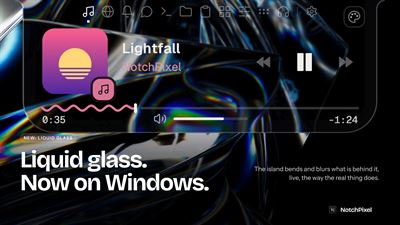
See what is playing in any app or browser, with the artwork, and play, pause, skip or scrub without hunting for the window. Volume, brightness, battery and headphone pop-ups appear at the top centre instead of the Windows flyouts.
LYRICS
Turn on lyrics and a button in the music card opens a drawer for the song: its cover, blurred, behind the words, its colours on the line being sung, and the lines scrolling along with the music. Click a line to jump there. To find them, the song's title, artist, album and length go to LRCLIB, a free community lyrics library, once per song. Off, nothing about your music leaves your PC. Lyrics come up for songs from music apps and sites: Spotify, YouTube Music, SoundCloud, Apple Music, Amazon Music and more. Music videos are left out, since their intros and edits would put the lines out of time.
CLIPBOARD AND NOTIFICATIONS
It keeps the text you copy, even after a restart, encrypted for your Windows account. Pin a line to keep it for good. Copies from password managers are skipped. Your notifications are mirrored on the notch and kept in one list, and they never leave your PC.
FOR STREAMERS AND CREATORS
Twitch and YouTube chat in its own drawer. A REC or LIVE pill from OBS Studio with the elapsed time and the scene, and keys to start and stop. Choose the folder your video editor renders to, and a pill shows the export's size, speed and time, then tells you when it is done. Ctrl+Alt+C reads the colour under the pointer and copies its hex code.
FOR YOUR SCRIPTS
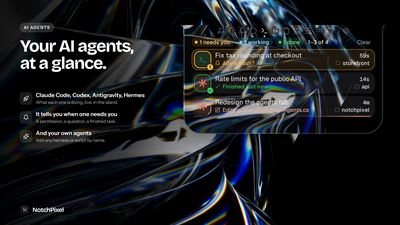
Any program on your PC can put a line on the notch or a live tile in the card, through a local address that only this PC can reach, or from the command line. A finished build, a failed test or a coding agent that is done shows up at the top of your screen.
EVERYTHING ELSE
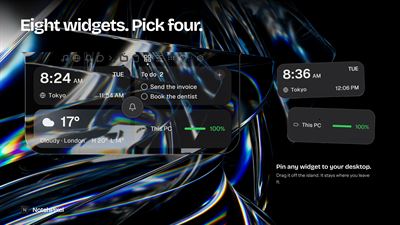
Brightness and volume sliders, and switches for Wi-Fi, Bluetooth, night light, focus assist, mute and power mode. Screenshots, snips and screen recording, with your voice if you want it. Six slots for your favourite apps, each with an optional shortcut that works even from a fullscreen game. The date, your next events, the weather and a focus timer. A dot on the notch while the microphone, camera or screen capture is live.
MAKE IT YOURS
A notch that hangs from the top edge, or an island that floats just below it, in any size and corner roundness, with themes and a rule for each app. Or keep it hidden until you rest the pointer on the top edge, with an open delay you choose. Every action has a keyboard shortcut you can change.
LIGHT AND PRIVATE
The figure above was measured over 120 seconds on a laptop with an Intel Core i5-11400H running Windows 10 22H2. The script is on notchpixel.com/footprint, so you can check it on your own PC. No account, no telemetry, no ads.
Requires Windows 10 version 2004 or later, or Windows 11, on an x64 PC.
PERMISSIONS
Microphone: the call timer and the mute key, and your voice in screen recordings if you leave that on. Webcam: the mirror, only when you open it. Location: the weather, only if you choose Use my location. Windows asks first. The Store also lists "Uses all system resources" because NotchPixel is a classic desktop app. Notifications: read only after you allow access in Windows, and they never leave your PC.
Made by one developer: notchpixel.com · info@notchpixel.com
NotchPixel is not affiliated with Apple Inc. Dynamic Island is a trademark of Apple Inc.
AVALW Coverage
Not yet mentioned in AVALW articles.
Similar apps


 Phone by GoogleGoogle LLCReliable phone calls with spam protection, caller ID and more helpful features★ 4.4 52440k


 Google Play servicesGoogle LLCGoogle Play services - Google services for Android apps★ 4.3 44573k



 Call of Duty®: Modern Warfare® 4 (Windows)Activision Publishing Inc.War erupts on the Korean Peninsula as North Korea launches a full-scale invasion that threatens to destabilize the world in Call of Duty®: Modern Warfare® 4. A ★ 4.3 16579k


 gov.brServiços e Informações do BrasilGov.br is a means of user access to digital public services.★ 4.6 14047k


 MyTelkomsel – Buy InternetTelkomselBuy credit, internet quota, streaming, game voucher & get cashback with e-wallet★ 3.8 12353k


 myIM3: Data Plan & Buy PackageIndosat Ooredoo HutchisonCheck balance & quota, detect & block spam, exchange IMPoin only on myIM3★ 4.4 11302k


 Files by GoogleGoogle LLCClean up your phone, find files, play media, and share files offline★ 4.5 9097k


 CNH do BrasilServiços e Informações do BrasilDigital driver's license and vehicle registration certificate, first driver's license, traffic violation and vehicle information.★ 4.9 8390k