
Screenshots


About Now Showing – Movie Poster TV
Live Movie Poster display for Home Theaters. Turn any TV into a stunning cinema marquee with animated Live Posters, trailers, and automatic artwork from your media player. Ideal for a Mac connected to a wall-mounted Samsung Frame TV, an Apple TV, or a wall-mounted iPad. Remotely control the display from your iPhone. Portrait mounting is recommended — Now Showing automatically rotates into portrait mode even when not supported by your devices. All platforms included with any purchase.
Direct network integration is provided for 6 media players: Apple TV, Kaleidescape, Panasonic UHD players, Kodi, Zidoo, and Oppo UHD players, plus your Plex Media Server. No control system needed. Features vary by player including automatic artwork display based on playing content, and playback progress.
Alternatively, if Roomie Remote X (separate app and subscription) is also deployed, deep room-aware integration is activated for over 20 supported media players.
Take your Home Theater to the next level with Now Showing!
FEATURES
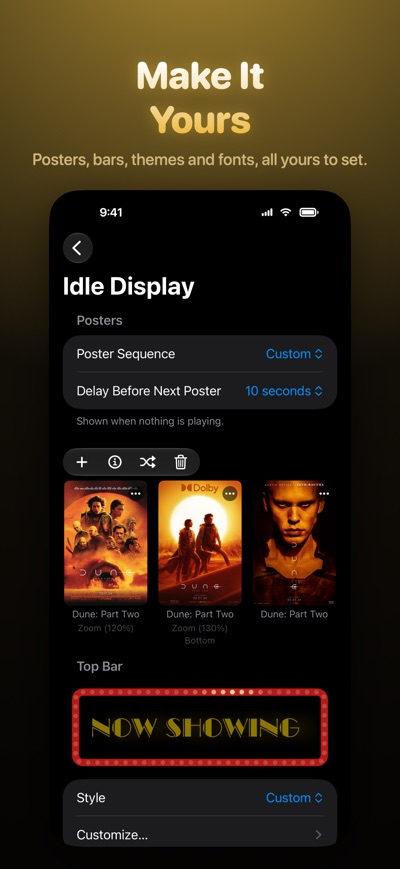
• Live Posters. Movie posters come alive with subtle, cinematic animation — the signature Now Showing experience.
• Curated Poster Collections. Idle cycling draws from hand-picked collections for consistently high-quality, family-appropriate artwork.
• Kaleidescape & Plex Library Cycling. Cycle the high-resolution covers of your own movie library.
• 4-Up Poster Wall. Optional layout shows four covers at once, refreshing on a stagger for a classic poster-wall feel.
• Multi-Display Poster Sync. Coordinated cycling across all displays with staggered offsets so each screen shows different content.
• Poster Anchor. 5 anchor points and 3 scale modes give 15 layout combinations, as a global default or per poster.
• Bar Displays. Fill an ultra-wide marquee panel — 1920×360, 1920×540, or a native 32:9 monitor — with banner artwork between thin rails, a side panel for title, year, rating, and overview, and an optional Poster Strip.
• Automatic Artwork. Players like Kaleidescape and Apple TV display the poster for whatever is playing.
• Playback Progress & Cast. Live progress, top or bottom, and a Cast bar with headshots of the top-billed cast.
• Scenes Library. Save configurations to an iCloud-synced library and switch between them from a document-style title menu.
• Timers. Countdown timers appear as a glass pill over a dimmed poster, with custom durations or absolute start times, and can fire commands to your media device when they start and complete.
• Playlists. Schedule Scenes and Timers to run automatically with Default, One-Time, Recurring, and On-Demand triggers.
• Send to Network Displays. Push Timers and Playlists to any other Now Showing display on your network.
• Remote Configuration. Deploy configurations to any Now Showing display on your network from any iPhone, iPad, or Mac.
• Full 4K images and trailers in any QuickTime-compatible format (2:3 poster ratio recommended).
• Themes & Fonts. One-tap looks that set fonts, colors, and frames; 16 fonts including our own Marquee Deco.
• Target Display-Relative Sizing. Zoom and bar sizing scale to your Target Display for accurate previews.
• Multiple simultaneous displays on macOS; iPadOS and tvOS drive one.
• Roomie Remote X integration (optional separate app) enhances the experience with room-aware auto-switching across your control system.
SUBSCRIPTION REQUIRED
This app requires an active subscription. First year of the Annual subscription is 38% off. Choose Weekly (for occasional movie events) or Annual. Each provides identical functionality including Unlimited Screens and Posters. Subscriptions are shared via Apple Family Sharing. A Perpetual non-subscription license option is also available. Purchases made on any Apple platform automatically apply to all others.
Roomie Remote established in 2010 as a provider of home automation apps. We bring many decades of experience with Apple's platforms, and our apps never collect any of your data.
AVALW Coverage
Not yet mentioned in AVALW articles.
Similar apps


 Zedge™ Wallpapers & RingtonesZedgeDiscover millions of background wallpapers & ringtones or make your own with AI.★ 4.7 17993k


 Zillow Real Estate & RentalsZillow.comFind your new home to buy or rent with expert real estate tools and millions of listings right at your fingertips. Seamlessly save, search, and share home listi★ 4.8 7238k


 Android AutoGoogle LLCControl maps, media and messaging, with Gemini while you drive★ 4.1 6304k


 Amazon AlexaAMZN Mobile LLCUse the Amazon Alexa app to manage Alexa-enabled devices, control music playback, view shopping lists on the go, keep track of upcoming reminders, check on acti★ 4.5 5906k


 PinterestPinterest, Inc.Pinterest is a place of endless possibilities. You can: - Discover everyday inspiration - Shop styles you love - Try and learn something new Create boards, save★ 4.8 5789k


 Parallel Space - app cloningLBE TechRun multiple accounts of the same app on a single device★ 4.1 5115k


 Microsoft SwiftKey AI KeyboardSwiftKeyAI-powered Copilot. Personalized keyboard with gifs, stickers & themes★ 4.3 4602k



 World of Tanks Blitz – Daylight AssaultWargaming Group LimitedCharge into battle with the explosive energy of daylight! This bright World of Tanks Blitz theme brings 5 high-resolution wallpapers packed with sun-scorched de★ 4.1 4525k
More by this developer


 FilmVault Movie CollectorRoomie Remote, IncFilmVault is the fastest way to catalog your movie and TV collection across physical discs and digital purchases. Native for iPhone and iPad. ORGANIZE YOUR ENTI★ 4.3 4


 Roomie Universal Remote XRoomie Remote, IncTake control of your home with Roomie Remote X, the next generation of the leading app turning your iPhone, iPad, or Mac into a powerful Universal Remote, with ★ 4.3 98