
Screenshots
About Pane Studio
Pane Studio – Auto Zoom Screen Recorder.
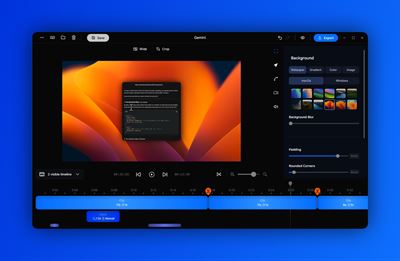
Pane Studio is an auto zoom screen recorder and video editor for Windows. Record screen, webcam, mic, and system audio; add mouse-click zoom, cursor tracking, smooth panning, and motion blur; then export MP4 in hardware-accelerated 4K 60 FPS.
KEY FEATURES
• Automatic zoom on mouse clicks keeps buttons, menus, and fields easy to follow.
• Cursor-following zoom and automatic mouse tracking keep attention on the action.
• Smooth panning and smooth cursor movement turn raw recordings into polished videos.
• Add motion blur and radial blur for cinematic zooms, cursor movement, and transitions.
• Record screen, webcam, microphone, and system audio simultaneously.
• Capture a full display, app window, selected area, or chosen monitor.
• Edit with built-in cut, trim, split, crop, reframe, speed, zoom, and segment controls.
• Use exact X, Y, width, and height crop values, custom ratios, or standard presets.
• Resize or restyle the cursor, force pointer style, hide it when idle, control visibility, loop its position, and add click sounds.
• Arrange screen and webcam with flexible layouts, sizing, shapes, framing, shadows, and zoom behavior.
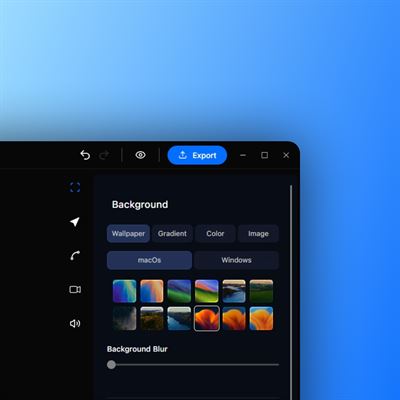
• Add solid colors, wallpapers, gradients, uploaded images, blur, padding, rounded corners, and drop shadows.
• Control mic and system audio separately, mute either source, adjust clip volume, remove noise, and enhance voice clarity.
• Generate private on-device transcripts with model, language, detection, notes, captions, and editable text controls.
• Add shortcut overlays, blur or focus masks, visual highlights, and single-frame exports.
• Export landscape, portrait, vertical, or square videos in MP4 at up to 4K 60 FPS.
eeCREATE SCREEN RECORDINGS THAT GUIDE THE VIEWER
Pane Studio is a Windows-native auto zoom screen recorder and full built-in video editor for product demos, Saas demo, tutorials, training, courses, presentations, support replies, bug reports, and social clips.
Capture your screen, webcam, microphone, and system audio together. Then turn the recording into a clear, professional video with automatic zoom on mouse clicks, cursor-following movement, smooth panning, cinematic effects, flexible layouts, audio cleanup, transcripts, and precise editing.
No manual keyframing or separate editor.
WHY CHOOSE PANE STUDIO?
AUTO-ZOOM THAT FOLLOWS THE ACTION
Pane Studio automatically zooms into important clicks so viewers can clearly see the button, field, menu, or interface element you are explaining.
Cursor-following zoom and automatic mouse tracking keep the focal area aligned with your pointer. Smooth viewport panning prevents abrupt jumps as you move across the screen.
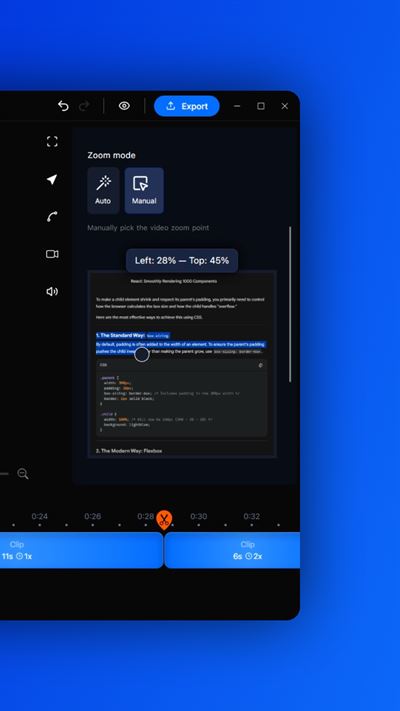
You can also add manual zooms, change timing, adjust focal points, and refine automatically created zoom effects after recording.
CINEMATIC MOTION
Create polished screen recordings with smooth zoom transitions, adjustable motion blur, radial blur, natural easing, and cursor smoothing.
Use motion presets or fine-tune cursor behavior with friction, tension, and mass controls. Fast mouse movement becomes easier to follow.
COMPLETE CURSOR CONTROL
Pane Studio captures the cursor separately, so you can adjust it after recording.
Change cursor size and style, force pointer appearance, control visibility by segment, hide it automatically when idle, loop it back to its starting position, add click sounds with volume control, and apply blur where needed.
RECORD EVERY INPUT TOGETHER
Capture a full screen, app window, selected region, or individual monitor, including multi-monitor workflows.
Record webcam video beside the screen while capturing microphone narration and system sound from apps, browsers, meetings, and videos.
Use the built-in teleprompter for scripted tutorials, launch videos, presentations, and talking-head explanations.
FULL WINDOWS VIDEO EDITOR
Cut mistakes, trim pauses, split clips, change playback speed, refine timing, and edit individual segments without leaving Pane Studio.
Crop and reframe with a visual editor, custom aspect ratios, standard presets, or exact X, Y, width, and height values.
Crop changes remain connected to zoom targets, cursor rendering, masks, layouts, templates, camera framing, and final output.
Add blur or focus masks to hide sensitive information or direct attention. Display automatic keyboard-shortcut overlays in technical tutorials and software walkthroughs. Export single frames for guides, tickets, and documentation.
PROFESSIONAL VISUAL STYLING
Style recordings with solid colors, built-in wallpapers, custom gradients, uploaded images, custom background blur, adjustable padding, rounded corners, drop shadows, brand colors, templates, and reusable layouts.
Control webcam size, position, shape, crop, framing, corner radius, shadow, and zoom behavior. Create picture-in-picture, side-by-side, presenter-focused, or screen-first layouts, and change them by segment.
CLEAN AUDIO AND PRIVATE TRANSCRIPTS
Keep microphone and system audio on separate controls. Mute either source, balance levels, and adjust volume per clip.
Use local background-noise removal and voice enhancement to improve tutorials, courses, support replies, and presentations.
Generate private on-device transcripts with selectable AI models, manual language choice, automatic language detection, transcript notes, and editable captions, subtitles, or text overlays. Processing stays local and privacy-first.
FAST, HIGH-QUALITY EXPORT
Export with hardware-accelerated Windows performance in MP4 up to 4K and 60 FPS.
Supports hardware acceleration on amd and intel's igpus and discrete gpus as well as nvidia gpus.
Create landscape, widescreen, portrait, vertical, square, or custom formats using presets such as 16:9, 9:16, 1:1, 4:3, 3:4, 4:5 and Auto.
Use export presets for landing pages, YouTube, YouTube Shorts, Product Hunt, TikTok, Instagram, courses, presentations, and documentation.
BUILT FOR YOUR WORKFLOW
SAAS FOUNDERS AND BUILDERS
Create product launch videos, feature updates, onboarding clips, landing-page demos, and interactive walkthroughs. Combine mouse-click zoom, smooth cursor motion, motion blur, shortcut overlays, branded gradients, camera layouts, and 4K output.
PRODUCT MANAGERS AND SUPPORT TEAMS
Record bug reports, QA reproductions, customer support video replies, product updates, onboarding guides, and step-by-step demos. Use cursor effects, click sounds, masks, transcripts, highlights, and single-frame exports for tickets and help articles.
PROFESSIONALS AND EDUCATORS
Produce tutorials, employee training, online courses, software lessons, and professional presentations. Record slides, apps, webcam, voice, and computer sound together, then use the teleprompter, audio enhancement, transcripts, captions, and flexible formats.
STUDENTS AND RESEARCHERS
Capture lectures, presentations, demonstrations, research workflows, coding assignments, and project walkthroughs. Record only the relevant screen area, add webcam commentary and narration, then prepare videos for submissions, portfolios, or group presentations. (With Student Discount)
DEVELOPERS AND TECHNICAL TEAMS
Create API demos, coding tutorials, pull-request explanations, deployment walkthroughs, and technical bug reports. Show shortcuts, zoom into small UI elements, mask confidential data, and export sharp videos where code and text remain readable.
COMPLETE FEATURE SUMMARY
RECORDING
• Windows 10 and Windows 11 support
• Full-screen, window, selected-area, and individual-monitor capture
• Multi-monitor selection
• Simultaneous screen, webcam, microphone, and system-audio recording
• Webcam-only and screen-plus-camera workflows
• Built-in teleprompter
• Fast local, hardware-accelerated capture
• Local recording and editing
• No account required to begin recording
EDITING
• Built-in Windows video editor
• Cut, split, trim, and per-clip speed controls
• Segment-level editing
• Crop and reframe tools
• Exact X, Y, width, and height values
• Custom ratios and standard presets
• Crop-aware zoom, cursor, masks, layouts, templates, camera, and output
• Automatic and manual zoom editing
• Blur and focus masks
• Visual highlights
• Keyboard-shortcut overlays
• Export presets
• Single-frame export
• Transcript generation
ZOOM AND CURSOR
• Autozoom on important clicks
• Mouse click zoom
• Cursor-following focal movement
• Automatic mouse tracking
• Smooth panning
• Manual zoom placement
• Adjustable zoom timing and framing
• Cursor smoothing and motion presets
• Friction, tension, and mass controls
• Adjustable cursor size and styles
• Force-pointer option
• Per-segment visibility
• Hide idle cursor
• Cursor-position looping
• Click sounds with volume control
• Motion blur and radial-blur transitions
CAMERA AND LAYOUTS
• Adjustable webcam position, size, shape, crop, framing, radius, shadow, and zoom
• Picture-in-picture and side-by-side layouts
• Screen-first and presenter-focused compositions
• Segment-level layout changes
BACKGROUNDS AND DESIGN
• Solid colors and wallpapers
• Custom gradients and uploaded images
• Background blur
• Adjustable padding and spacing
• Rounded corners and drop shadows
• Brand colors, templates, and reusable compositions
AUDIO AND TRANSCRIPTS
• Separate microphone and system-audio controls
• Independent muting and per-clip volume
• Local noise removal and voice enhancement
• Privacy-first on-device transcription
• Selectable transcript models
• Manual language choice and automatic detection
• Transcript notes
• Editable captions, subtitles, and text overlays
FORMATS AND EXPORT
• Hardware-accelerated export
• Up to 4K and 60 FPS
• Landscape, widescreen, vertical, portrait, and square output
• 16:9, 9:16, 1:1, 4:3, 3:4, 4:5, and custom ratios
• Export presets for different platforms and workflows
Pane Studio gives Windows users one focused workflow for professional screen videos.
AVALW Coverage
Not yet mentioned in AVALW articles.
Similar apps


 Phone by GoogleGoogle LLCReliable phone calls with spam protection, caller ID and more helpful features★ 4.4 52440k


 Google Play servicesGoogle LLCGoogle Play services - Google services for Android apps★ 4.3 44573k



 Call of Duty®: Modern Warfare® 4 (Windows)Activision Publishing Inc.War erupts on the Korean Peninsula as North Korea launches a full-scale invasion that threatens to destabilize the world in Call of Duty®: Modern Warfare® 4. A ★ 4.3 16579k


 gov.brServiços e Informações do BrasilGov.br is a means of user access to digital public services.★ 4.6 14047k


 MyTelkomsel – Buy InternetTelkomselBuy credit, internet quota, streaming, game voucher & get cashback with e-wallet★ 3.8 12353k


 myIM3: Data Plan & Buy PackageIndosat Ooredoo HutchisonCheck balance & quota, detect & block spam, exchange IMPoin only on myIM3★ 4.4 11302k


 Files by GoogleGoogle LLCClean up your phone, find files, play media, and share files offline★ 4.5 9097k


 CNH do BrasilServiços e Informações do BrasilDigital driver's license and vehicle registration certificate, first driver's license, traffic violation and vehicle information.★ 4.9 8390k