
Screenshots




About PoseSnap: Pose Guide Camera
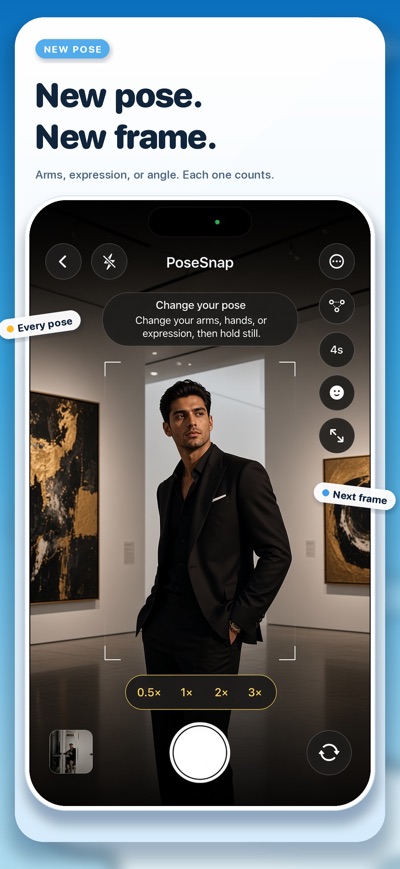
Take your own photos without running back to the shutter. Set your iPhone down, step into the frame, strike a pose and hold still. PoseSnap sees you and takes the photo on its own — no timer to race, no remote, no tapping.
HOW IT WORKS
• Frame the shot, then walk in
• Strike a pose and freeze for a moment — the photo is taken automatically
• Change your arms, hands or expression and hold still again for the next shot
• Keep going until the whole set is done
POSE GUIDES
Not sure how to stand? Pick a pose — Classic Portrait, Confident Stand, Casual, Crossed Arms, Side Angle or Face Touch Selfie. A see-through outline and a reference photo show you where to stand, and the guide turns green when your pose matches.
PHOTO AND VIDEO
Switch to video and raise your hand to start or stop recording, even from across the room.
CAMERA TOOLS
• Front or back camera, 0.5× to 5× zoom on supported iPhones
• 3, 5 or 10 second timer and 3-shot burst
• Grid, horizon level and live framing tips
• Flash and mirrored front camera
• Optional smile detection and auto zoom
YOUR GALLERY
Every shot is saved to Photos. Review the set, pick favorites and compare two poses side by side or with a slider.
FREE AND PRO
20 automatic photos each week are free, and the shutter always works. PoseSnap Pro unlocks unlimited automatic capture, smile detection and auto zoom. Pro is a monthly or yearly auto-renewing subscription; cancel anytime in Settings.
Pose detection runs on your iPhone. Available in 40 languages.
Terms of Use (EULA): https://www.apple.com/legal/internet-services/itunes/dev/stdeula/
Privacy Policy: https://techas.co/privacy
AVALW Coverage
Not yet mentioned in AVALW articles.
Similar apps


 YouTubeGoogleGet the official YouTube app on iPhones and iPads. See what the world is watching -- from the hottest music videos to what’s popular in gaming, fashion, beauty,★ 4.7 49315k


 InstagramInstagram, Inc.Little moments lead to big friendships. Share yours on Instagram. — From Meta Connect with friends, find other fans, and see what people around you are up to an★ 4.7 29567k



 Affinity by CanvaCanvaONE APP TO CRAFT IT ALL, FOR NO COST AT ALL. Design. Edit. Lay it out. Affinity gives you vector, pixel, and layout tools, all in the same professional-grade ap★ 4.8 27291k


 Video Editor & Maker - InShotInShot Video EditorAI video editor with music! Edit video with effects, slideshow & slow motion★ 4.8 24760k


 MX PlayerAmazon Mobile LLCPowerful video player with advanced hardware acceleration and subtitle supports★ 4.2 14336k


 VivaVideo - Video Cut & EditorQuVideo Inc. Video Editor & Video Maker AppAI Video Editor: AI Templates, Text to Video, Extract Audio, Auto Caption.★ 4.3 12268k


 YouCut - Video Editor & MakerInShot Video EditorAI Video Editor with Music, Filter, Slideshow, Effect, Merge & Trim Video.★ 4.8 8635k


 Screen Recorder - XRecorderInShot Inc.Record games with audio. Smooth, HD screen capture & Built-in video editor.★ 4.7 7662k
More by this developer


 Leaf AI: Daily Calorie TrackerMESUT ASSnap your plate and see the calories. Leaf AI reads a photo, a short note, or a barcode, then estimates the portion and the macros. TRACK THE DAY IN ONE LOOK • -


 SeedMoney: Financial EcosystemMESUT ASStart your financial journey with a single seed. SeedMoney helps you track income and expenses, manage multiple accounts, and understand your spending — all in -


 SyncScale: Smart Body ScaleMESUT ASTurn your Bluetooth body composition scale into a complete health tracker. Step on, and SyncScale reads your weight live, locks the result and saves it automati-


 Mise: AI Recipe GeneratorMESUT ASOpen the fridge, take a photo, and Mise turns what you have into a recipe you can cook tonight. No more scrolling for ideas. Tell AI Chef what's at home, or jus-