
Screenshots

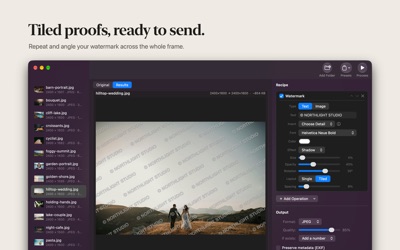


About PrepBatch: Watermark Photos
Watermark hundreds of photos at once, privately on your Mac.
PrepBatch puts your name, logo or copyright on every photo in a batch, sized and placed consistently whether the shot is portrait or landscape. Build the recipe once, preview it live, then run it across your whole library. Resize, crop, convert, compress and rename in the same pass.
Everything happens on your Mac. No accounts, no uploads, no tracking.
WATERMARK
• Text or your own logo, with your installed fonts, any color and opacity
• Single mark in any corner, or drag it exactly where you want on the preview
• Tiled pattern across the whole image, ideal for proofs and client galleries
• Rotate any mark, from subtle to a bold diagonal
• Shadow or outline so your mark reads on bright skies and dark shadows alike
• Smart details filled in per photo: {year}, {date} taken, {name}, {counter}, {artist}, {copyright}, {camera}, {lens} and {exposure}
• Your copyright written into each file's info (EXIF and IPTC), even when other metadata is removed
• Sized from the photo's shorter side, so it looks the same on every orientation
• Save it as a preset and watermark future batches in one click
BUILD A RECIPE, RUN IT ON EVERYTHING
Stack operations in any order, watch a live before/after preview with an estimated output size, then export your whole batch in parallel.
EDIT
• Resize: fit, exact, max width/height or percentage
• Crop: aspect presets, anchors, and content-aware Smart Crop
• Rotate & flip, plus Smart Rotate that auto-straightens photos and scans
• Color: brightness, contrast, saturation, grayscale
• Border & frame
CONVERT & COMPRESS
• Export to JPEG, PNG, HEIC, TIFF, WebP and AVIF
• Quality control with an estimated output size before you commit
• Preserve or strip EXIF metadata, and remove GPS location with one tap
PRIVACY TOOLS
• Redact: automatically blur, pixelate, black out or emoji-cover faces
• Hide sensitive text like emails, phone numbers and addresses
• Cover barcodes and QR codes
• Remove Background to a transparent PNG
RENAME & ORGANIZE
• Rename with patterns: {name}, {counter}, {date}, {width}, {height}
• Preserve your source folder structure or export everything as a ZIP
• Handle name clashes: add a number, skip, or overwrite
AUTOMATE
• A "Process Images" action for Shortcuts
• Services menu and Finder Quick Action integration
FAST & NATIVE
Built with Apple frameworks and Metal. Multi-core, memory-friendly, and comfortable with 10,000+ files.
AVALW Coverage
Not yet mentioned in AVALW articles.
Similar apps


 YouTubeGoogleGet the official YouTube app on iPhones and iPads. See what the world is watching -- from the hottest music videos to what’s popular in gaming, fashion, beauty,★ 4.7 49315k


 InstagramInstagram, Inc.Little moments lead to big friendships. Share yours on Instagram. — From Meta Connect with friends, find other fans, and see what people around you are up to an★ 4.7 29567k



 Affinity by CanvaCanvaONE APP TO CRAFT IT ALL, FOR NO COST AT ALL. Design. Edit. Lay it out. Affinity gives you vector, pixel, and layout tools, all in the same professional-grade ap★ 4.8 27291k


 Video Editor & Maker - InShotInShot Video EditorAI video editor with music! Edit video with effects, slideshow & slow motion★ 4.8 24760k


 MX PlayerAmazon Mobile LLCPowerful video player with advanced hardware acceleration and subtitle supports★ 4.2 14336k


 VivaVideo - Video Cut & EditorQuVideo Inc. Video Editor & Video Maker AppAI Video Editor: AI Templates, Text to Video, Extract Audio, Auto Caption.★ 4.3 12268k


 YouCut - Video Editor & MakerInShot Video EditorAI Video Editor with Music, Filter, Slideshow, Effect, Merge & Trim Video.★ 4.8 8635k


 Screen Recorder - XRecorderInShot Inc.Record games with audio. Smooth, HD screen capture & Built-in video editor.★ 4.7 7662k
More by this developer


 AppFader - Per app volumeGeorgios TrigonakisYour Mac has one volume slider. AppFader gives every app its own. Turn Music down so you can hear a call. Keep a video quiet while a podcast plays. Record a lec-


 SteadyNote: CBT JournalGeorgios TrigonakisSteadyNote is a private CBT journal for understanding your thoughts, tracking your mood, and feeling a little steadier — one small reflection at a time. When yo-


 TextMagnet - Copy Screen TextGeorgios TrigonakisTextMagnet pulls text off anything on your screen. Press one shortcut and everything becomes copyable: videos, images, slides, PDFs, error dialogs and apps that-


 Photo List ExportGeorgios TrigonakisPhoto List Export turns folders of photos into a fast, searchable catalog of everything your camera recorded. Add a folder or drop photos on the window, and wit-