
Screenshots


About QR Code Maker - Color & Shape
Make a QR code that actually looks like yours. Pick any two colors, then switch the dots between square, rounded and circle.
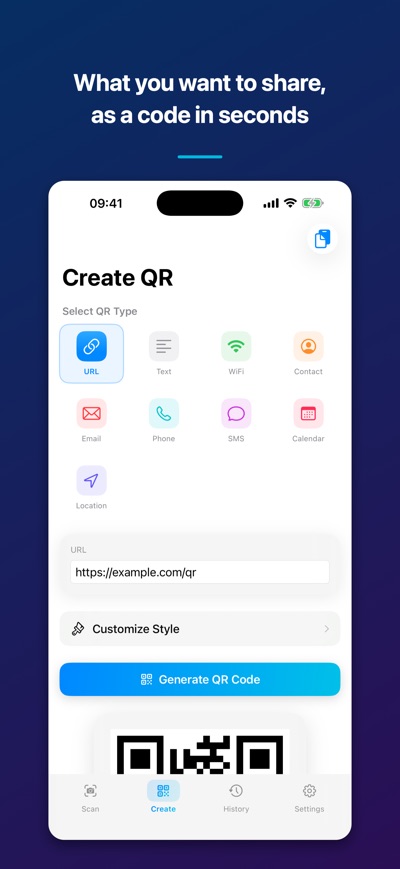
Nine kinds of QR code — link, Wi-Fi, contact, email, phone, SMS, calendar, location and plain text. Pick a type, fill in the short form, and tap Generate.
Scanning is built in: line the code up, tap it, and the matching action is waiting. Everything you scan or make is kept in your history.
DESIGN IT
• Any foreground and background color, with a one-tap swap
• Three dot shapes: square, rounded, circle
• Put your logo in the middle (error correction Q or H recommended)
• Four error correction levels and four sizes, up to 600 px
NINE QR TYPES
• Link, plain text, Wi-Fi, contact card (vCard), email
• Phone, SMS, calendar event, map location
• A dedicated form for each type, plus a paste-from-clipboard button
SCAN AND ACT
• Line the code up in the frame and tap it
• The result screen recognizes the content and offers the matching action — open a link, call, compose an email, send an SMS, open a place in Maps, copy a Wi-Fi password
• Flashlight for dark places
YOUR HISTORY
• Every code you scanned or made, grouped by day
• Favorites, search, filter by type, sort and bulk delete
• Export your whole history as JSON
MADE TO LOOK GOOD
• Glass-effect interface, light and dark themes, seven accent colors
• Haptics and sound effects you can turn off
• Statistics: totals, a seven-day chart, your most-used type and a daily streak
Save to Photos, share it, or copy the image to the clipboard.
AVALW Coverage
Not yet mentioned in AVALW articles.
Similar apps


 Zedge™ Wallpapers & RingtonesZedgeDiscover millions of background wallpapers & ringtones or make your own with AI.★ 4.7 17993k


 Zillow Real Estate & RentalsZillow.comFind your new home to buy or rent with expert real estate tools and millions of listings right at your fingertips. Seamlessly save, search, and share home listi★ 4.8 7238k


 Android AutoGoogle LLCControl maps, media and messaging, with Gemini while you drive★ 4.1 6304k


 Amazon AlexaAMZN Mobile LLCUse the Amazon Alexa app to manage Alexa-enabled devices, control music playback, view shopping lists on the go, keep track of upcoming reminders, check on acti★ 4.5 5906k


 PinterestPinterest, Inc.Pinterest is a place of endless possibilities. You can: - Discover everyday inspiration - Shop styles you love - Try and learn something new Create boards, save★ 4.8 5789k


 Parallel Space - app cloningLBE TechRun multiple accounts of the same app on a single device★ 4.1 5115k


 Microsoft SwiftKey AI KeyboardSwiftKeyAI-powered Copilot. Personalized keyboard with gifs, stickers & themes★ 4.3 4602k



 World of Tanks Blitz – Daylight AssaultWargaming Group LimitedCharge into battle with the explosive energy of daylight! This bright World of Tanks Blitz theme brings 5 high-resolution wallpapers packed with sun-scorched de★ 4.1 4525k
More by this developer


 Roll Cube - Dice PuzzleMIZOU, CO., LTD.Roll Cube is a rolling-block puzzle in three dimensions. A cube sits on a grid of tiles. Swipe, and it tips over one edge onto the next tile - and every tip tur-


 Kouzu Cadastral MapMIZOU, CO., LTD.View Japan's official cadastral maps ("Tokibasho Sonaetsuke Chizu", published by the Ministry of Justice) directly on top of Apple Maps. Overlay on the map Parc-


 ColorLens - Color VisionMIZOU, CO., LTD.ColorLens shows you what your work looks like to someone whose color vision differs from yours. Point the camera at a screen, a poster or a printed design, or l-


 Object PreviewMIZOU, CO., LTD.Place your photos and images in real space, and view them anytime, anywhere. Point your camera at a room and Object Preview finds the floor or wall, then pins y-