
Screenshots





About QR File Transfer - PixyMove
Transfer content from one device to another with QR Transfer - PixyMove.
Send text, photos, documents, and audio using a simple visual transfer experience. Choose what you want to share, start a live broadcast, and receive it on another device by scanning the QR stream.
No complicated setup. Just choose, broadcast, scan, and receive.
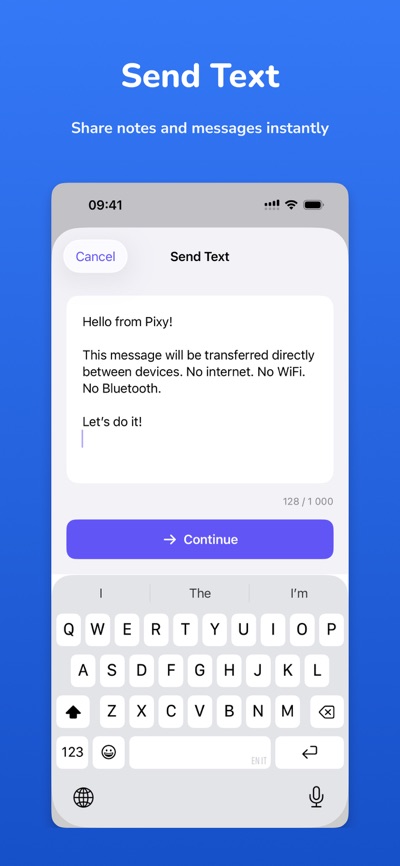
SEND TEXT
Type or paste a message and turn it into a live transfer. A quick way to move text between devices without retyping it.
RECEIVE FILES
Start the scanner and point your camera at an active QR Transfer broadcast. The app automatically receives the incoming data and shows the transfer progress.
PHOTO TRANSFER
Choose an image from your photo library and send it directly to another device.
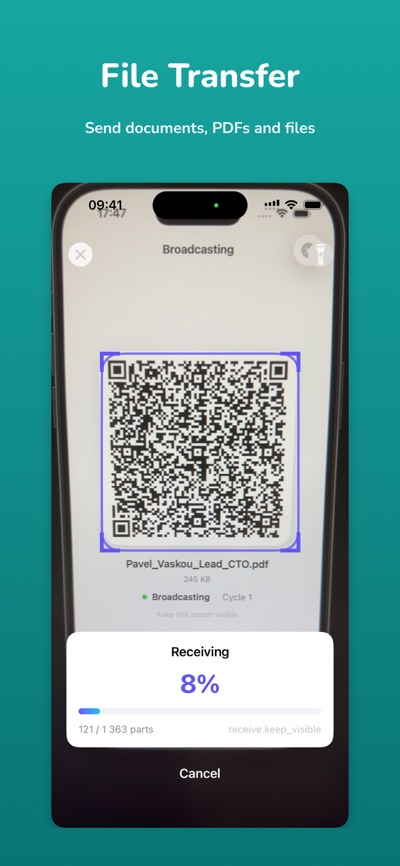
FILE TRANSFER
Select documents and supported files from your device and prepare them for transfer in just a few taps.
LIVE BROADCAST
QR Transfer displays your data as a live sequence that can be scanned by another device.
Keep the broadcast visible while the receiving device collects the transfer.
TRANSFER HISTORY
Previously received items are kept in your transfer history, making it easy to find and open recent transfers again.
AUDIO TRANSFER
Send supported audio files between devices using the same simple transfer flow.
DARK MODE
Enjoy a clean interface designed for both Light and Dark Mode.
KEY FEATURES
• Send text
• Receive files with the camera
• Transfer photos
• Transfer documents and files
• Live QR broadcast
• Transfer progress
• Received transfer history
• Audio transfer
• Light and Dark Mode
QR Transfer keeps the process simple:
Choose what to send.
Start the broadcast.
Scan from another device.
Receive your content.
No Wi-Fi. No Internet. No Bluetooth.
Just point, scan, and transfer.
Support URL:
https://vnorme.app/pixymove/support.html
Privacy Policy URL:
https://vnorme.app/pixymove/privacy.html
Terms of Use URL (EULA):
https://vnorme.app/pixymove/eula.html
Terms & Conditions URL:
https://vnorme.app/pixymove/terms.html
AVALW Coverage
Not yet mentioned in AVALW articles.
Similar apps


 Phone by GoogleGoogle LLCReliable phone calls with spam protection, caller ID and more helpful features★ 4.4 52440k


 Google Play servicesGoogle LLCGoogle Play services - Google services for Android apps★ 4.3 44573k



 Call of Duty®: Modern Warfare® 4 (Windows)Activision Publishing Inc.War erupts on the Korean Peninsula as North Korea launches a full-scale invasion that threatens to destabilize the world in Call of Duty®: Modern Warfare® 4. A ★ 4.3 16579k


 gov.brServiços e Informações do BrasilGov.br is a means of user access to digital public services.★ 4.6 14047k


 MyTelkomsel – Buy InternetTelkomselBuy credit, internet quota, streaming, game voucher & get cashback with e-wallet★ 3.8 12353k


 myIM3: Data Plan & Buy PackageIndosat Ooredoo HutchisonCheck balance & quota, detect & block spam, exchange IMPoin only on myIM3★ 4.4 11302k


 Files by GoogleGoogle LLCClean up your phone, find files, play media, and share files offline★ 4.5 9097k


 CNH do BrasilServiços e Informações do BrasilDigital driver's license and vehicle registration certificate, first driver's license, traffic violation and vehicle information.★ 4.9 8390k
More by this developer


 Color Quest: Hidden Tile CodesIryna VaskovaColor Quest: Hidden Tile Codes is an exciting adventure in a world of logic and colors! Test your intuition and strategy as you decode color combinations and un-


 Cockadoo: Task Manager & To DoIryna VaskovaCockadoo - Shared Task Manager & Family Planner Stop forgetting. Start getting things done - together. Cockadoo is a simple and powerful way to organize your li-


 Wordpaw: Logic & Brain GameIryna VaskovaWordPaw – A Story Puzzle Adventure Where Every Word Is a Clue! Step into the paws of a clever cat detective on a journey through mysterious letter puzzles. Word-


 Spot It: Flags Find the TwinsIryna VaskovaSpot It: Catch Twins – A Fun Challenge for Your Attention! Ready to test your observation skills and reaction speed? Welcome to Spot It: Catch Twins, an excitin-