
Screenshots
About Quick Gantt Chart
Plan projects, track costs and share clear schedules.
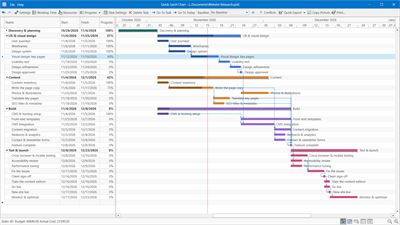
Build and update your schedule on an interactive Gantt chart. Quick Gantt Chart helps you organize tasks, manage resources and present your plan as editable PowerPoint slides. Open Microsoft Project files without installing Microsoft Project.
Work offline with project files on your PC. One-time purchase, no subscription. Free updates included.
PLAN AND ADJUST YOUR SCHEDULE
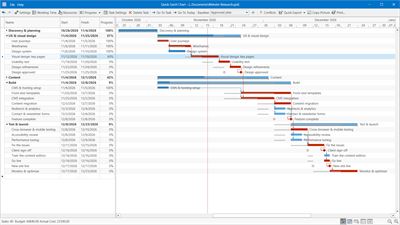
• Drag and resize task bars, create dependencies and update progress on the chart.
• Organize work into phases, summary tasks and milestones, with notes and custom colors.
• Use optional automatic scheduling, four dependency types with lead and lag, and forward or backward planning.
• Set working hours, holidays and days off. Highlight the critical path and compare current task dates with a saved baseline.
TRACK RESOURCES AND COSTS
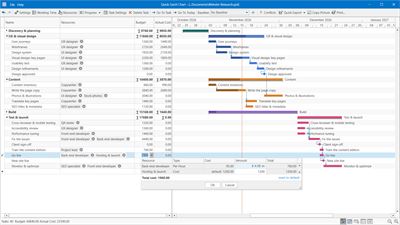
• Assign people, equipment or materials and check for potential resource conflicts.
• Calculate task budgets from hourly rates, item quantities or fixed costs, with manual adjustments when needed.
• Record actual costs and compare them with task budgets. See totals for phases and the project.
PRESENT AND SHARE YOUR PLAN
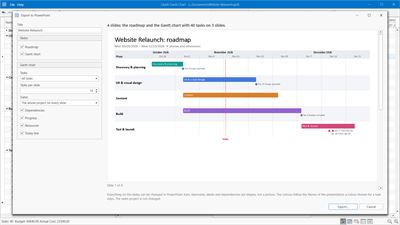
• Export PowerPoint Gantt slides and an optional roadmap of phases and milestones. Bars, labels and dependency arrows are editable shapes. PowerPoint is not required to create the .pptx file.
• Print or export the table, chart or both to PDF and PNG. Copy the chart as a picture for emails, documents and slides.
• Export task data to Excel (XLSX) or CSV, or export your schedule to Microsoft Project XML.
START WITH A TEMPLATE OR YOUR EXISTING DATA
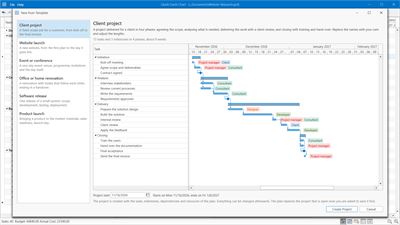
• Choose from six templates: client project, website launch, event, renovation, software release and product launch.
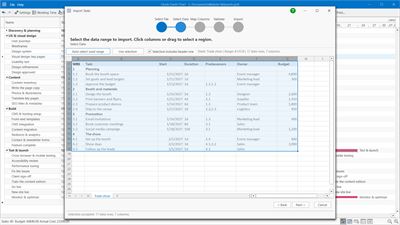
• Import task lists from Excel, CSV or text with a guided wizard, or paste a table from Excel.
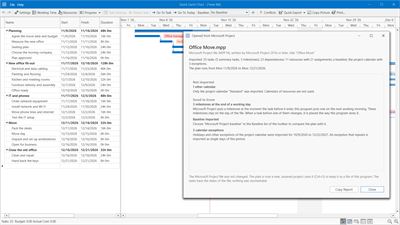
• Open Microsoft Project files (MPP, MPT, XML and MPX). Import supported project data and review a report of changes and limitations.
Switch between Gantt, calendar, timeline, agenda and list views. Built-in help includes animated examples, and recovery copies help protect unsaved work.
Share project files and exports with clients and colleagues. Cloud sync and simultaneous editing are not included. Microsoft Project import may simplify or omit features that Quick Gantt Chart does not support.
AVALW Coverage
Not yet mentioned in AVALW articles.
Similar apps


 Booking.com for BusinessBooking.comManage your business travel with the Booking.com for Business app! Book trips and manage expenses in just a few minutes. - Book your whole business trip in one ★ 4.8 6450k


 ADP Mobile SolutionsADP, IncADP Mobile Solutions provides you with an easy and convenient way to access payroll, time & attendance, benefits, and other vital HR information for you and you★ 4.7 4460k


 Indeed Job SearchIndeed Inc.Discover your next job opportunity on Indeed, the free job search app designed to connect you with better work anytime, anywhere. Forget the other job search ap★ 4.8 4078k


 Microsoft TeamsMicrosoft CorporationWhether you’re connecting with your community for an upcoming activity or working with teammates on a project, Microsoft Teams helps bring people together so th★ 4.8 3378k


 Zoom WorkplaceZoom Communications, Inc.Zoom Workplace helps you streamline your day and collaborate effortlessly with the power of AI. Zoom Workplace brings video meetings, chat, phone, appointment s★ 4.7 3244k


 DoorDash - DasherDoorDash, Inc.Enjoy the freedom to be your own boss and earn money on your schedule. Plus, get 100% of your tips, always. * CASH AFTER EVERY DASH * Get paid right after every★ 4.7 2464k


 Duo MobileDuo Security LLCDuo Mobile works with Duo Security's two-factor authentication service to make logins more secure. The application generates passcodes for login and can receive★ 4.9 2306k


 Naukri: Job Search Appinfoedge.comSearch jobs, apply fast, and get noticed by 5 lakh+ recruiters hiring in India★ 4.5 2024k