
Screenshots



About Reins: for Ollama & LM Studio
Take the Reins of your AI.
Reins connects to your Ollama, LM Studio or any OpenAI-compatible server and runs local AI models directly on-device. It brings powerful AI models like Gemma, Qwen, Llama and more to your iPhone and iPad — with tools, web search, and full control over every conversation. No login. No data collection.
PLUG-n-PLAY
Either connect to your Ollama, LM Studio or OpenAI-compatible server, or run models on-device. Reins just works, keeps everything private, every chat stays yours.
TOOLS & WEB SEARCH
Go beyond chat. Reins gives models the ability to search the web, fetch pages, calculate and reason across multiple steps — no API key required for web search.
FULL MODEL CONTROL
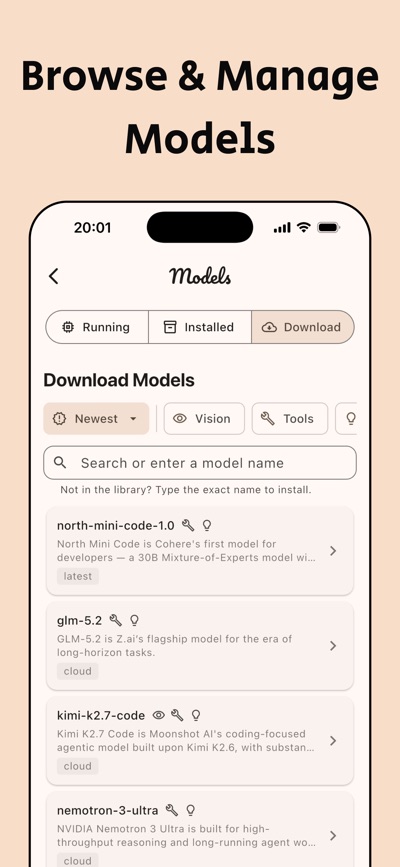
Download, switch and manage your models directly from the app. Connect multiple servers, configure API keys and custom headers and switch between them instantly. Access Ollama Cloud when you need it.
POWERFUL CHAT
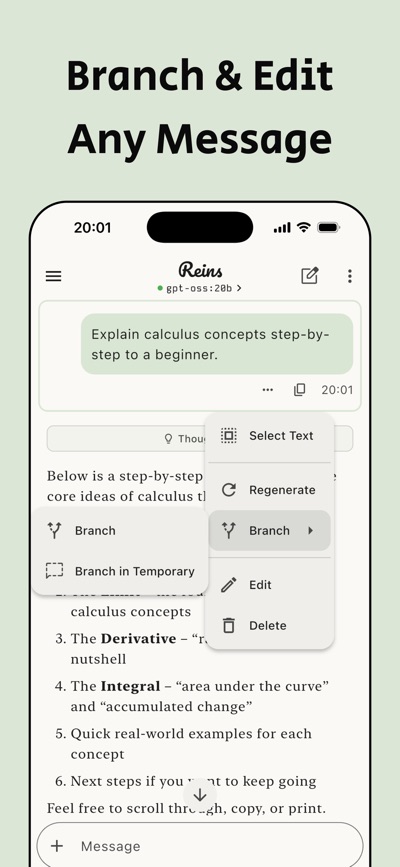
Attach images, PDFs, CSVs and text files to any conversation. Enable thinking mode for deeper reasoning when you need it. Branch chats to explore different paths without losing your original thread. Never lose a cut-off response, pick up exactly where it stopped. Export or back up your conversations anytime.
FINE-GRAINED CONTROL
Set a different system prompt for every conversation. Dial in temperature, context size, max tokens and more for precise control over model behavior.
ON DEVICE MODELS
Run AI models directly on your iPhone and iPad without any setup. It's powered by MLX to achieve the best performance on Apple Silicon. You can download any MLX model even if it's not listed in the library. Reins also works with Apple Intelligence's on-device Foundation Models.
BACKGROUND PROCESSING
No need to wait around for complex reasoning, long responses or model downloads. Switch apps or lock your screen and Reins keeps generating in the background. Come back and it'll be waiting for you. (Requires iOS or iPadOS 26.0+)
Reins works with your Ollama, LM Studio or OpenAI-compatible server, or runs AI models on-device with no server required. Self-hosted or Ollama Cloud both work too.
Privacy Policy: https://getreins.app/privacy
Terms of Use: https://getreins.app/terms
AVALW Coverage
Not yet mentioned in AVALW articles.
Similar apps



 ChatGPTOpenAIChatGPT is your everyday AI assistant for Windows. Use Chat to ask questions, explore ideas, write, learn, and work through everyday tasks. When you need to go ★ 4.8 11034k

 Remote Tools for Microsoft EdgeMicrosoft CorporationRemote Tools for Microsoft Edge enables developers to debug live web content running on remote Windows desktop, Xbox, and HoloLens devices. This app extends Win★ 4.7 1610k


 TestFlightAppleTestFlight makes it easy to test beta versions of apps and App Clips to provide valuable feedback to developers before they release their apps on the App Store.★ 4.7 791k


 Holy Quran Offline ReadingJedyAppsAl QURAN-القرأن الكريم app to read Quran offline just like an actual Quran book★ 4.4 207k


 Galaxy S9 Plus RingtonesZenTint CreationsDownload The 100 Best Galaxy S9+ Ringtones & Notifications For Free★ 4.6 135k


 Quran Pro - القران الكريمQuanticapps FZ LLERead and listen to the Holy Quran Offline. MP3 recitations & Tafsir★ 4.7 124k


 IGAMES PS2IGames BRThe best PS2 games from your childhood come to life in their mobile version!★ 4.4 56k


 Gamers GLTool with Game TunerTrilokia Inc.Tune your game graphics with our GFX optimizer for optimal gaming experience★ 4.5 45.1k