
Screenshots
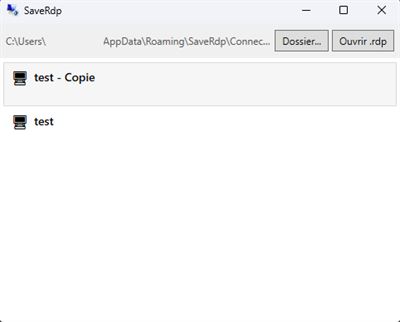
About SaveRdp
Product name: SaveRdp
Description:
SaveRdp lets you launch Remote Desktop connections without the new Windows security warnings introduced in April 2026.
Instead of opening .rdp files through mstsc.exe (which now shows mandatory security dialogs and disables all resource redirections by default), SaveRdp reads your existing .rdp files and connects using an embedded RDP client directly inside the app window.
How it works:
- Place your .rdp files alongside SaveRdp, or let the app import them on first launch
- The app displays your available connections in a simple list
- Double-click to connect - no security warnings, no popups, no extra steps
- If only one .rdp file is found, the connection starts automatically
Key benefits:
- No Windows security dialogs or redirection warnings
- All resource redirections enabled by default (clipboard, drives, printers, microphone)
- Supports standard desktop connections and RemoteApp
- Works with RD Gateway, load balancing, and all .rdp parameters
- Create desktop shortcuts for one-click access to any connection
- Reads both UTF-8 and UTF-16 encoded .rdp files
SaveRdp is designed for IT professionals and users who manage multiple Remote Desktop connections daily and need a fast, frictionless experience.
What's new in this version:
(leave blank - first submission)
Product features:
1. Bypass April 2026 RDP security warnings
2. Embedded RDP client - no external mstsc.exe window
3. Auto-connect when only one .rdp file is present
4. One-click desktop shortcuts for each connection
5. All redirections enabled: clipboard, drives, printers, microphone
6. Supports RemoteApp, RD Gateway, and load balancing
7. Import .rdp files to a central location on first launch
8. Lightweight and portable - single .exe, no installation required
AVALW Coverage
Not yet mentioned in AVALW articles.


