
Screenshots




About Set Tool by mathies
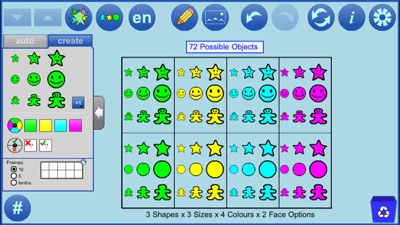
Sets of objects can be generated randomly or designed by the user. Sort and classify objects. Create patterns. Represent, compose and decompose whole numbers, tenths, and fractions. Explore experimental probability.
Mathematical Concepts:
Create visual representations that help explore mathematical thinking related to:
• Subitizing (instantly seeing “how many”)
• Sorting by attributes (shape, colour, size, with face/no face)
• Counting principles, e.g., conservation of number
• Skip counting by 2s, 5s and 10s
• Representing, comparing and ordering numbers
• Composing and decomposing numbers
• Using anchor values of 2, 5, and 10
• Modelling operations with numbers
• Demonstrating multiplicative thinking
• Exploring number patterns and concepts
• Creating patterns
• Exploring probability and randomness
Features:
• Create a user-designed set of objects by dragging into the workspace
• Auto-generate a random set of objects by specifying a number
• Auto-generate a new set while conserving count and selected attribute options
• Select an object or set of objects by drawing a marquee around them
• Copy selected objects
• Change the attributes of selected objects (shape, colour, size, facedness) specifically or randomly
• Organize objects using Ten frames or Frames of Tenths
• Scramble or align objects in the workspace
• Increase and decrease the object size
• Use the multiplier button to set the number of objects (1, 2, 5, 10) to drag to the workspace
• Use the Object Count button (#) to check to see how many objects are in the workspace
• Step through a history of your work with the undo/redo buttons
• Communicate your thinking or highlight various features of your representation using the built-in annotation tool
• Insert background images
AVALW Coverage
Not yet mentioned in AVALW articles.
Similar apps



 Duolingo - Language LessonsDuolingo Inc.Learn a new language with the world’s most-downloaded education app! Duolingo is the fun, free app for learning 40+ languages through quick, bite-sized lessons.★ 4.7 5492k


 Duolingo: Language LessonsDuolingoLearn a new language, chess & more with the world's most downloaded education app! Duolingo is the fun, free app for learning 40+ languages through quick, bite-★ 4.7 5492k


 Read Along by GoogleGoogle LLCLearn to read with the magic of your voice and a friendly reading buddy★ 4.6 5287k


 Brainly: AI Homework HelperBrainlyQuick Math Helper & Science Solutions | Get Homework Answers for School Doubts★ 4.5 4470k


 Gauth: AI Study CompanionGauthTech Pte. Ltd.Ask anything, get right answer★ 4.8 2111k


 Remind: School CommunicationParentSquareRemind is a communication platform that helps every student succeed. Whether you're in the classroom, at home, or anywhere in between, Remind makes it easy to s★ 4.8 1799k


 Memrise: Fun language lessonsMemriseImprove vocabulary & learn to speak English, Spanish, German, Japanese & more!★ 4.4 1571k


 ClassDojoClassDojoClassDojo connects teachers, tutors, kids, and families★ 4.8 1341k