
Screenshots




About Sidekick Pro Remote by DYM
Sidekick Remote turns your iPhone or iPad into a remote control for Sidekick Pro on your Mac. Walk away from the laptop and run the whole show from anywhere in the room: advance slides, start a game, reveal the answer and black out the screen, all from your phone.
RUN THE SHOW
• Move through your presentation item by item, or jump to any one
• See every slide and jump to any of them, or let them auto-advance
• Play, pause and scrub the video on the screen
• Show or hide the title graphic and on-screen instructions
RUN THE GAMES
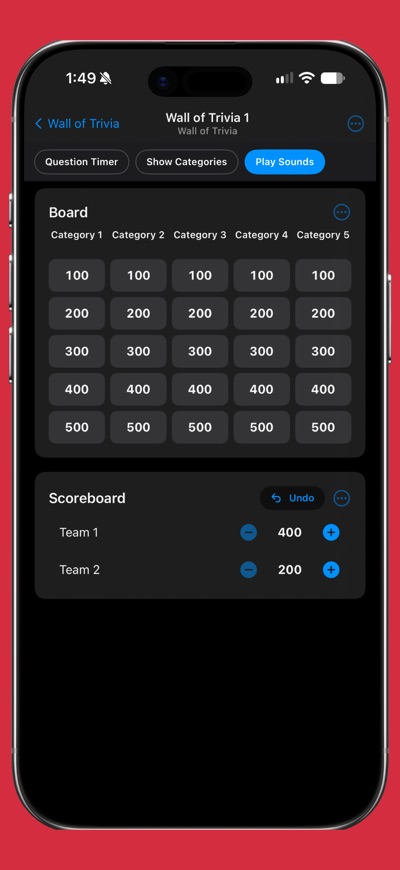
Your iPhone or iPad shows the same controls as the Mac for whatever is on the screen: spin Wheel of Destiny, pick a winner in Boxes or Pick Me, reveal answers in Trivia and Survey Says, keep score on the Leaderboard, run Wall of Trivia, and open and close voting in Live Polls, Live Ranking, Read the Room, Would You Rather and Live Trivia. It covers every game in Sidekick Pro, from Live Responses to Extreme Bingo.
CONTROL THE SCREEN
• Blackout or your logo, in one tap
• Put the join QR code up full screen so everyone can get in
GET READY FROM YOUR PHONE
• Open, create, rename and favorite documents
• Add, edit, reorder and hide items in many of your games
• Generate questions and lists with AI
SIMPLE AND PRIVATE
• Pair once with a 4-digit PIN; after that it reconnects by itself
• No account and no sign-in on the phone
• Talks to your Mac directly over your local network. Nothing goes over the internet, and Sidekick Remote collects no data.
REQUIREMENTS
The latest version of Sidekick Pro on a Mac, with your iPhone or iPad on the same network as the Mac. Sidekick Remote controls the features included in your Sidekick Pro plan.
AVALW Coverage
Not yet mentioned in AVALW articles.
Similar apps


 TikTokTikTok Pte. Ltd.TikTok is THE destination for mobile videos. On TikTok, short-form videos are exciting, spontaneous, and genuine. Whether you’re a sports fanatic, a pet enthusi★ 4.0 70099k


 TikTok - Videos, Shop & LIVETikTok Ltd.TikTok is the global discovery platform for videos, streaming on LIVE, shopping, and more. Our mission is to inspire creativity and bring joy. Over a billion pe★ 4.7 18383k


 NetflixNetflix, Inc.Netflix is the leading subscription service for watching TV episodes and movies.★ 4.6 16405k


 Google Play GamesGoogle LLCPlay games instantly, save progress, and earn achievements.★ 3.9 13150k


 Roku Remote (Official)ROKU INCThe official remote app for your Roku® device. Roku Remote (Official) turns your phone into a feature-packed remote control for Roku players and Roku TVs. Enjoy★ 4.7 6245k


 HBO Max: Stream Movies & TVWarnerMedia Global Digital Services, LLCThe most talked about shows and movies featuring the worlds of HBO, the DC Universe, Adult Swim, A24, and beyond. With HBO Max you'll get: • Access to thousands★ 4.9 5760k


 Prime VideoAmazon Mobile LLCWatch movies, TV shows, live programming, and sports★ 4.7 5709k


 WEBTOON: Manga, Comics, ManhwaNAVER WEBTOONThe largest manga, comics, and manhwa community with millions of fans!★ 4.6 4614k


