
Screenshots


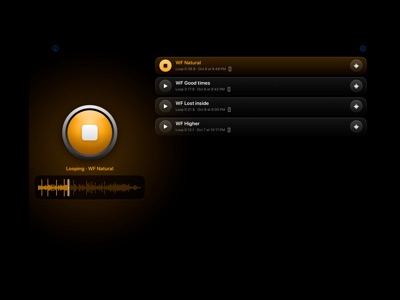

About Solo Looper
SOLO LOOPER is the simplest way to loop your playing. Tap the big green button, play a riff, tap again — and it repeats, over and over, while you play along.
No pedal to plug in. No amp. No power cable. Just your iPhone, iPad or Mac.
HOW IT WORKS
- Tap the green button and play. Tap it again to stop.
- Your take starts looping right away.
- Play your lead, improvise, or practise over it.
MADE FOR PRACTISING
- See what you're recording: a live waveform shows the microphone picking you up.
- See where you are: a moving playhead shows your position in the loop.
- Trim the start and end with two handles (plus ±10 ms fine nudge) so the loop fits your bar. The loop keeps playing while you drag, so you hear the seam as you cut. Save the trimmed loop as a new take if you like.
- A short crossfade smooths the loop point so there is no click.
EVERY TAKE IS SAVED
- Every recording is kept in a history list.
- Tap any past take to loop it again.
- Rename, share or delete with a swipe (on a Mac, with the menu next to each take).
- Each take shows when and on which device it was recorded.
SYNCS BETWEEN YOUR DEVICES
- iCloud Sync keeps your takes, names and trims on your iPhone, iPad and Mac (turn it off any time in Settings).
KEEPS PLAYING
- The loop continues when the screen locks or you switch to another app — handy for a chord chart or tab.
- Pause it from the lock screen.
Works with guitar, bass, keys, voice, beatbox — anything the microphone can hear.
No ads, no subscription, no account, no in-app purchases. Your recordings stay on your own devices, and sync only through your own iCloud.
AVALW Coverage
Not yet mentioned in AVALW articles.
Similar apps

 Spotify - Music and PodcastsSpotify ABLove music and podcasts? Play your favorite songs, podcasts and albums on Windows with Spotify. Stream the tracks you love instantly, browse the charts or fire ★ 4.8 42460k


 Spotify: Music and PodcastsSpotifyWith the Spotify app, you can explore an extensive library of music and podcasts for free. Curate the best playlists and stream millions of free songs, albums, ★ 4.8 42460k


 Shazam: Identify SongsAppleShazam for Mac takes your music discovery to a whole new level. Name any song in seconds without ever digging your phone out of your pocket! Highlights: * Shaza★ 4.8 12248k


 Pandora: Music & PodcastsPandora Media, LLCCreate stations from your favorite songs, artists or genres, search or browse to find recommended stations for your mood or activity, and discover podcasts that★ 4.8 11330k


 Shazam: Find Music & ConcertsApple"What's that song? Shazam will instantly identify music playing around you or in apps like TikTok, Instagram, YouTube & Snapchat. Discover concerts near you, so★ 4.9 8845k


 Lark Player:Music Player & MP3Lark Player Studio - Music, MP3 & Video PlayerOffline Music Player&MP3 Player with themes, equalizer, lyrics, music play mode★ 4.6 5506k


 Gaana: Music App, MP3 SongsEntertainment Network (India) Ltd.India's Largest Hindi, English, Punjabi Music Streaming & Radio & Podcast App★ 4.2 5134k


 StarMaker: Sing Karaoke SongsSKYWORK AI PTE. LTD.Record karaoke songs with pro audio editors, learn to sing, duet and share music★ 4.3 3945k
More by this developer


 SlowSoloOskar KunickiHear a solo you want to learn, but you have no audio file to import? Hold your iPhone to the speaker, record it, and practise it slowly. - Record from a speaker-


 RetroPong: CRT ArcadeOskar KunickiRetroPong brings the original arcade paddle game back to life with an authentic CRT monitor look — barrel curvature, scanlines, and a glowing phosphor glow — an-


 Speedway Oval RacingOskar KunickiSPEEDWAY OVAL RACING puts you in the gate for real oval speedway racing — the sport where there's no throttle and no brake. Your bike always drives forward; the-