
Screenshots



About Telescopo: Markdown & Notes
Telescopo is a Markdown editor and notes app for Mac, iPhone, and iPad. Read comfortably, write your way, convert existing documents into Markdown, and export work that’s ready to share. Keep your files with you through iCloud.
READ
Give your Markdown documents room to breathe. Choose a theme, adjust the font, reading width, and zoom, and navigate longer documents by heading.
View Mermaid and ZenUML diagrams, LaTeX equations, highlighted code, tables, and images alongside your text. Open files and folders directly from your device and work with the documents you already have.
WRITE
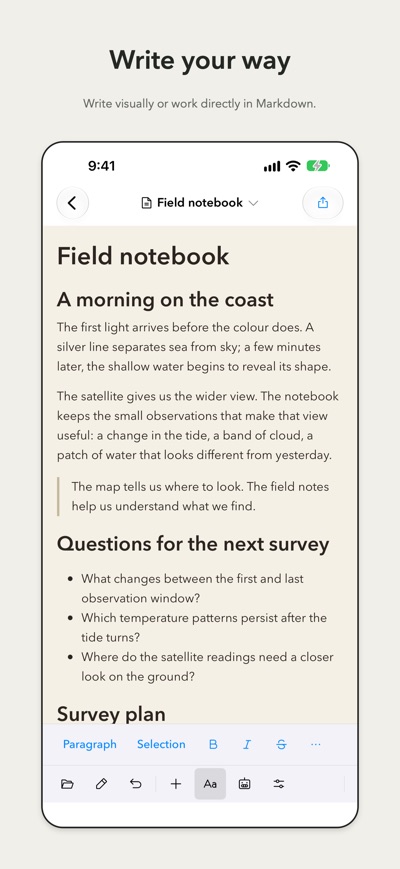
Choose how you want to write: use the visual editor, edit Markdown directly, or work with your source and live preview side by side on supported layouts.
Add headings, lists, tasks, tables, images, diagrams, and equations with built-in formatting and insertion tools. Start with a guided template, customize its structure, and save personal layouts for reuse.
Organize notes with folders and tags, pin frequently used documents, and find your work with search. Link related notes and use backlinks to follow the connections between them.
Capture a quick thought, open today’s daily note, or settle into a longer writing session with word goals, writing focus, and typewriter scrolling.
Need a hand? The on-device AI editing assistant can help create outlines, lists, tables, and other supported content, or shorten and clarify selected plain text. Review suggestions before applying them. Requires a supported device and language with Apple Intelligence enabled.
CONVERT
Bring existing work into Markdown. Convert Word, PowerPoint, Excel, OpenDocument, RTF, EPUB, CSV, and text-based PDF files.
Conversion happens locally and leaves the original file untouched. Review the converted Markdown before saving it as a new note.
Conversion requires Apple silicon on Mac. PDF layout may differ from the original, and PDF images aren’t extracted. Scanned pages that require text recognition aren’t supported.
EXPORT
Turn your Markdown into a polished PDF. Choose portrait or landscape orientation, set the paper size and margins, and control page breaks.
Customize headers and footers with text, the document title, date, and page numbers. Preview the result before saving, sharing, or printing.
Export Mermaid diagrams as SVG or PNG for use in presentations and other documents. You can also share original Markdown files or export your library with supported attachments.
SYNC
Keep files stored in iCloud available across your Telescopo installations on Mac, iPhone, and iPad. Supported appearance and writing preferences can sync separately.
Your notes remain ordinary Markdown files. Work in your own folders, and use local history and recovery tools to review earlier versions or recover deleted notes.
GET STARTED
Reading Markdown, diagrams, equations, and Quick Look are included. Explore editing tools and PDF previews with your own documents or Samples. A subscription unlocks writing and editing, document conversion, PDF and diagram export, and supported AI features.
Monthly and annual subscriptions provide access across Mac, iPhone, and iPad using the same Apple Account. A separate Mac-only lifetime purchase is also available.
Terms of Use: https://www.apple.com/legal/internet-services/itunes/dev/stdeula/
Terms of Service: https://www.telescopo.app/terms-of-service
Privacy Policy: https://www.telescopo.app/privacy-policy
AVALW Coverage
Not yet mentioned in AVALW articles.
Similar apps


 Canva Configurator (BYOD)CanvaThe Configurator app allows Canvanauts to configure internal settings of Canva's iOS app, such as server target and client flags.★ 4.8 27857k



 ChatGPTOpenAIChatGPT is your everyday AI assistant for Windows. Use Chat to ask questions, explore ideas, write, learn, and work through everyday tasks. When you need to go ★ 4.8 11034k

 Remote Tools for Microsoft EdgeMicrosoft CorporationRemote Tools for Microsoft Edge enables developers to debug live web content running on remote Windows desktop, Xbox, and HoloLens devices. This app extends Win★ 4.7 1610k


 TestFlightAppleTestFlight makes it easy to test beta versions of apps and App Clips to provide valuable feedback to developers before they release their apps on the App Store.★ 4.7 791k


 Holy Quran Offline ReadingJedyAppsAl QURAN-القرأن الكريم app to read Quran offline just like an actual Quran book★ 4.4 207k


 Galaxy S9 Plus RingtonesZenTint CreationsDownload The 100 Best Galaxy S9+ Ringtones & Notifications For Free★ 4.6 135k


 Quran Pro - القران الكريمQuanticapps FZ LLERead and listen to the Holy Quran Offline. MP3 recitations & Tafsir★ 4.7 124k


 IGAMES PS2IGames BRThe best PS2 games from your childhood come to life in their mobile version!★ 4.4 56k


