
Screenshots




About Text to Speech Voice Generator
Turn any script into natural-sounding speech, right on your Mac.
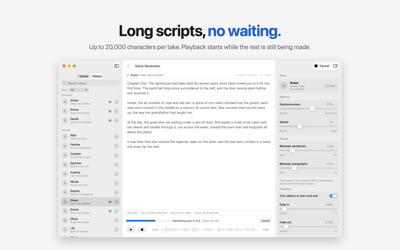
Voice Generator creates lifelike voiceovers on your own computer. There's no cloud service, no subscription and no usage cap. Paste your script, pick a voice, and click Generate. Short clips are ready in seconds, and long scripts start playing before they've finished.
Made for creators, educators and anyone who needs a clean voice on demand: TikToks, Reels and YouTube Shorts, podcast intros, audiobook drafts, tutorials, presentations, on-hold messages and game characters.
PRIVATE AND UNLIMITED
• Everything runs on your Mac. Your scripts never leave your device.
• Unlimited generations. No credits, tokens or daily limits.
• No account or sign-up. After a one-time download of the voice model, it works offline.
35 VOICES
• Narrators, presenters and character voices.
• Preview any voice instantly and star your favorites.
LONG SCRIPTS, FULL CONTROL
• Scripts up to 20,000 characters, about 20 minutes of audio.
• Listen to the beginning while the rest is still being generated, and cancel at any time.
• Adjust expressiveness, speed, pauses between sentences and paragraphs, fades and silence trimming.
• Type [pause 2s] anywhere in your script for an exact pause.
• Teach the voice how to say names, brands and acronyms with a pronunciation list.
READY FOR YOUR EDITOR
• Export WAV, AIFF, AAC, Apple Lossless or FLAC, at 24, 44.1 or 48 kHz.
• Export subtitles (SRT or WebVTT) timed to the voice, for captions in Final Cut, Premiere or YouTube.
• Drag audio straight into Finder or your video editor.
• Export many takes at once.
FITS YOUR WORKFLOW
• Import scripts from Word, PDF, Markdown, RTF or plain text files.
• Every generation is saved in History, with its settings, so you can replay, rename or regenerate it.
• Shortcuts actions and a Services menu item for creating speech from any app.
• Light and Dark Mode.
Requires a Mac with Apple Silicon (M1 or later). English voices only.
AVALW Coverage
Not yet mentioned in AVALW articles.
Similar apps


 Phone by GoogleGoogle LLCReliable phone calls with spam protection, caller ID and more helpful features★ 4.4 52440k


 Google Play servicesGoogle LLCGoogle Play services - Google services for Android apps★ 4.3 44573k



 Call of Duty®: Modern Warfare® 4 (Windows)Activision Publishing Inc.War erupts on the Korean Peninsula as North Korea launches a full-scale invasion that threatens to destabilize the world in Call of Duty®: Modern Warfare® 4. A ★ 4.3 16579k


 gov.brServiços e Informações do BrasilGov.br is a means of user access to digital public services.★ 4.6 14047k


 MyTelkomsel – Buy InternetTelkomselBuy credit, internet quota, streaming, game voucher & get cashback with e-wallet★ 3.8 12353k


 myIM3: Data Plan & Buy PackageIndosat Ooredoo HutchisonCheck balance & quota, detect & block spam, exchange IMPoin only on myIM3★ 4.4 11302k


 Files by GoogleGoogle LLCClean up your phone, find files, play media, and share files offline★ 4.5 9097k


 CNH do BrasilServiços e Informações do BrasilDigital driver's license and vehicle registration certificate, first driver's license, traffic violation and vehicle information.★ 4.9 8390k
More by this developer


 Encrypt Messages: Secret TextAnthony HarveyType a message. Pick a secret code. Send the scrambled result through any app you already use — Messages, WhatsApp, email, even a handwritten note. Only someone★ 4.0 4


 Proof of Service Invoice MakerAnthony HarveyYou do the work. Proof of Service sends the proof. Built for solo operators and small crews — plow drivers, lawn care, cleaners, handymen, pool techs, anyone wh★ 5.0 2


 NH Criminal & Vehicle CodeAnthony HarveyNO SUBSCRIPTION REQUIRED New Hampshire's Criminal Code and Vehicle Code, in one fast, easy-to-read app. Updated for 2026 and works completely offline, so every ★ 4.8 5


 Lacrosse Playbook: Learn RulesAnthony HarveyLearn lacrosse the way coaches teach it: one rule, one position and one play at a time, with diagrams that show you what's happening on the field. New to the sp★ 5.0 2