
Screenshots
About TextPort: Export Text Messages
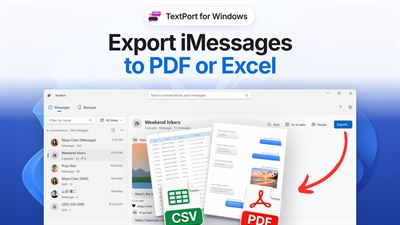
TextPort for Windows is a free app that exports your iPhone text messages and iMessages to PDF, CSV (Excel) or text on your PC, with photos and attachments. Plug in your iPhone with its USB cable, and TextPort backs it up to your PC. Then read, search and export every conversation, or print it as a PDF. No account, no trial, and your messages stay on your PC.
HOW TO TRANSFER TEXT MESSAGES FROM YOUR IPHONE TO YOUR PC
1. Install TextPort. It checks for Apple Devices, Apple's free app that lets Windows talk to an iPhone, and walks you through setup.
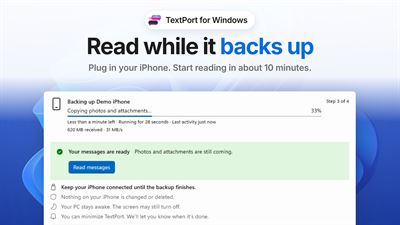
2. Plug in your iPhone and tap Trust. TextPort backs it up to your PC.
3. Start reading in about 10 minutes. Your messages are ready while photos and attachments are still copying.
4. Pick a conversation and the dates you need, and export it.
EXPORT THE WAY YOU NEED IT
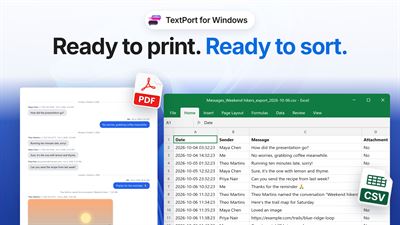
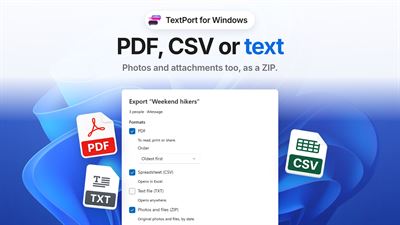
• PDF: ready to print or share, with names and timestamps on every page, plus photos and reactions.
• Spreadsheet (CSV): opens in Excel, one row per message, ready to sort and filter.
• Text file (TXT): opens anywhere.
• Photos and files (ZIP): the original photos, videos, voice notes and files, sorted by date.
Export one conversation or all of them at once. TextPort saves every chat as its own file in a new folder.
PRINT TEXT MESSAGES FROM YOUR PC
Export a PDF and print it from any PDF viewer. Each message shows who sent it, with their name and phone number or email, and the date and time. Pages are numbered, photos print in place, and the paper size matches your region (Letter or A4).
FOR COURT AND LEGAL RECORDS
People use TextPort to print text messages for court, custody and divorce cases, small claims, HR complaints and insurance claims. TextPort reads the messages straight from your iPhone's backup; nothing is retyped or transcribed. No app makes a court-certified export; courts authenticate text messages through testimony that the export came from your own device and was not changed.
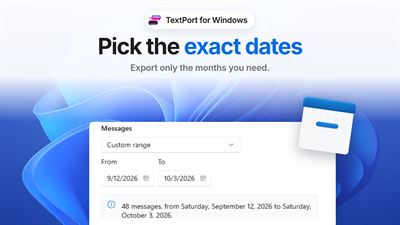
PICK THE EXACT DATES
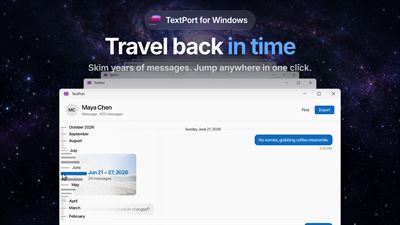
Export only the months you need, or the whole history. TextPort tells you how many messages fall in the range before you export.
FIND ANYTHING
Search years of texts in seconds, filter conversations by name, and jump straight to a date.
ALREADY BACKED UP?
If Apple Devices or iTunes already backed up your iPhone to this PC, TextPort lists that backup and opens its messages without backing up again. It works as a free iPhone backup viewer for your texts. If your backups are encrypted, TextPort checks your iPhone and walks you through turning encryption off (you'll need your backup password).
BUILT FOR LONG HISTORIES
• Keep reading while the backup runs.
• Cable slipped out? Continue the backup where it stopped.
• Nothing on your iPhone is changed or deleted.
• Group chats, reactions, edited messages, SMS and RCS are all included.
QUESTIONS PEOPLE ASK
Is TextPort for Windows free?
Yes. There's no account, no trial and no in-app purchase. TextPort for iPhone is a separate app with its own subscription.
Is this iMessage for Windows?
No. TextPort reads and exports the iMessages and texts already on your iPhone; it doesn't send messages. To send and receive iMessages on a PC, use Microsoft's Phone Link.
Can it recover deleted messages?
No. TextPort shows the messages that are in your iPhone's backup.
Are my messages uploaded anywhere?
No. TextPort for Windows reads and exports your messages on your PC.
What about WhatsApp and other chat apps?
TextPort for Windows exports the Messages app: iMessage, SMS and RCS. For WhatsApp, Messenger, Instagram, Telegram and other apps, use TextPort for iPhone, which exports chats right on your phone. There's also TextPort for Mac.
PERFECT FOR
• Printing text messages for court, a lawyer or an insurance claim
• Keeping records of business and client conversations
• Saving a loved one's messages before you change or lose a phone
• Moving years of iMessages to a PC you control
TextPort is a format and export tool: it turns the messages on your iPhone into clean files. The app is in English and 25 other languages.
Requires Windows 10 version 22H2 (build 19045) or Windows 11, an iPhone with its USB cable, and Apple Devices.
AVALW Coverage
Not yet mentioned in AVALW articles.
Similar apps


 Phone by GoogleGoogle LLCReliable phone calls with spam protection, caller ID and more helpful features★ 4.4 52440k


 Google Play servicesGoogle LLCGoogle Play services - Google services for Android apps★ 4.3 44573k



 Call of Duty®: Modern Warfare® 4 (Windows)Activision Publishing Inc.War erupts on the Korean Peninsula as North Korea launches a full-scale invasion that threatens to destabilize the world in Call of Duty®: Modern Warfare® 4. A ★ 4.3 16579k


 gov.brServiços e Informações do BrasilGov.br is a means of user access to digital public services.★ 4.6 14047k


 MyTelkomsel – Buy InternetTelkomselBuy credit, internet quota, streaming, game voucher & get cashback with e-wallet★ 3.8 12353k


 myIM3: Data Plan & Buy PackageIndosat Ooredoo HutchisonCheck balance & quota, detect & block spam, exchange IMPoin only on myIM3★ 4.4 11302k


 Files by GoogleGoogle LLCClean up your phone, find files, play media, and share files offline★ 4.5 9097k


 CNH do BrasilServiços e Informações do BrasilDigital driver's license and vehicle registration certificate, first driver's license, traffic violation and vehicle information.★ 4.9 8390k