
Screenshots



About TransforMAP
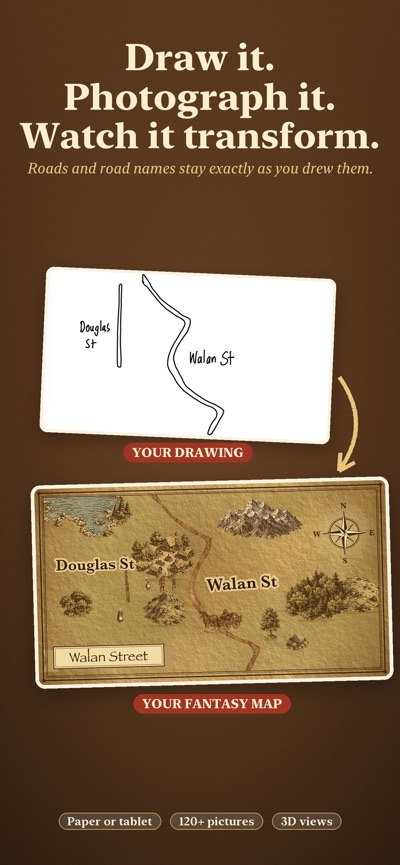
Draw the roads. TransforMAP turns them into a finished, illustrated map.
Sketch a map on paper and photograph it, or draw one on a tablet and use a screenshot. TransforMAP finds your roads and road names, then redraws the map on aged parchment with dirt, gravel or cobblestone roads, and mountains, forests, villages and more. The roads stay exactly where you drew them, and the names stay exactly as you wrote them.
No drawing to hand? Start with a blank map and draw the roads with your finger or Apple Pencil.
HOW IT WORKS
1. Say whether you drew on paper or on a tablet.
2. Take a photo or choose a picture.
3. Check the road names the app read and fix any it got wrong.
4. Your map appears, ready to change.
MAKE IT YOURS
- More than 120 pictures to choose from: mountains, hills, forests, lakes, villages, castles, ships, bridges, people, a horse and cart, and more
- Drag pictures onto the map, then resize, rotate, flip, duplicate, or move them in front of or behind each other
- Type your own labels for landmarks
- Move, resize or remove the title and the compass
- Choose dirt, gravel or cobblestone roads
- Rub out any part of a road you don't want
- Undo and redo as much as you like
SEE IT FROM OTHER ANGLES
Top Down is the editing view. Isometric, Pop-Up and Front show the same map from other angles, with the pictures standing up off the page. Pinch to zoom and drag to look around.
SAVE AND SHARE
- Every map is saved in your gallery, so you can come back to it
- Share or save any view as a PNG image or a PDF
- Choose standard size, or large size for posters
PRIVATE AND OFFLINE
Everything happens on your device. There is no account, no ads, and no internet connection needed. Your drawings and photos are never sent anywhere.
GETTING GOOD RESULTS
A dark pen on plain paper works best, with two lines for each road and the road name written beside it. A short guide inside the app shows which drawings work and which don't.
Good for school projects, story settings, tabletop games, or anyone who likes maps.
AVALW Coverage
Not yet mentioned in AVALW articles.
Similar apps



 Duolingo - Language LessonsDuolingo Inc.Learn a new language with the world’s most-downloaded education app! Duolingo is the fun, free app for learning 40+ languages through quick, bite-sized lessons.★ 4.7 5492k


 Duolingo: Language LessonsDuolingoLearn a new language, chess & more with the world's most downloaded education app! Duolingo is the fun, free app for learning 40+ languages through quick, bite-★ 4.7 5492k


 Read Along by GoogleGoogle LLCLearn to read with the magic of your voice and a friendly reading buddy★ 4.6 5287k


 Brainly: AI Homework HelperBrainlyQuick Math Helper & Science Solutions | Get Homework Answers for School Doubts★ 4.5 4470k


 Gauth: AI Study CompanionGauthTech Pte. Ltd.Ask anything, get right answer★ 4.8 2111k


 Remind: School CommunicationParentSquareRemind is a communication platform that helps every student succeed. Whether you're in the classroom, at home, or anywhere in between, Remind makes it easy to s★ 4.8 1799k


 Memrise: Fun language lessonsMemriseImprove vocabulary & learn to speak English, Spanish, German, Japanese & more!★ 4.4 1571k


 ClassDojoClassDojoClassDojo connects teachers, tutors, kids, and families★ 4.8 1341k
More by this developer


 GausNotePaul HamiltonStep inside your 3D scans. GausNote turns photoreal Gaussian-splat scans into places you can walk through, annotate, and share. Open a scene, move through it wi-


 Explorer GlidePaul HamiltonLean to the left and the bird turns left. Look down and it swoops low over the rooftops, then tip your head back and it climbs again. Explorer Glide lets childr-


 Study Deck BuilderPaul HamiltonStudy Deck Builder transforms your notes into powerful Anki-style flashcards in seconds, using Apple Intelligence, entirely on your Mac. Whether you're cramming-


 WondAR WordsPaul HamiltonUnlock the Magic of Learning with WondAR Words! Transform your classroom or playground into an interactive learning adventure! WondAR Words helps little learner-