
Screenshots

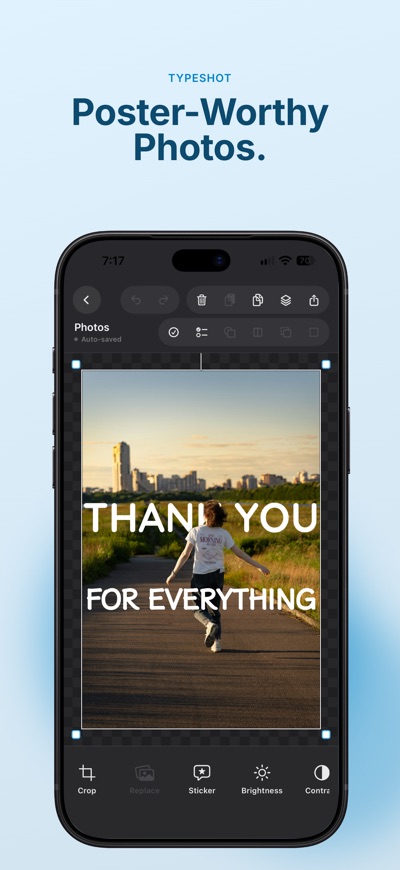


About TypeShot - Text & Photo Editor
Put text behind your subject. Turn everyday photos into designs that feel like you.
TypeShot is a photo design app for cutout collages, typography, and creative layering. Cut out people or pets and combine them with text, or bring multiple photos together in a collage. Customize fonts and layers to create images for social posts and thumbnails.
Start with a photo or choose your canvas size first. Explore the possibilities of photos and text on iPhone and iPad.
■ Put text behind your subject
Keep the original photo as your background and place a cutout of your subject in front. Arrange your photo, text, and subject to create depth, with lettering tucked behind a person or pet.
• Keep the original photo and its foreground cutout aligned when moving or resizing
• Move text behind or in front of your subject
• Refine cutout edges with erase and restore brushes
Cutout results may vary depending on the subject and background.
■ Create photo collages
Add multiple photos and freely adjust their size, position, and stacking order. Combine cutouts with text, stickers, and shapes for designs that are minimal, playful, or full of personality.
• Add up to six photos at once
• Cut out, crop, and replace individual photos
• Add white outlines and shadows to cutouts
• Reorder, group, and duplicate layers
• Undo and redo your edits
■ Make typography part of your photo
Choose from a wide range of fonts to match your image and message. Go bold with oversized lettering, make room for whitespace, or layer text over your photos.
• Adjust text size, color, letter spacing, and line spacing
• Use vertical text, shadows, and outlines
• Control how text overlaps with photos
■ Sizes for social posts and thumbnails
Start with your photo’s aspect ratio, or choose an Instagram, thumbnail, or custom canvas size.
• Square posts: 1:1
• Portrait posts: 4:5
• Stories: 9:16
• Custom dimensions for your needs
Change the aspect ratio while editing, scaling your photos and text together.
■ Learn with your own photo
An interactive, 12-step tour guides you through adding a photo, editing text, creating a cutout, and placing text behind your subject. A usage guide and FAQ are also available in Settings.
■ Save and keep creating
Your projects save automatically, so you can reopen them and continue editing. Organize your work with search, folders, and favorites. Project backup and restore are also supported.
■ Start for free
Export designs using free fonts as standard-size PNG or JPG images with a background. Free fonts and free shapes do not require watching ads.
■ TypeShot Pro
Get more freedom to design with photos and text:
• Access all fonts and Pro shapes
• Export projects containing Pro fonts
• Export transparent PNG, PDF, and SVG
• Export at sizes above the standard resolution
• Create unlimited saved projects without rewarded ads
Choose a monthly subscription, yearly subscription, or lifetime purchase.
■ Photo editing happens on your device
Photo editing and subject cutouts are processed on your device. Photos you edit are not uploaded to our servers.
Terms of Use (EULA): https://www.apple.com/legal/internet-services/itunes/dev/stdeula/
Privacy Policy: https://typeshot-website.sunager.workers.dev/en/privacy
AVALW Coverage
Not yet mentioned in AVALW articles.
Similar apps


 YouTubeGoogleGet the official YouTube app on iPhones and iPads. See what the world is watching -- from the hottest music videos to what’s popular in gaming, fashion, beauty,★ 4.7 49315k


 InstagramInstagram, Inc.Little moments lead to big friendships. Share yours on Instagram. — From Meta Connect with friends, find other fans, and see what people around you are up to an★ 4.7 29567k



 Affinity by CanvaCanvaONE APP TO CRAFT IT ALL, FOR NO COST AT ALL. Design. Edit. Lay it out. Affinity gives you vector, pixel, and layout tools, all in the same professional-grade ap★ 4.8 27291k


 Video Editor & Maker - InShotInShot Video EditorAI video editor with music! Edit video with effects, slideshow & slow motion★ 4.8 24760k


 MX PlayerAmazon Mobile LLCPowerful video player with advanced hardware acceleration and subtitle supports★ 4.2 14336k


 VivaVideo - Video Cut & EditorQuVideo Inc. Video Editor & Video Maker AppAI Video Editor: AI Templates, Text to Video, Extract Audio, Auto Caption.★ 4.3 12268k


 YouCut - Video Editor & MakerInShot Video EditorAI Video Editor with Music, Filter, Slideshow, Effect, Merge & Trim Video.★ 4.8 8635k


 Screen Recorder - XRecorderInShot Inc.Record games with audio. Smooth, HD screen capture & Built-in video editor.★ 4.7 7662k
More by this developer


 World Weirdos: Flags & LawsTakao SunagawaAround the world, there are countless "bizarre laws" and "unique customs" that we could never even imagine. "World Weirdos" is a fun, interactive quiz and explo-


 AppTrack - Analytics for DevsTakao SunagawaAppTrack is an analytics app for developers that brings App Store Connect data into one clear view — so you can see how your apps are doing at a glance. Check s-


 Thought Organizer - GoalGridTakao SunagawaBring your dreams to life with GridGoal, the ultimate goal-setting app inspired by the proven 9x9 "Mandala Chart" method. Having big dreams is great, but do you-


 Exiframer : Photo Frame & EXIFTakao SunagawaTurn your iPhone and camera photos into gallery-ready, framed artwork with authentic EXIF metadata. From risograph and cyanotype to thermal receipts and custom -