
Screenshots




About Vector Expert
Stop converting files just to view them.
If you've ever received an EPS, CDR, VSDX or AI file and had no way to open it on your Mac — Vector Expert is for you. Designed for graphic designers, print professionals, and engineers who deal with vector files from clients, suppliers, and legacy systems, Vector Expert opens 14 professional vector formats natively. No conversion. No third-party plugins. No web uploads.
OPEN ALMOST ANY VECTOR FILE
- EPS, PS, AI — PostScript and Adobe Illustrator files
- CDR, CMX — CorelDRAW and Corel Presentation Exchange
- PDF — full PDF support
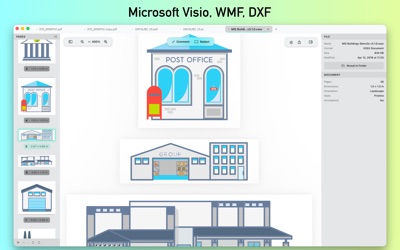
- DXF — AutoCAD drawings with import options
- WMF — Windows Metafile
- WPD, WPG — WordPerfect graphics
- VSD, VSDX, VSS, VSSX — Microsoft Visio diagrams
COMBINE PAGES FROM ANY FORMAT
The headline feature: drag-and-drop files from Finder into any open document. Pages from EPS, CDR, AI, DXF — they all combine into one PDF you can save, share, and reorder. Drag thumbnails in the sidebar to rearrange. Right-click to extract a single page. Add blank pages. Build a portfolio, a print spec sheet, or a client review deck without ever leaving the app.
ANNOTATE & REDACT
Add text comments anywhere on a page. Style with fonts, colors, alignment. Cover sensitive content with redaction rectangles in six colors — black, white, red, green, blue, or purple — drawn directly on top of anything visible, including your own annotations.
EXPORT & PRINT
Save your combined documents as PDF. Export pages as PNG, TIFF, or JPG for sharing and publishing. Print directly from the app with full page-range control. Your edits are preserved — annotations and redactions stay editable on reopen.
FILE MANAGEMENT THAT FEELS NATIVE
- Tabs for multiple documents in one window
- Sidebar thumbnails with drag-to-reorder
- Multi-page documents with full navigation
- Recent files always one click away
- Native macOS feel — keyboard shortcuts, undo/redo, save panels, all the conventions
FREE & PRO
Vector Expert is free to try with 3 file opens per day, up to 1 MB each. Upgrade to Pro for unlimited file opens of any size — perfect for daily professional use. Pro is available as monthly subscription, annual subscription, or one-time lifetime purchase.
Welcome to Vector Expert 1.0
This release:
- Open 14 professional vector formats: EPS, PS, CDR, CMX, PDF, AI, DXF, WMF, WPD, WPG, and Visio
- Combine pages from any format into one document via drag-and-drop
- Text annotations with style controls
- Redaction rectangles in six colors
- PDF, PNG, TIFF, and JPG export
- Multi-tab interface with thumbnail sidebar
- Print, share, and full undo/redo
Have feedback? Tap Help menu and visit splashroad.com/vector-expert
Thanks for trying Vector Expert.
---
Privacy Policy: https://splashroad.com/privacy-policy/
Terms of Service: https://splashroad.com/terms-of-service/
AVALW Coverage
Not yet mentioned in AVALW articles.
Similar apps


 YouTubeGoogleGet the official YouTube app on iPhones and iPads. See what the world is watching -- from the hottest music videos to what’s popular in gaming, fashion, beauty,★ 4.7 49315k


 InstagramInstagram, Inc.Little moments lead to big friendships. Share yours on Instagram. — From Meta Connect with friends, find other fans, and see what people around you are up to an★ 4.7 29567k



 Affinity by CanvaCanvaONE APP TO CRAFT IT ALL, FOR NO COST AT ALL. Design. Edit. Lay it out. Affinity gives you vector, pixel, and layout tools, all in the same professional-grade ap★ 4.8 27291k


 Video Editor & Maker - InShotInShot Video EditorAI video editor with music! Edit video with effects, slideshow & slow motion★ 4.8 24760k


 MX PlayerAmazon Mobile LLCPowerful video player with advanced hardware acceleration and subtitle supports★ 4.2 14336k


 VivaVideo - Video Cut & EditorQuVideo Inc. Video Editor & Video Maker AppAI Video Editor: AI Templates, Text to Video, Extract Audio, Auto Caption.★ 4.3 12268k


 YouCut - Video Editor & MakerInShot Video EditorAI Video Editor with Music, Filter, Slideshow, Effect, Merge & Trim Video.★ 4.8 8635k


 Screen Recorder - XRecorderInShot Inc.Record games with audio. Smooth, HD screen capture & Built-in video editor.★ 4.7 7662k
More by this developer


 Squad SurfersSplash ColorsRun. Shoot. Survive. Jump into the action-packed world of Squad Surfers, a fast-paced shooter where survival is all that matters! Battle through waves of enemie-


 Hesap KitaplarSplash ColorsHesap Kitaplar bu kişilerin şahsi veya kurumsal şirketlerinin gündelik hesap kitaplarını kayıt yapma ve gözetleme uygulamasıdır. Sadece giriş ve çıkışları girme-


 SepForge - Color SeparationSplash ColorsSepForge turns your artwork into press-ready color separations for screen printing — right on your Mac. Load a design, choose how to separate it, fine-tune ever-


 AirShotsSplash ColorsAirShots: Screenshot cleaner & organizer Stop the Desktop clutter. Automate your screenshots. Every time you take a screenshot, your Desktop gets messier. AirSh-