
Screenshots


About ZipHaven
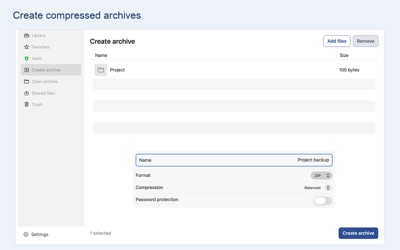
ZipHaven brings archive tools and an encrypted private Vault together. Create compressed files, open archives, preview supported documents and keep sensitive files in a separate locked space.
CREATE AND EXTRACT
• Create ZIP, 7Z, TAR, TAR.GZ, TAR.BZ2, TAR.XZ, GZIP, BZIP2 and XZ files.
• Open common formats including ZIP, RAR/RAR5, 7Z and TAR.
• Browse archive folders, preview supported files and extract all or selected contents.
• Protect new ZIP archives with AES-256 encryption. Open supported password-protected ZIP, RAR and 7Z archives.
PRIVATE VAULT
• Encrypt file contents and filenames while Vault is locked.
• Browse folders and preview supported files after unlocking.
• Extract archive contents into Vault for private browsing, or keep the original archive inside Vault.
• Unlock with your Vault password or enable supported system authentication.
• Change your Vault password and lock Vault manually. Automatic locking limits unlocked sessions to 15 minutes.
ORGANIZE YOUR FILES
Manage finished archives and extracted folders in Library. Search, rename, share, export and mark favorites. Use Trash to restore removed items or choose permanent deletion. Shared files remain available until you remove their copies.
FORMAT AND SECURITY NOTES
New archive password protection is available for ZIP. RAR creation, encrypted 7Z creation and split archives are not supported. GZIP, BZIP2 and XZ compress individual files; use a TAR format for folders. Compatibility depends on the archive's compression method and structure.
Keep your passwords safe: forgotten passwords cannot be recovered. Vault protection does not remove originals, exports or backups outside Vault. Local storage is not a backup; export important files before removing the app.
ON MAC
Use a native Mac interface, open archives from Finder, drag extracted files to Finder and preview supported files with the keyboard. Enable Touch ID or Mac password authorization on supported Macs.
AVALW Coverage
Not yet mentioned in AVALW articles.
Similar apps


 Phone by GoogleGoogle LLCReliable phone calls with spam protection, caller ID and more helpful features★ 4.4 52440k


 Google Play servicesGoogle LLCGoogle Play services - Google services for Android apps★ 4.3 44573k



 Call of Duty®: Modern Warfare® 4 (Windows)Activision Publishing Inc.War erupts on the Korean Peninsula as North Korea launches a full-scale invasion that threatens to destabilize the world in Call of Duty®: Modern Warfare® 4. A ★ 4.3 16579k


 gov.brServiços e Informações do BrasilGov.br is a means of user access to digital public services.★ 4.6 14047k


 MyTelkomsel – Buy InternetTelkomselBuy credit, internet quota, streaming, game voucher & get cashback with e-wallet★ 3.8 12353k


 myIM3: Data Plan & Buy PackageIndosat Ooredoo HutchisonCheck balance & quota, detect & block spam, exchange IMPoin only on myIM3★ 4.4 11302k


 Files by GoogleGoogle LLCClean up your phone, find files, play media, and share files offline★ 4.5 9097k


 CNH do BrasilServiços e Informações do BrasilDigital driver's license and vehicle registration certificate, first driver's license, traffic violation and vehicle information.★ 4.9 8390k
More by this developer


 MineOrbit: Sphere Minesweeper小健 赵A familiar puzzle. A whole new dimension. Explore a rotating 3D planet or enjoy a classic square board. MineOrbit brings a fresh perspective to Minesweeper—with-


 Stack Pact: Co-op Blocks小健 赵One board. Multiple players. Every move matters. Stack Pact is a cooperative falling-block puzzle where each player controls a different active piece on the sam-


 ChordLuma: Chords, Key & BPM小健 赵Hear the rhythm. Explore the harmony. ChordLuma helps you estimate chords, musical key, and tempo from nearby music or an imported file. Follow live estimates, -


 Smart Screenshot Stitcher小健 赵Turn overlapping screenshots into one clean, shareable long image—with careful review and privacy controls built in. SMART, ON-DEVICE STITCHING • Automatically -