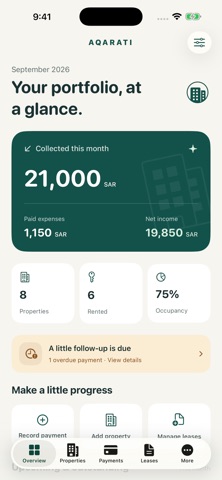
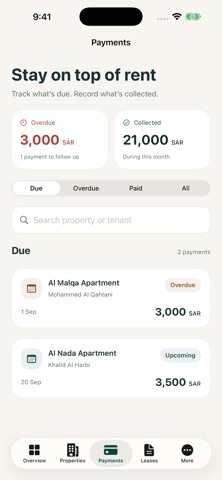
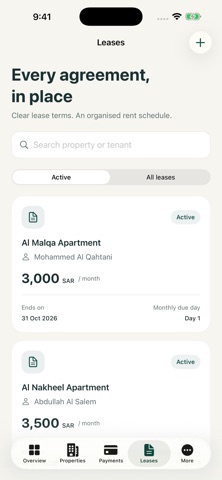
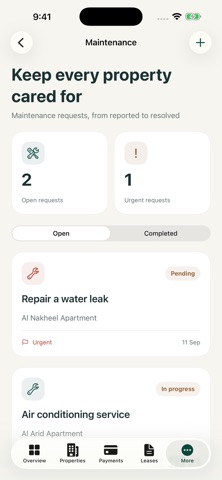
Your properties, clearly organised. Aqarati helps landlords and property managers keep properties, tenants and rent records together. A considered interface, in Arabic and English, built for iPhone and iPad. A place for every property Organise apartments, villas, buildings, offices, shops and land. Save addresses, area, bedrooms, notes and a property photo. Track available, rented, maintenance and sold status. Search by name or address. Tenants and leases, connected Keep tenant contact details and notes alongside their leases. Link each lease to a property and tenant, set start and end dates, monthly rent and a due day, and attach a PDF or image of the agreement. Aqarati records lease details; it does not provide electronic signatures or legal contract drafting. Know what is due Monthly rent charges are generated from your lease terms. See paid, overdue and outstanding charges. Record full or partial payments and create a PDF receipt for payments you have entered. Recording a payment does not transfer money or charge the tenant. Keep maintenance moving Track requests, categories, priorities, contractor details and costs. Update a request as work progresses and mark its expense as paid when it has been settled. See the financial picture Review collected income, paid expenses and net income for each month, with a six-month chart. Export a PDF report or a CSV transaction list. Reports reflect the records you enter and are not tax invoices. Local records, manual backups Manage records offline, with no account and no ads. Create a manual backup of records and attachments, save it to a destination you choose and restore it from a file. Records do not sync automatically between devices. Purchases and restoration use Apple services and require a connection when needed. Start free All core tools are included for up to 3 properties. An Aqarati Plus monthly or yearly subscription removes the property limit while active. Local prices are shown in the app before purchase. For our original Premium customers If you bought the one-time Premium upgrade in the original app, your lifetime access to unlimited properties continues without a new subscription. Use Restore Purchases with the Apple Account used for that purchase. Subscription details Payment is charged to your Apple Account at confirmation. Subscriptions renew automatically unless cancelled at least 24 hours before the current period ends. Manage or cancel in your Apple Account settings. After a subscription ends, existing records remain usable and exportable; adding properties is subject to the free limit. Privacy policy: Terms of use: https://www.apple.com/legal/internet-services/itunes/dev/stdeula/
Finance · iPhone, iPad · Free