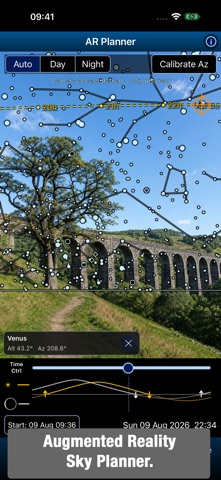
Every astronomy tool, in a single app. Astro Tools brings together the astronomy tools from Polar Scope Align Pro and Xasteria, while adding new tools including an Augmented Reality Sky Planner, Astro Camera, Plate Solver and a Digital Finderscope. It is a complete toolkit for amateur astronomers: plan the night, find targets, aim a telescope, check the weather, follow satellites, calculate an imaging setup and explore the sky - all from one app. PLAN THE NIGHT SKY Use any date, time and location to plan ahead. Browse Moon phases by month, with Moon and Sun rise, set and altitude graphs plus twilight times. Compare astronomy-focused forecasts for cloud layers, seeing, transparency, wind and precipitation, or use the Multi forecast to combine 7Timer’s astronomy data with MET Norway or Apple Weather forecasts. Check aurora forecasts, light pollution, animated satellite cloud maps, and the visibility of the ISS and other bright satellites. WIDGETS Keep essential observing information on your Home Screen. Widgets provide astronomy weather forecasts, aurora conditions and upcoming satellite passes. FIND AND OBSERVE Explore more than 22,000 deep-sky objects, stars and Solar System targets. Search, filter and create observing lists, then see object details and altitude charts. Turn a manual telescope into a Push-To system: attach your phone, select a target and follow live arrows. Sync on a known star or use star-hopping for improved accuracy. Digital Finderscope provides a live, zoomable sky map that follows your phone and guides you to a selected target. SEE THE SKY IN AUGMENTED REALITY AR Sky Planner overlays a star chart on your live camera view. Move through time to see where targets will be above the horizon or behind landmarks, whether you are planning an observing session or a nightscape photograph. CAPTURE, EDIT AND PLATE-SOLVE ASTROPHOTOS Astro Camera offers manual controls for photos and time-lapses, Star Trail mode with optional fading, and Deep Stack / Long Exposure mode to align and stack images taken with a tripod or tracker. Star Assist measures a selected star live to help you focus, while an optional sky overlay helps frame your shot. Photo Editor opens JPEG, TIFF, RAW and FITS images, or an Astro Camera stack. Develop RAW photos, adjust exposure, curves, colour and detail, crop and export. Plate Solver identifies stars in a photo to find its sky coordinates, field of view and orientation. Overlay constellation lines and object labels on the image. ALIGN, MEASURE AND CONTROL Polar-align a star tracker or equatorial mount without a polar scope, even in daylight. Start with the compass or calibrate using the camera on the Sun, Moon or stars. Use Laser / Hop Align when the pole star is obstructed, measure level and tilt, inspect GPS and sensor data, or control compatible WiFi mounts (iOptron, Pegasus Nyx and more). FOR OBSERVERS AND IMAGERS More than 30 calculators cover observing and astrophotography, with shared inputs and remembered values for quick comparisons. Find and simulate solar eclipses for your exact location, and use tools for field of view, magnification, exposure, focal length, image scale and more. Whether you observe with binoculars, a manual telescope, a GoTo mount or an imaging rig, Astro Tools keeps the information and practical tools you need close at hand. Many tools are completely free, for the rest there is a single Pro subscription with a free trial. Terms of Use: https://www.apple.com/legal/internet-services/itunes/dev/stdeula/
Utilities · iPhone, iPad · Free