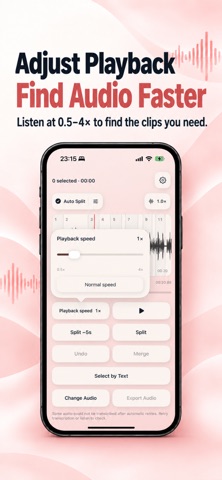
Turn long recordings into the audio you need. Audio Clip Picker helps you trim meetings, interviews, lectures, and everyday recordings. Select the parts worth keeping, refine your cuts, and export your selection. SELECT SEGMENTS ON THE WAVEFORM Automatically divide audio at pauses, then tap waveform segments to select what to keep. Select multiple segments or turn off automatic splitting to place cuts yourself. LISTEN AND CUT PRECISELY Follow the red playhead, zoom into the waveform, and adjust playback position to find your cut. Split at the current position or five seconds earlier—useful when you hear a key moment after it has already passed. MERGE AND EXPORT Merge consecutive selected segments and undo edits. Export your selection as one combined WAV file or as separate WAV files. FIND MOMENTS WITH TEXT On-device transcription starts after importing audio. Text breaks follow recognized pauses, making recordings easier to scan. Use the transcript to locate relevant content, then listen to confirm your selection. Speech recognition availability depends on your device, language, and system support. IMPORT COMMON AUDIO FORMATS Import MP3, M4A, AAC, WAV, AIFF, and CAF files. Compatibility depends on the audio encoding. WORK ACROSS YOUR DEVICES Available for iPhone, iPad, and Mac. Larger screens include a segment list for reading transcripts, selecting sections, and previewing audio. Supports English, Japanese, Simplified Chinese, and Traditional Chinese. Audio analysis and editing take place on your device, without uploading your recordings.
Utilities · iPhone, iPad · Free