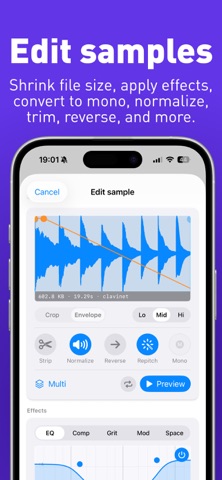
Best Friend is the unrivaled companion app for Teenage Engineering EP-Series Samplers. Connect your EP-133, EP-40, or EP-1320 via USB-C to manage your hardware, upload and edit new files, and see your pad settings. Best Friend is an extended display and feature augmentation app for the physical EP-133, EP-40, or EP-1320. Connecting to one of these is REQUIRED for the app to function. Use a USB-C to USB-C cable. Lightning iPhones and iPads can connect with USB-IF certified USB-A to USB-C cable and a MFi-certified Lightning to USB adapter. Scenes: - See all notes across all banks in a Scene or Song - See all notes and all patterns for a selected Group - See Fader FX and automation lanes for each Group - Export REAL audio stems of every individual pad from your EP - Navigate through the Scene timeline with automatic playhead following Bounce and Export Audio Stems: - Export REAL audio stems from the hardware WITHOUT AI separation for any Scene or Song - Choose from every individual pads (all 48), group mixdowns, or stereo mixdowns - Use Real-time bounces to capture performances, Supertone, and effects - All real-time captures are MIDI-sync'd - Fader automation is included in the export - Export MIDI data from a Scene or Song - Bring your bounces into your DAW of choice for mixing MIDI Controller: - Build rich chords with a button. Pick major, minor, suspended, or diminished triads then add a 6th, 7th, or 9th for flavour - Play the velocity-sensitive keyboard - Arpeggiator with 4 modes, 6 rates, and 3 octaves synced to the hardware clock - Configure your own custom chords to any of the Chord or Extension buttons - Split each key into 1-3 zones for playing chords in alternate positions - Add pitch bends or modulation to any chord - iPad and MacOS support Logic Pro-style Musical Typing Sample Editing: - Extract stems (drum, bass, vocal, guitar, and other instrument) from your samples - Build, edit, and convert multi-samples on the EP-1320 or EP-40 - Use Repitch to reduce the file size - Permanent cropping - Increase volume with normalize - Reverse playback - Convert stereo to mono - Change sample rate - Apply effects: 3-band EQ; compression; distortion and saturation; octaver; phaser; chorus; tremolo; delay; and reverb - Automatically detect and set the key - Save default pad settings Backups: - Build Kits and Bank Snapshots while disconnected from the hardware - Backup your Project or entire System - Browse your backups to see and hear what it contains - Restore portions of your backup: a single pattern, a couple samples, a scene, and more - Import Project and System from the official EP Sample Tool - Extract Projects from your System Backups - Preview stereo mixes and make Bounces of your Project Backups - Import and record MIDI files and patterns Hardware Sample Management: - Bulk upload samples from your Files and Videos - Bulk move, share, and delete samples - Edit and replace samples in place - Record audio directly to your iPhone, iPad, or Mac to process before importing - Keyboard support on iPad and macOS Pads: - Mute and unmute individual pads - Apply performance effects to individual pads: mute, pitch up, pitch down, reverse - Change Pad Settings for multiple pads at once - Copy a pad and its settings to another - Chop a sample across pads in equal chops, transient chops, or lazy mode - Drag and drop pads to reassign them across groups - See an entire bank of samples at once - See the sample waveform along with its name and length - See and edit the trim, attack, and release windows - See and adjust volume, pitch, pan, mute, play mode, time-stretch, and MIDI channel - See Supertone settings on your EP-40 Universal support: - Automatic iCloud syncing across your Apple devices - works on iPhone, iPad, and MacOS with built-in iCloud syncing - works with EP-133 K.O. II, EP-40 Riddim, and EP-1320 Medieval with dedicated themes for each device Best Friend is not affiliated with Teenage Engineering in any way.
Music · iPhone, iPad, Android · $9.99
Rating: 4.9 out of 5, based on 60 user ratings.