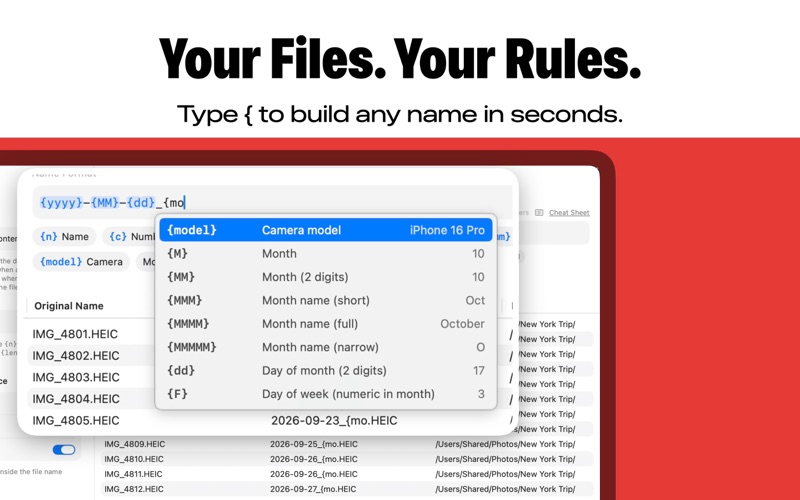
BatchName renames hundreds of files at once, and shows you every new name before anything changes. Build a name from the parts you need: the original name, a running number, the date, or details from inside the file such as the camera model. Type { to pick a placeholder, or open the cheat sheet to see every option with a live example. RENAME BY DATE TAKEN • Choose whether dates come from when a file was created, captured or last changed • Photos keep the time zone where they were taken, so trips abroad sort correctly USE WHAT'S INSIDE YOUR FILES • Camera make and model, lens, image size, ISO, aperture, shutter speed and focal length • Values are safe to use in file names and stay empty for files without them CLEAN UP MESSY NAMES • Find and replace text in file names • Change the case: UPPER CASE, lower case, Capitalize, Sentence case, camelCase, PascalCase, snake_case and kebab-case • Number files in order with your own start, step and zero padding • Change file extensions SEE IT BEFORE YOU RENAME • A live preview shows every original and new name side by side • Try your format on sample files: an iPhone photo, a camera photo, a screenshot, a video or a document • Undo works while you build your format BatchName is available in English, German, Spanish, French, Italian, Japanese, Korean, Portuguese, Russian and Chinese. Try it free with 30 file renames. Upgrade to Pro for unlimited renaming. Terms of Use: https://sarunw.com/apps/batchname/terms/ Privacy Policy: https://sarunw.com/apps/batchname/privacy/
Utilities · iPhone, iPad · Free