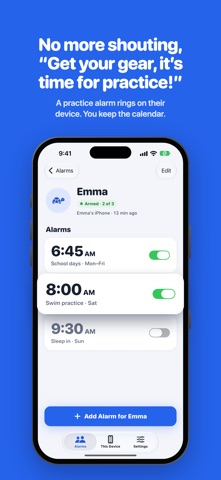
Set the alarm on your phone. It rings on theirs. Bunkbell is a family alarm clock for iPhone and iPad. You set the kids' alarms. Their devices ring. Even in Silent mode or Focus. SCHOOL MORNINGS, SOLVED Ask if the alarm is set. Get a "yeah." Find out at 7:20 that it wasn't. Bunkbell fixes that. Set a School days alarm from your phone and it lands on their device. A green Armed tag tells you it's really going to ring. Snow day? Push 6:45 to 8:00 from the kitchen. Nobody has to wake up to be told to sleep in. NO MORE "GET YOUR GEAR, IT'S TIME FOR PRACTICE!" You already get the team emails, the league app pings and the "practice moved" texts. Your kids don't need all that. They need one alarm that says: time to get your bag. Set a Swim practice alarm for Saturday at 8:00 and it rings on their iPhone. You keep the calendar. They get the alarms. HOW IT WORKS • Make one family account and sign in on every iPhone and iPad in the house. • Pick who uses each device. Emma's iPhone rings for Emma. Your phone can be just a remote. • Set, change or turn off any kid's alarm from any device. Changes usually arrive in seconds. • If a device hasn't confirmed a change and the alarm is coming up soon, Bunkbell tells you. REAL ALARMS Bunkbell uses iOS system alarms, so they ring like the Clock app: through Silent mode and Focus, with snooze if you allow it. Pick the kid, the time, the days, a label and a sound. PARENT CONTROLS Set a Parent PIN and turn on Kid device for each kid's iPhone or iPad. A kid device shows only its own profile, and kids can change only their own alarms. MADE FOR THE WHOLE FAMILY • A profile for every kid, with a color and an avatar: animals, sports and more, or just their initial. • Works on iPhone and iPad, in Light and Dark Mode. • Free for two profiles. One purchase, Bunkbell Family, unlocks up to ten, and it works with Family Sharing. No subscription. (We don't love subscriptions either.) Questions? bunkbellapp.com/support
Utilities · iPhone, iPad · Free