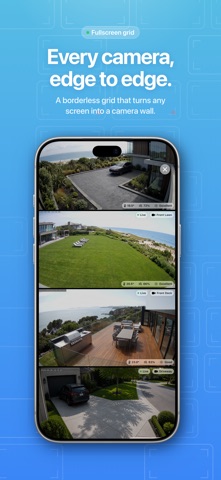
Cameras Ultra is the fastest way to see every HomeKit camera you own, on every Apple device you use. NEW IN VERSION 2: ALL YOUR HOMES, ON ONE SCREEN Before, you had to switch between homes. Now you can view cameras from several HomeKit homes at the same time. Pick as many homes as you like and watch your house, holiday home, office and family's place side by side. Each tile shows its home name so you always know what you're looking at. If two homes both have a "Living Room", Cameras Ultra keeps them apart. YOUR CAMERA WALL • A grid of 1 to 4 columns that adapts to iPhone, iPad, Mac and Apple TV • Live video on tiles, or snapshots that refresh automatically • Live, Online and Offline badges, plus "updated X ago" times • A borderless fullscreen grid that turns any screen into a monitoring wall • Room conditions on each tile: temperature, humidity and air quality from your HomeKit sensors ORGANISE IT YOUR WAY • Group cameras by home, by room, by home and room, or not at all • Reorder homes, rooms and cameras separately • Your order also sets live-stream priority, so the cameras at the top go live first • Star your most important cameras and find them in the Favourites tab • Search by camera name, room or home POWERFUL CAMERA DETAIL • A live stream that shows the latest snapshot while it connects • Fullscreen viewing with pinch to zoom up to 5x, drag to pan, and double-tap to zoom • Listen to camera audio, with volume control • Night Vision, Digital Zoom, Optical Zoom and Pan/Tilt on cameras that support them • Manufacturer, model and capability info at a glance • Room conditions in fullscreen, in whichever corner you choose BUILT FOR EVERY APPLE DEVICE • iPhone: portrait and landscape layouts, plus Light, Dark or Automatic appearance • iPad: an optional sidebar layout with support for every orientation • Mac: a native app that remembers its window size and position, with quick toolbar access to the fullscreen grid and home selection • Apple TV: a living-room camera wall. Press Play/Pause for the fullscreen grid, and keep the screen saver from interrupting your view SYNCED WITH ICLOUD Your favourites, home order, room order and camera order sync across your devices through iCloud. Set things up once on your iPhone and your iPad, Mac and Apple TV match automatically. SMART STREAMING Optimised HomeKit hub streaming. Cameras Ultra starts streams one at a time, in priority order, and switches to snapshots if a stream doesn't connect. Advanced settings let you: • Set how many live streams can play on tiles and in fullscreen • Control how many streams start at once • Prefer snapshots to live streams, with refresh intervals from 5 to 120 seconds PRIVATE BY DESIGN • No accounts and no sign-in • No ads, no analytics and no tracking • Your video goes straight from your cameras through Apple's HomeKit. It never passes through our servers. Cameras Ultra works with any HomeKit-compatible camera already set up in Apple's Home app.
Lifestyle · iPhone, iPad · $0.99