
Screenshots


About Chronos: Daily Work Tracker
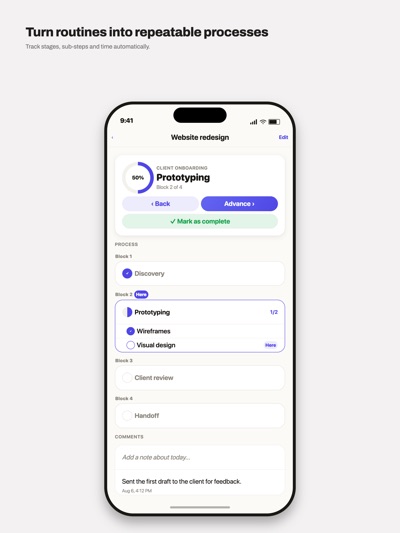
Chronos organizes your work by process, not by loose lists.
A process is the series of stages your tasks move through: Contact, Proposal, Close. You define it once and reuse it across every task you want. Each task knows which stage it's in and how long it's been there.
WHAT YOU CAN DO
Create processes with as many stages as you need, in any order.
Add substeps inside each stage for finer detail.
Mark stages and substeps as parallel or sequential. You can mix both in the same process.
Move a task forward step by step: each tap completes what's next and jumps blocks when the stage is done.
Track which days you worked on each task.
Add dated comments as you go.
See how long each stage and substep took.
SORTING
Sort your list by age, by process and stage, or by process, stage and age. Tasks group under their process when you need it, and you can tag them to separate by client, urgency or team.
COMPLETED TASKS
When you close a task it leaves the list and gets archived with its full history: when it was created, when it closed, how long it stayed open, the days you worked on it, the time per stage and every comment.
WIDGETS
Four home screen widgets: worked today, worked today by process, all pending tasks, and each process with its open tasks.
APPEARANCE
Four themes: two light ones on a cream base and two dark. They apply to the widgets too.
SYNC
Your processes and tasks sync between iPhone and iPad with iCloud. Everything works offline and catches up when you're back.
NOTIFICATIONS
Pick the weekdays and time you want to be reminded, per task.
FREE AND PRO
Free: up to 4 tasks and 3 processes, with every feature available. Pro: unlimited tasks and processes. Monthly or yearly subscription.
Terms of Use (EULA): https://www.apple.com/legal/internet-services/itunes/dev/stdeula/
AVALW Coverage
Not yet mentioned in AVALW articles.
Similar apps


 MyJio: For Everything JioJio Platforms LimitedTrue 5G, recharges, payments & UPI, music & movies, backup, games, news & more.★ 4.4 27428k


 Microsoft WordMicrosoft CorporationThis application requires a qualifying Microsoft 365 subscription. Microsoft 365 includes premium Word, Excel, and PowerPoint apps, 1 TB cloud storage in OneDri★ 4.8 17535k



 Samsung NotesSamsung Electronics Co, Ltd.(Samsung Notes is optimized for Samsung Galaxy Books. Other computers may have issues running it.) "Samsung Notes allows you to use the enhanced S Pen to write ★ 4.8 15228k



 ChatGPT ClassicOpenAIThe official ChatGPT desktop app brings you the newest model improvements from OpenAI. Do more on your PC with ChatGPT: · Instant answers—Use the [Alt + Space] ★ 4.8 11034k


 ChatGPTOpenAI OpCo, LLCIntroducing ChatGPT for iOS: OpenAI’s latest advancements at your fingertips. This official app is free, syncs your history across devices, and brings you the l★ 4.8 11034k


 Microsoft OutlookMicrosoft CorporationOutlook helps you stay connected and organized at the office and at home with easy access to emails, files, calendar events, and contacts across all your accoun★ 4.3 10673k


 Turbo VPN: Unlimited VPN ProxyINNOVATIVE CONNECTING PTE.LIMITEDDo you want online security and privacy while browsing? Turbo VPN now provides the fastest, reliable and encrypted network. With Turbo VPN, you can get the safe★ 4.7 10243k



 Microsoft ExcelMicrosoft CorporationThis application requires a qualifying Microsoft 365 subscription. Microsoft 365 includes premium Word, Excel, and PowerPoint apps, 1 TB cloud storage in OneDri★ 4.8 9702k
More by this developer


 Smart Calculator PlusHector Pedro ToledoAll the calculators you need in your daily life, in one clean and fast app. No sign-up, no internet connection, no data collection. INCLUDED CALCULATORS - BMI (-


 Sudoku Ultimate GamingHector Pedro ToledoThe classic logic puzzle with a modern dark design, made for comfortable play. THREE LEVELS - Easy: perfect for beginners - Medium: for those who know the game -


 Vacation Planner ProHector Pedro ToledoOrganize every detail of your trips in one place — no internet, no accounts, no hassle. VacationOrganizer is your personal travel companion. Build complete day--


 Academy Daily TrackerHector Pedro ToledoAcademy keeps your entire semester in one place: class schedule, assignments, exams, course material and grades. YOUR DAY AT A GLANCE Open the app and see today-